Scenario 3 - PDF Generation and Signing
The following diagram shows a scenario where IBM Sterling e-Invoicing accepts an XML document as input, converts it to a PDF, and then sends that PDF to TrustWeaver for signing. The signed PDF is then sent to the Buyer. Attachments can be embedded within the PDF.
PDF Generation and Signing
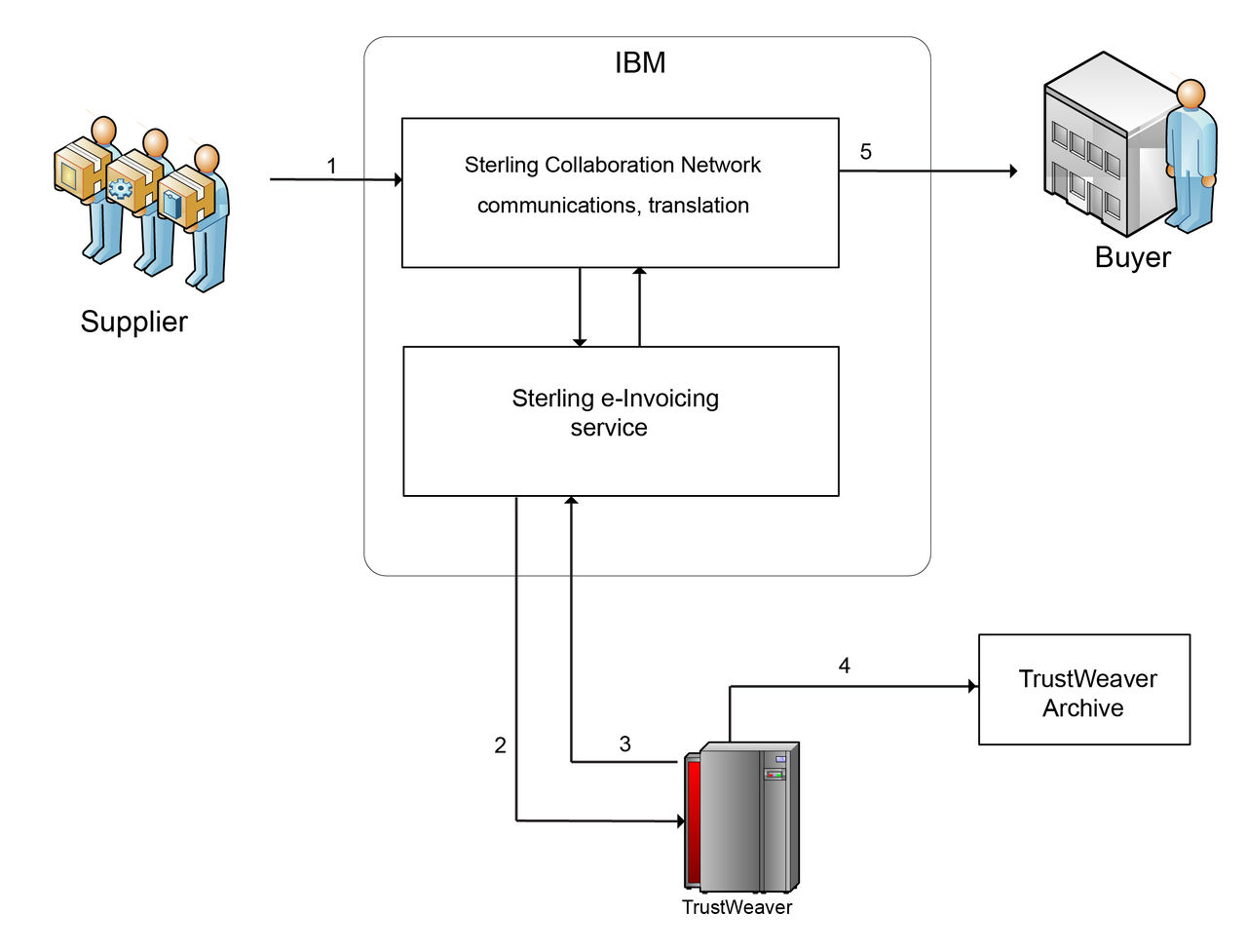
The following steps describe the e-invoicing process for Europe:
- IBM Sterling e-Invoicing accepts an XML document. The document is converted to a PDF. Attachments can be embedded within the PDF as set up in the Supplier's configuration. Also, a custom implementation can be done to convert EDI or FlatFile to XML format which can then be used by IBM Sterling e-Invoicing.
- IBM Sterling e-Invoicing sends the PDF to TrustWeaver for signing.
- TrustWeaver sends the signed PDF back to IBM Sterling e-Invoicing.
- The PDF is archived by TrustWeaver.
- IBM Sterling e-Invoicing sends the signed PDF to the Buyer.
Note: By default, IBM Sterling e-Invoicing supports only
Canonical and Zugferd XML formats, which are CII standards. If you require setup for a different XML
format, please contact Customer Support.
Note: This service is currently not available for
Brazil, Mexico, or Turkey.