Scenario 2 - Validation Services Only
The following diagram shows a scenario where IBM Sterling e-Invoicing provides validation services for a Supplier. In this scenario, the Supplier is subscribed to TrustWeaver Archiving and the Supplier is able to generate a signed invoice, so no signing is being performed.
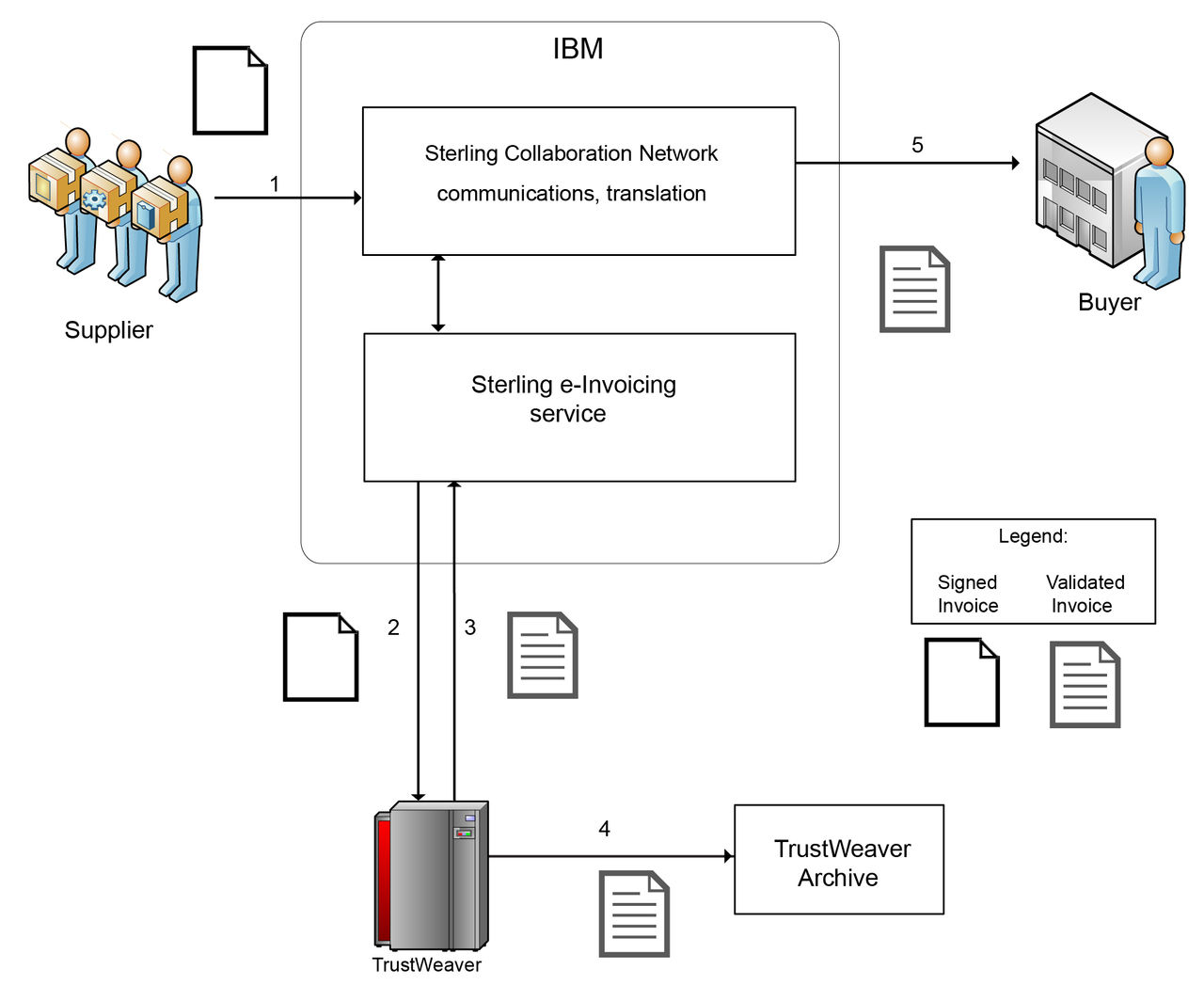
The following steps describe the process:
- The Supplier sends a signed invoice to IBM Sterling B2B Integration SaaS.
- The signed invoice is sent by the IBM Sterling e-Invoicing service to TrustWeaver to be validated.
- The validated invoice is sent by TrustWeaver back to the IBM Sterling e-Invoicing service.
- Because the Supplier is subscribed to TrustWeaver Archiving in this scenario, the signed invoice is sent to the TrustWeaver Archive.
- The validated invoice is sent by the IBM Sterling B2B Integration SaaS to the Buyer.