Changing the authorization state of a user
- The configuration cycle, which indicates when an entity can go into production
- The authorization cycle, which indicates whether a user is available for use
| Configuration process | Authorization process |
|---|---|
| In process | Revoked |
| Committed | Reactivated |
| Approved | Authorized |
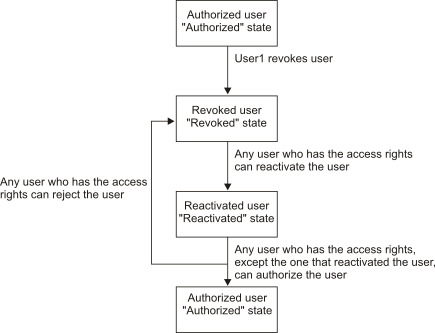
When you first add a role or role group to a user for an OU, the user becomes active in FTM SWIFT. The user is in the Authorized state.
To revoke the user's access, issue the revoke command. You must provide a reason for revoking user access. FTM SWIFT stores the revocation reason until the state of the user is changed back to Authorized, at which time it deletes the revocation reason. The revoke command moves the user from the Authorized state to the Revoked state.
To reauthorize the user, first use the reactivate command. This places the user in the Reactivated state. When the user is in this state, you can place the user either in the Authorized state or back to the Revoked state.
If you decide not to reauthorize the user and instead reject the user, use the reject command and specify the reason. This moves the user from the "Reactivated" state to the Revoked state. FTM SWIFT only temporarily stores the reject reason. As soon as you change the state of the user to Authorized, the reject reason is deleted.
To reauthorize the user, issue the authorize command. This allows the user to access FTM SWIFT again. The user moves from the "Reactivated" state to the Authorizedstate. If dual authorization is enabled, a different user than the one who placed the user in the Reactivated state must issue the authorize command. If dual authorization is disabled, any user who has the appropriate access rights can issue the command.