Main flow: Debtor processes a direct debit request
- Receives debit notification file (DNF) bulks containing pacs.003 messages from STEP2.
- Unbulks the DNF messages and forwards the pacs.003 messages to the debtor clients.
- Maintains the status of debit transactions until settlement.

The following steps describe how to use the SDD reference application to demonstrate the debtor side processing of debit requests. The creditor side processing does not need to be performed before running the debtor side flow. These instructions show what the processing looks like on the debtor side and does not need any prior setup of creditor side transactions. The instructions also have additional information about debit processing and the way that the SDD reference application operates.
- The instructions for this step correspond to reference point 1 on the flow diagram in Figure 1.
- Clear the FTM database. It is advisable to start with a clean system to easily follow the processing of the debit request.
- Make sure that the integration bus is started and that the BAR files are deployed.
- Locate the SDD Test Files project in the Integration Toolkit workspace.
- Edit the FTM SDD Test Data/Debtor/Incoming DNF/DNF_pacs003.xml file and change the
dates in the IntrBkSttlmDt and ReqdColltnDt tags to a date two business days in the future. Save the file.
This DNF file is a file that STEP2 produces. STEP2 aggregates pacs.003 debit messages that are destined for a particular debtor bank and bulks them into a DNF file, which is posted to the debtor bank. STEP2 DNF messages may also contain other file types besides pacs.003.
- Using a utility that can post messages to MQ queues, post this message to the queue named Q3 (FXJ.SDD.STEP2.IN.DNF).
- This DNF message is based on the pacs.003 batch message that was used for the creditor side flow. As such,
it has five debit transactions in it. The application unbulks the debit messages from the DNF message and
creates five inbound transactions. These transactions have a status of Inbound Transaction Waiting Settlement
as shown in the following figure. This step corresponds to reference point 2 on the flow diagram in Figure 1.
Figure 2. OAC payment transaction list 
Part of each pacs.003 transaction is a reference to a mandate. A mandate is a document that authorizes the creditor to debit the account of a debtor. The SDD reference application does not do anything with the mandate reference except record it as an active mandate. Each of the five debit transactions in the test file refer to the same mandate, so only one mandate record is produced. Looking at the mandate record in the OAC shows that it is associated with the five debit transactions.
- Figure 2 also shows five outbound transactions that are created and marked complete. These represent the debit transactions, which are forwarded to the debtor client using Q4 (FXJ.SDD.CLIENT.OUT.PACS003). This step corresponds to reference point 3 on the flow diagram in Figure 1.
- The messages on Q4 notify the debtor client of the debits that are being made. The messages on Q4 are each pacs.003 messages containing a single debit. Usually, a back end system receives these messages and, based on BIC and IBAN, forwards them to the appropriate client banks. This step corresponds to reference point 4 on the flow diagram in Figure 1.
- As on the creditor side, settlement is driven by STEP2 sending an RSF message that contains information
about the transactions that have settled. This step corresponds to reference point 5 on the flow diagram in
Figure 1.
- Post any message to Q6 (FXJ.SDD.RSFSIM) to cause the simulator to generate an RSF message.
- The simulator generates an RSF message for all activity for today's date and posts it to Q11 (FXJ.SDD.STEP2.IN.RSF). This step corresponds to reference point 6 on the flow diagram in Figure 1.
- The SDD reference application processes the RSF message. The transactions in the RSF
that were completed have their status updated to show that they were settled and completed successfully. The
RSF message is also mapped into internal standard format (ISF) and stored in the FTM
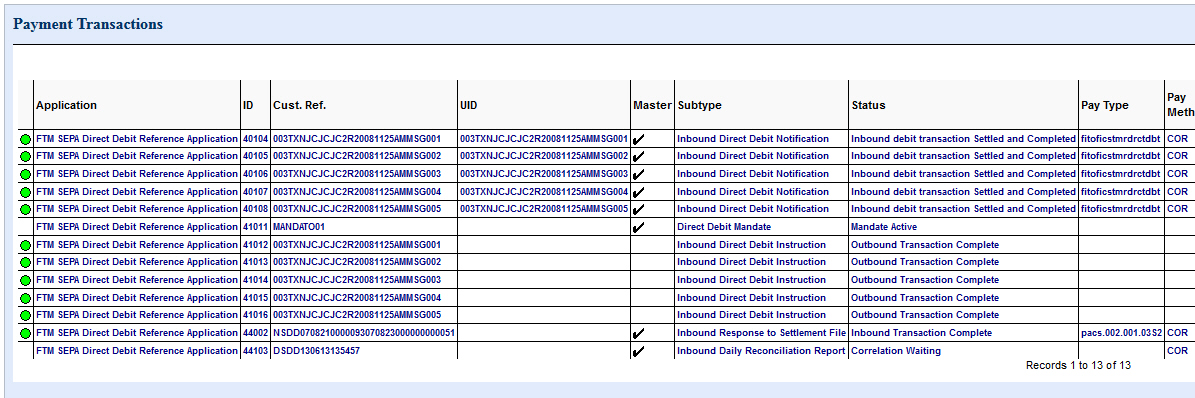
database. This step corresponds to reference point 7 on the flow diagram in Figure 1. After the RSF message is processed, the OAC displays the status as shown in the following figure.
Figure 3. RSF OAC debtor status 
- As on the creditor side, completion is driven by STEP2 sending a DRR message that contains information
about the transactions that have been processed during the day. This step corresponds to reference point 8 on
the flow diagram in Figure 1.
- Post any message to Q7 (FXJ.SDD.DRRSIM) to cause the simulator to generate a DRR message.
- The simulator generates a DRR message for all activity for today's date and posts it to Q8 (FXJ.SDD.STEP2.IN.DRR). This step corresponds to reference point 9 on the flow diagram in Figure 1.
- The SDD reference application processes the DRR message. The DRR message is also
mapped into internal standard format (ISF) and stored in the FTM database. No status
changes occur because everything has already been marked complete for the day. This step corresponds to
reference point 10 on the flow diagram in Figure 1.
Figure 4. OAC payment transaction list