KVM Hypervisor
Live Guest Migration of Red Hat OpenShift worker nodes using as a shared file system
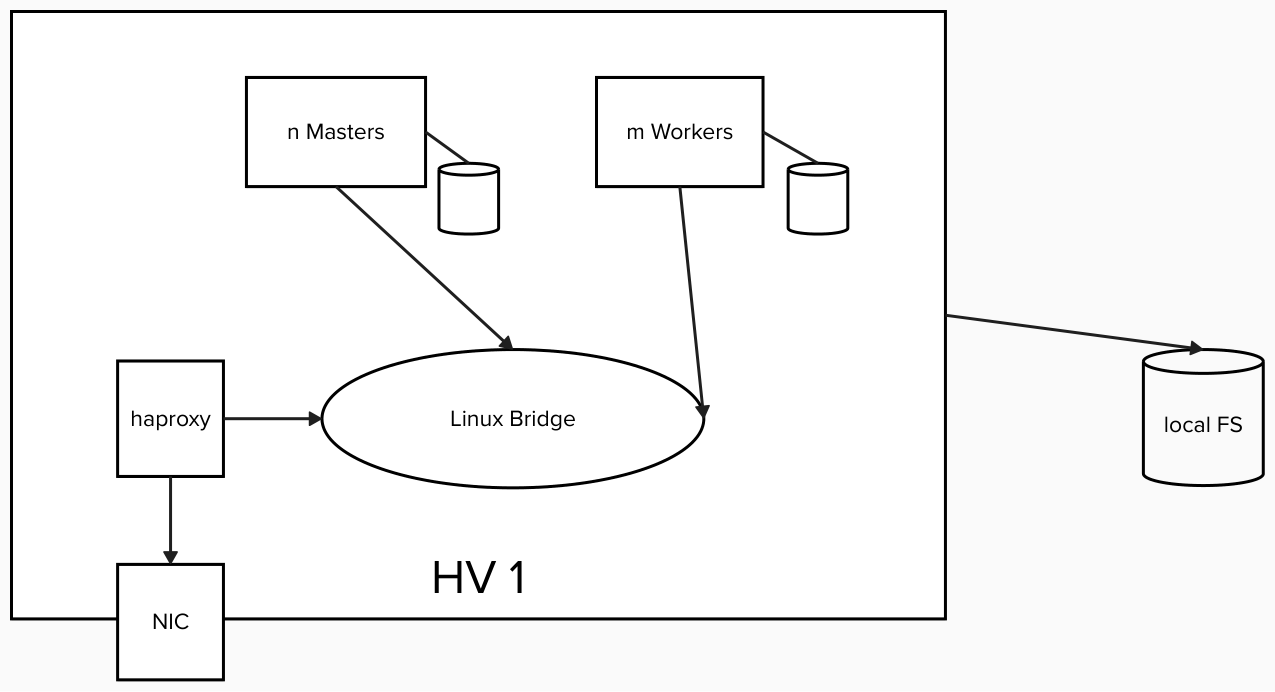
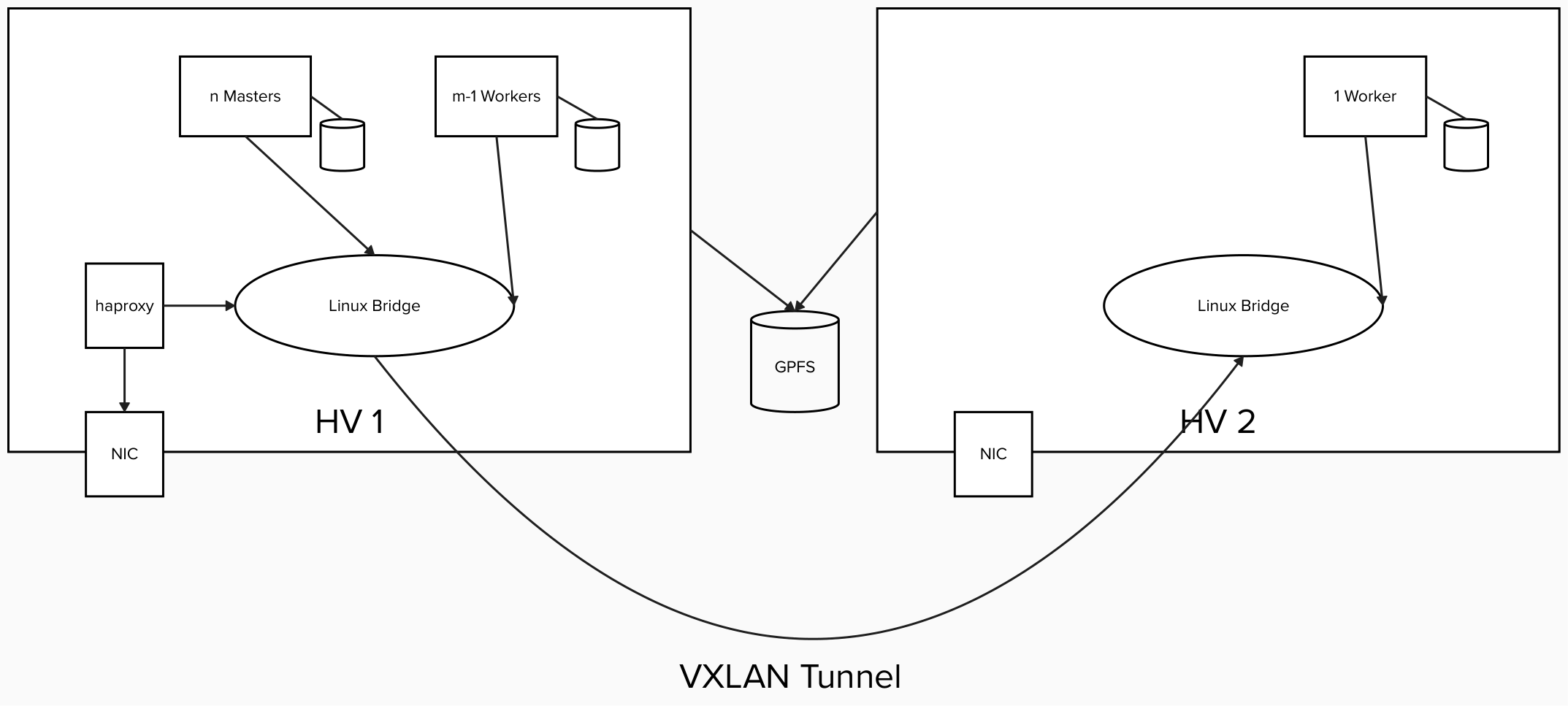
One deployment scenario of Red Hat OpenShift on IBM Z is to install the complete RHOCP cluster in an LPAR using the KVM hypervisor (see Figure 1). For the cluster to survive a reboot of the LPAR, it would be preferable if the RHOCP nodes could be live migrated to another LPAR allowing for continuous operation of the RHOCP cluster. It is described how this can be achieved by using the two LPAR also as a 2-node Scale Cluster and the Scale file system as a shared file system containing the image files of RHOCP nodes. A worker node serves as example to demonstrate live migration (see Figure 2).
Prerequisites
- A minimum of two LPARs with RHEL 9.X
- A Scale cluster consisting of these LPARs and Scale file system that is configured on this cluster
- A SAN storage device that is attached to all the LPARs
- An RHOCP cluster installed in one of the LPARs with a private Linux bridge for the intra cluster communication
Overview of the required steps
- Connect the two LPARs with, for example, a VXLAN tunnel
- Configure (at least) one worker node to use the Scale file system for its virtual disk image
- Migrate the worker node to the other LPAR
- Verify that the cluster still works and the nodes can communicate with each other
Detailed steps
- Connect the two LPARs with, for example, a VXLAN tunnel
LPAR 1
nmcli connection add type bridge con-name boessl6 ifname boessl6 ipv4.method disabled ipv6.method disabled

nmcli connection add type vxlan slave-type bridge con-name boessl6-vxlan10 ifname vxlan10 id 10 local 172.20.145.57 remote 172.20.145.56 master boessl6

nmcli connection up boessl6

ifconfig  boessl7 192.168.128.1
LPAR 2
nmcli connection add type bridge con-name boessl7 ifname boessl7 ipv4.method disabled ipv6.method disabled nmcli connection add type vxlan slave-type bridge con-name boessl7-vxlan10 ifname vxlan10 id 10 local 172.20.145.56 remote 172.20.145.57 master boessl7 nmcli connection up boessl7 ifconfig boessl7 192.168.128.2 - Configure (at least) one worker node to use the Scale file system for its virtual disk image
- Shutdown the worker node
Copy the disk images
mkdir -p /gpfs/fs1/var/lib/libvirt/images/ocp413/cp /var/lib/libvirt/images/ocp413/worker.ign /gpfs/fs1/var/lib/libvirt/images/ocp413/ cp /var/lib/libvirt/images/ocp413/worker2.qcow2 /gpfs/fs1/var/lib/libvirt/images/ocp413/Change the domain XML
@@ -22,13 +22,13 @@ <emulator>/usr/libexec/qemu-kvm</emulator> <disk type='file' device='disk'> <driver name='qemu' type='qcow2'/> - <source file='/var/lib/libvirt/images/ocp413/worker2.qcow2'/> + <source file='/gpfs/fs1/var/lib/libvirt/images/ocp413/worker2.qcow2'/> <target dev='vda' bus='virtio'/> <address type='ccw' cssid='0xfe' ssid='0x0' devno='0x0000'/> </disk> <disk type='file' device='disk'> <driver name='qemu' type='raw'/> - <source file='/var/lib/libvirt/images/ocp413/worker.ign' startupPolicy='optional'/> + <source file='/gpfs/fs1/var/lib/libvirt/images/ocp413/worker.ign' startupPolicy='optional'/> <target dev='vdb' bus='virtio'/> <readonly/> <serial>ignition</serial> - Boot the worker node
Migrate the worker node to the other LPAR
virsh migrate ocp413-worker2 qemu+ssh://boessl6.gpfs.boe/systemMigrate the worker node back to the original LPAR
virsh migrate ocp413-worker2 qemu+ssh://boessl7.gpfs.boe/system - Verify that the cluster still works and the nodes can communicate with each other.
- Shutdown the worker node