Sizing and planning the hardware infrastructure
This section covers sizing and planning of the hardware infrastructure.
Hardware requirements
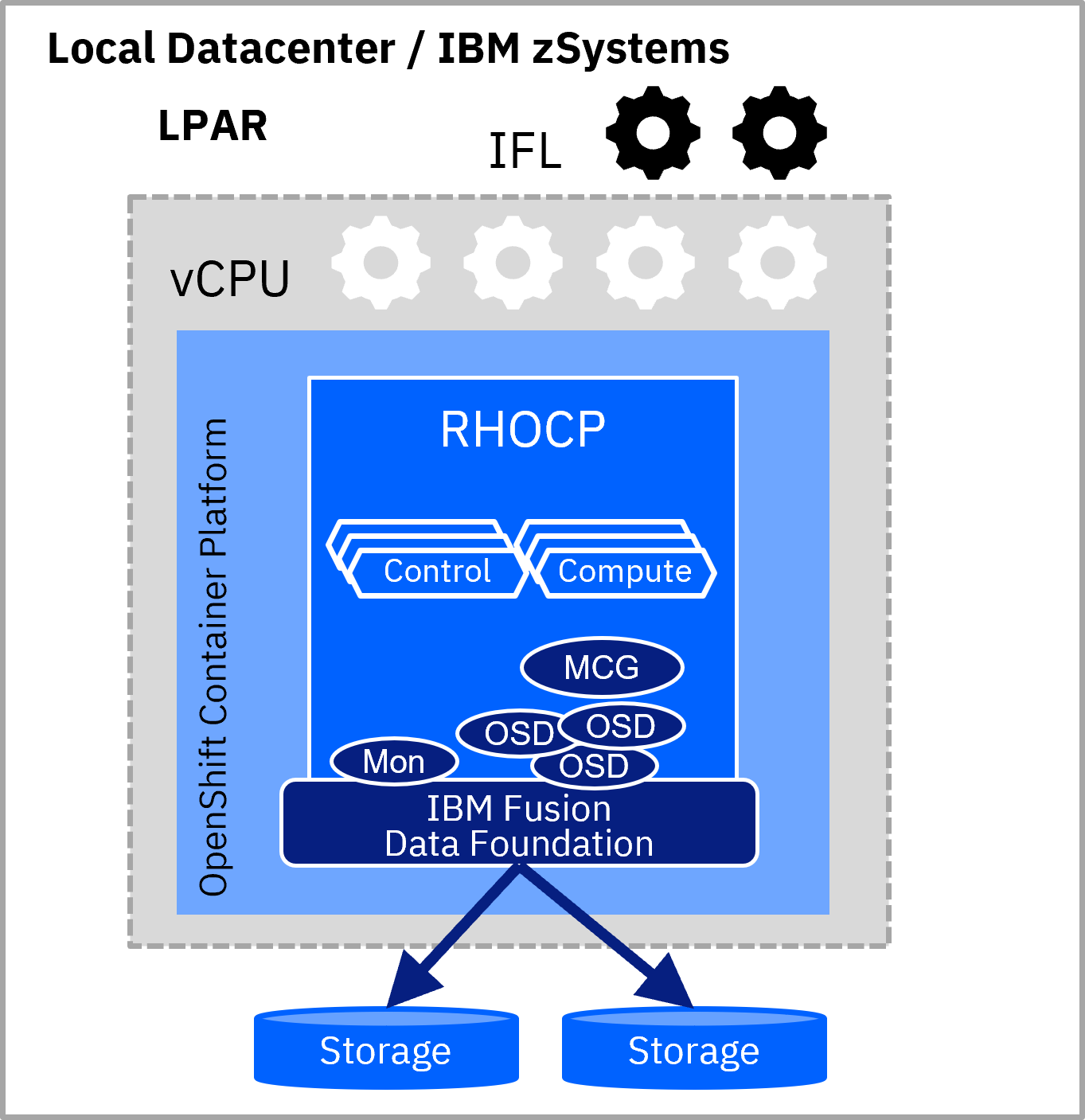
The sizing for an infrastructure that runs IBM Fusion Data Foundation needs to reflect the requirements of the underlying OpenShift Container Platform cluster, as well as the IBM Fusion Data Foundation deployment.
From a licensing perspective, the subscriptions are calculated per used IBM® LinuxONE IFL (or per zIIP instead of IFLs for IBM zCX).
The key hardware requirements are listed in the following table.
Using infrastructure or compute nodes
IBM Fusion Data Foundation storage nodes can be either installed on compute nodes or on infrastructure nodes within the same Red Hat OpenShift cluster.
When installing on infrastructure nodes, the application workload on the compute nodes can scale independently of the storage nodes that are used by IBM Fusion Data Foundation. A further consideration is that infrastructure nodes do not need extra licenses for Red Hat OpenShift Container Platform.
When installing on compute nodes, the application and available storage scale together, and the management is a bit easier.
Using external mode
If the external mode for IBM Fusion Data Foundation is being used, a bulk of the CPU consumption for managing the stored data is being offloaded to the external Ceph cluster. For the stub of IBM Fusion Data Foundation, which is running within the Red Hat OpenShift cluster only the minimal amount of hardware prerequisites is needed (as specified in table 4.5-1).
Configuring local attached storage
When deploying IBM Fusion Data Foundation, a minimum of 3 storage nodes is needed. But there is flexibility on the number of locally attached physical storage hardware devices, which are being used.
A minimum of 3 physical storage devices are required. At least one for each storage node. For each device, Ceph needs a logical Object Storage Device (OSD), which abstracts the hardware underneath. While the capacity of the storage disks is not relevant for CPU consumption of the storage cluster, the number of used OSD drives is extremely relevant:
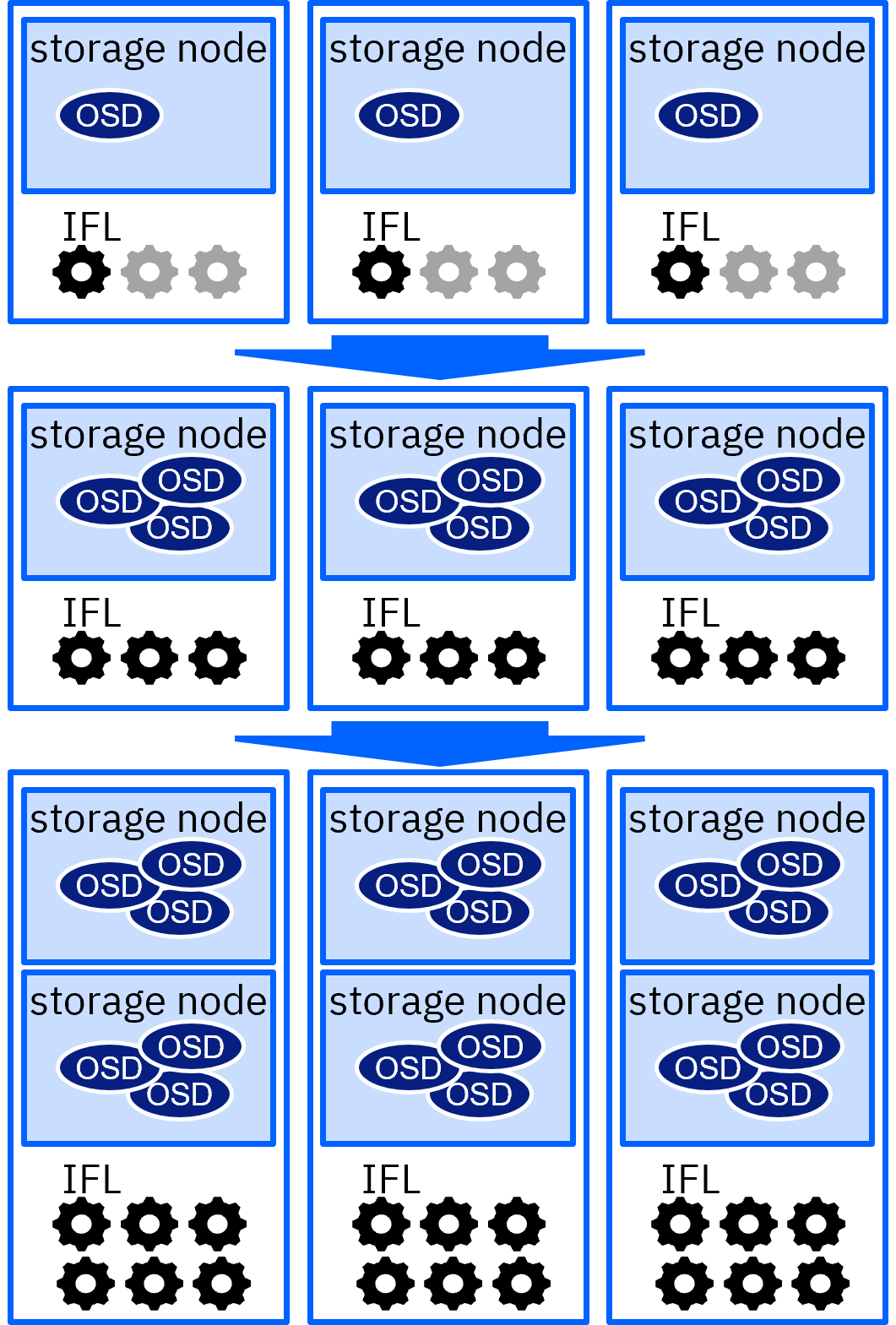
- 1 – 3 IFLs are roughly needed for IBM Fusion Data Foundation to drive the minimum of 3 OSDs (in addition to the resources needed for RHOCP itself). This implies a minimum of 1 physical storage hardware device and 1 logical OSD per storage node.
- If more physical storage devices are required (for example to achieve 1000 TiB +), extra OSDs need to be configured (as each physical storage device must be mapped to only a single OSD). This increases the demand for further IFLs.
- The need to increase the processing power with a growing number of OSDs is shown in figure 4.5-2.
For resilience, it is recommended to distribute OSDs equally across storage nodes. At one point, adding more OSDs makes extra storage nodes necessary (to provide sufficient hardware resources).
Considering replication of storage nodes
One key concept of Fusion Data Foundation is to always replicate the data between the three storage nodes (availability or failure zones). This leads to an extremely resilient overall solution, as the storage infrastructure is still able to work, even if there is an outage of a single storage node. The downside is obviously the increased need for storage capacity (3 times the usable storage) and also a reduced I/O performance results due to the replication operation.
Nevertheless, this advanced resilience is not always needed:
- Sometimes the application can deal with data loss independently of the storage
- In other cases the underlying physical storage can provide redundancy (RAID, mirroring, …)
Especially, the later is often the case in an IBM Z environment, which offers reliable hardware.
To avoid the additional CPU and demand for disk size, it is possible to disable the replication between storage nodes partially. This is configured on the granularity of Ceph OSDs by creating a storage class with only one single replica. This “replica-1” option disables the usual replication. Data in those OSDs (nonresilient pool) is stored only once in a chosen storage node.
There is flexibility on which storage nodes those OSDs should be placed, but on each storage node, there must be at least on OSD, which is fully replicated three times in the default way.
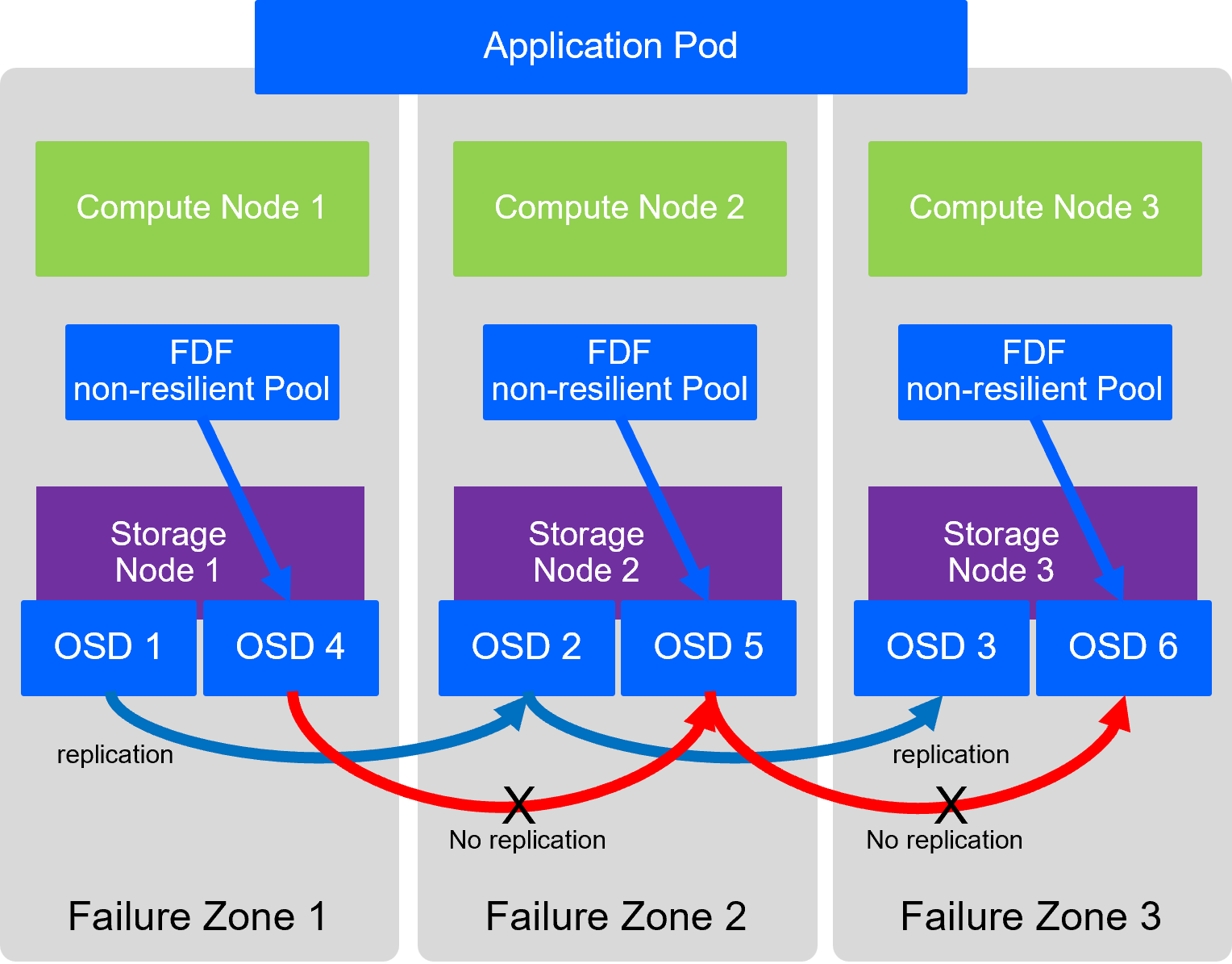
This capability is described in Storage Classes(Red Hat documentation).