Deployment methods and tools
IBM Fusion Data Foundation can be deployed on IBM Z and IBM® LinuxONE as well as within IBM z/OS Container Extensions (zCX).
Depending on the subscription, IBM Fusion Data Foundation can be deployed in different ways:
-
Installing via Red Hat Operator Hub (using the branding Red Hat OpenShift Data Foundation)
-
Installing via IBM Fusion from IBM (starting IBM Fusion version 2.4 and using the new branding IBM Fusion Data Foundation)
In any case, a fully operational Red Hat OpenShift Container Platform cluster needs to be prepared and sufficient storage must be attached locally (see documentation).
Installation via Red Hat Operator Hub
IBM Fusion Data Foundation is deployed via operators, which are available from the Red Hat Operator Hub.
Each release of IBM Fusion Data Foundation can be based on a OpenShift Container Platform with either the same matching release number, or with one or two back-level releases.
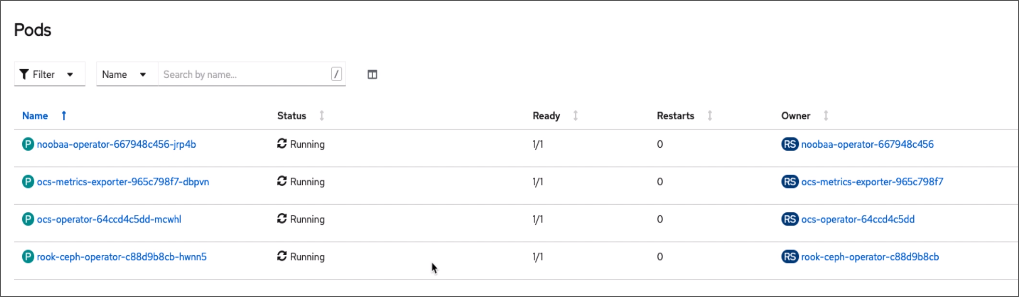
The deployment of IBM Fusion Data Foundation within an Red Hat OpenShift cluster creates:
- NooBaa
- Red Hat OpenShift Data Foundation Metrics
- Red Hat OpenShift Data Foundation Operator
- Rook-Ceph Operator
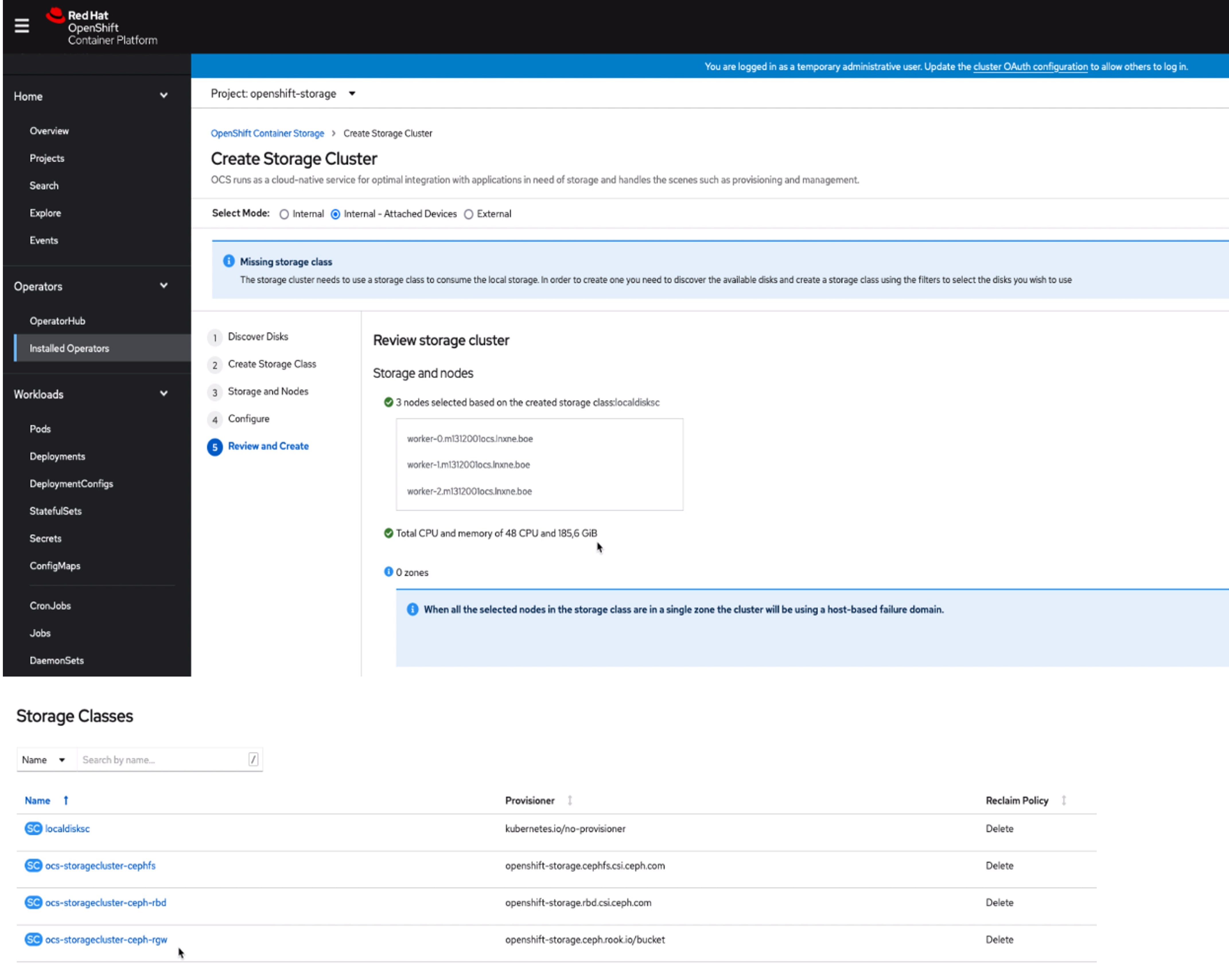
After IBM Fusion Data Foundation is deployed, the next step is to create a storage cluster.
- The internal attached storage devices are selected. As the Local Storage Operator is required to connect to the devices, that operator gets installed as part of this step as well.
- The Red Hat OpenShift cluster nodes, which are used as storage nodes, can be selected. A minimum
of three nodes is required.
- The available disks, which can be used are discovered automatically.
- There must be a minimum of one raw block device per node.
- All disks must be empty and have a minimum size of 100 GiB.
- Disks can be either DASD or FCP devices.
- Storage classes for use by applications are created during this step. The default naming of the
IBM Fusion Data Foundation storage classes are:
- ocs-storagecluster-ceph-rbd
- ocs-storagecluster-cephfs
- openshift-storage.noobaa.io
- ocs-storagecluster-ceph-rgw
- The available disks, which can be used are discovered automatically.
Installation via IBM Fusion
You can also install IBM Fusion Data Foundation via the IBM Fusion user interface. A new operator wraps the existing (Red Hat) Red Hat OpenShift Data Foundation operators. The advantage of IBM Fusion is to provide a common installation and configuration experience for all underlaying storage infrastructure options regardless if IBM Storage Scale or IBM Fusion Data Foundation is being used.
When installation is complete, there is no functional difference between Red Hat OpenShift Data Foundation or IBM Fusion Data Foundation. Nevertheless, IBM Fusion provides a growing number of extra data services on top of IBM Fusion Data Foundation (like a new installation experience).
For more details on IBM Fusion, refer to Documentation for IBM Fusion