Typical RHOCP Topologies and Deployments
Depending on the use case, you can choose from different topologies and deployment options for RHOCP.
- Deploying RHOCP as the only cloud environment on IBM Z and IBM® LinuxONE
- Deploying RHOCP with another, non-containerized workload that you also run as a back-end in a Linux environment on IBM Z and IBM® LinuxONE hardware.
- Deploying RHOCP in colocation with a traditional operating and transactional environment or Data Warehouse and services such as z/OS or z/TPF on IBM Z hardware.
- Deploying RHOCP inside the z/OS Operating System in the z/OS Container Extension (zCX) Address Spaces that uses the product IBM zCX Foundation for Red Hat OpenShift. This deployment is described here.
- A newer topology for an RHOCP environment is a Multi-Architecture Compute topology, which enables a main RHOCP cluster to be extended with compute nodes on another architecture.
- Hosted Control Planes - input from WM

The last releases increased the variety of deployment options and the flexibility to build the environments that correspond to your needs and service requirements.
In general, all deployments of an RHOCP cluster can be realized in one or multiple Logical Partitions (LPARs).
The deployments now have the flexibility to be installed as follows:
- In native LPARs without any hypervisor
- Virtualized with IBM z/VM or RHEL KVM as hypervisors
Depending on the planned deployment, you can opt for different resource sharing topologies for core capacity, I/O, and network.
IBM Z and IBM® LinuxONE provide specialized components, which can be shared between the LPARs:
- The capacity core for running Linux and RHOCP is called Integrated Facility for Linux processor (IFL) and corresponds as component to a distributed core, but has characteristics, which enables for more workload per unit.
- The I/O attachments use FICON cards, which can be configured for traditional DASDs disks or for Fibre Channel SCSI, or FCP protocol. IBM Z and IBM® LinuxONE machines have dedicated processors to handle I/O and are independent from the application.
- The network can use machine internal network capabilities called HiperSockets networks (HS) and network cards called Opensystem adapters (OSA) or RoCE cards (Remote Direct Memory Access over Converged Ethernet cards). Multiple isolated internal networks can be defined and the ports on the network cards can be shared.
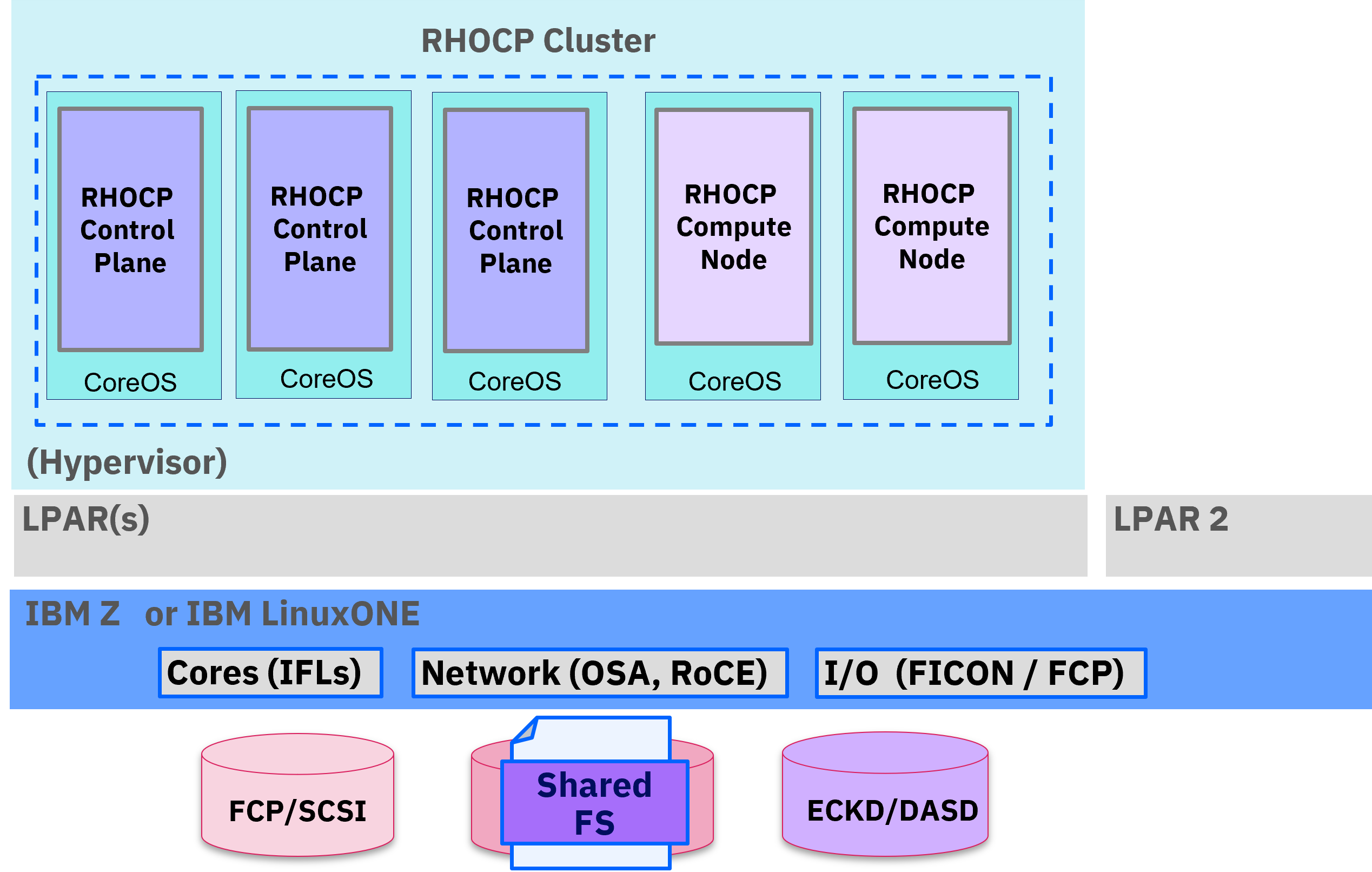
The concept of an RHOCP cluster is to provide service with high availability in mind. Therefore, the RHOCP cluster can be deployed with three control plane nodes and several compute nodes depending on the planned workloads and container applications needs. The minimum number of compute nodes is two. Extra compute nodes can or might be required, depending on the software solution requirements. For example, some software or databases require a minimum of three-nodes.
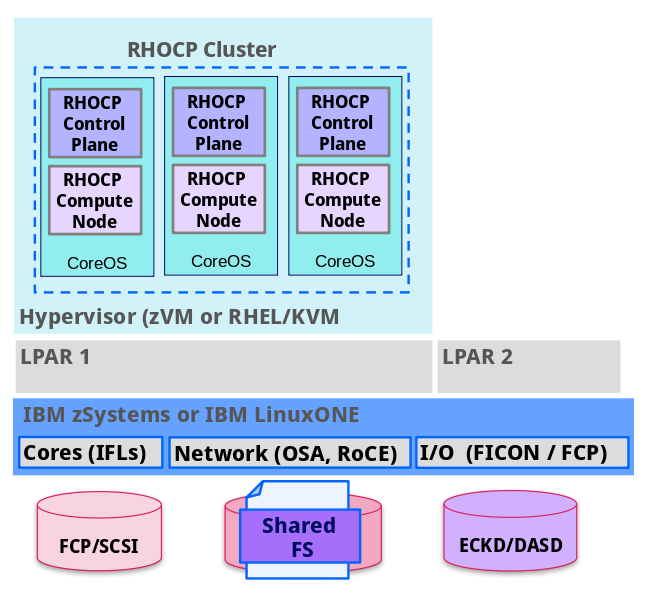
An alternative deployment model to the full HA deployment of RHOCP, was made available by introducing converged control planes and compute nodes in a total of three nodes per cluster, as shown in image. This setup can be a very helpful for proof of technologies, development, or test environments. This cluster can be extended with extra compute nodes, keeping the initial three converged nodes unchanged. This is a flexible way to start an HA model and extending it as needed.
The single-node OpenShift (SNO) environment is an exception to the concept of building a highly available RHOCP environment. It is built on a single node. This deployment is lacking the high availability of the cluster deployment, but can be useful for development, test environments, or uncritical workloads, which do not require high availability characteristics. With this model you start with a single converged node containing control and compute without extra need for more nodes. Further you can add to this single node extra compute nodes for scalability. Control nodes cannot be scaled and stay with 1, but you can add compute nodes to SNO. With this setup, resource consumption is reduced but cluster updates require a downtime and cluster availability is restricted to this single control node.
With Red Hat OpenShift 4.14, an extra deployment model to install RHOCP on a single node is supported. With this model, you start with a single converged node that contains control and compute without the extra need for more nodes. Further you can add to this single node extra compute nodes for scalability.
Control nodes cannot be scaled and stay with 1. With this setup, resource consumption is reduced but cluster updates require a downtime and cluster availability is restricted to this single node.

All RHOCP cluster deployments on IBM Z and IBM® LinuxONE can be deployed in native LPARs or in a virtualized environment, which means there is a requirement for a hypervisor in the RHOCP LPAR.
Therefore, on IBM Z and IBM® LinuxONE the deployment options to implement an RHOCP cluster are:
- Using IBM z/VM Version 7.2 or later.
- Using Red Hat Enterprise Linux 8.6 KVM (RHEL KVM) or later.
- Using LPARs only. This is a supported deployment option with Red Hat OpenShift 4.15 and later and allows to build a cluster without virtualization and hypervisors.
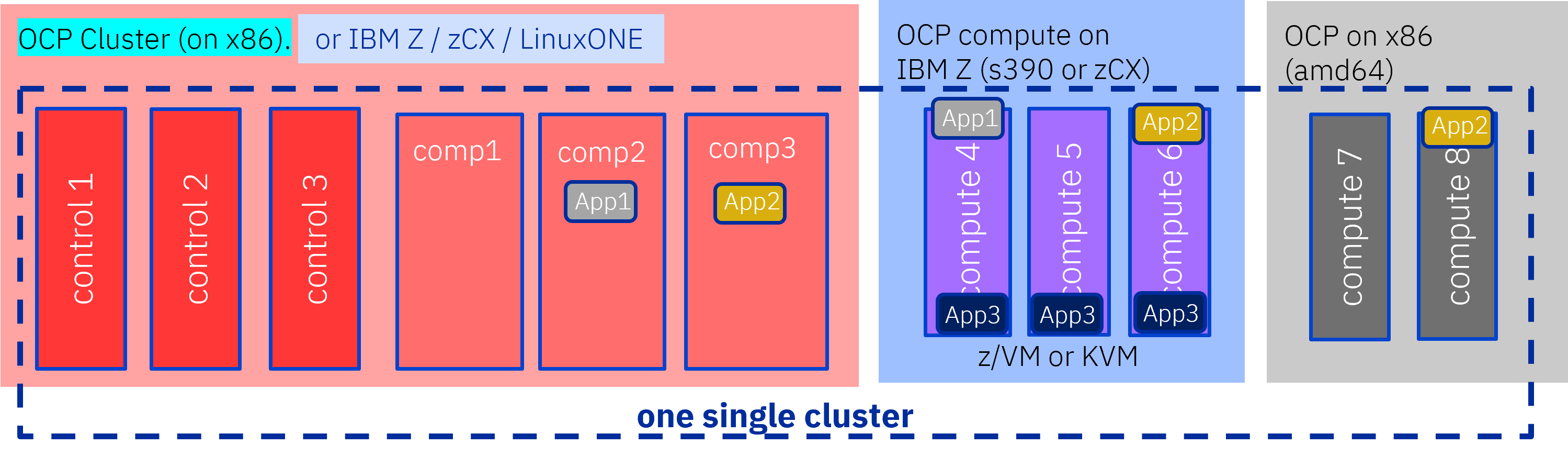
The most flexible and advanced deployment of an RHOCP cluster is the Multi-Architecture Compute deployment. This deployment starts with a traditional RHOCP cluster on IBM Z / IBM® LinuxONE or on x86 architecture. The base cluster can then be extended with compute nodes, which can reside on other architectures. Such a deployment enables solutions, which run on different architectures and can complement each other.
Figure 5 shows an architecture of a such deployment. Applications that are developed for Multi-Architectures can run based on their labels, on a single architecture or can run at the same time on Multi-Architecture compute environments.
For an RHOCP cluster, Red Hat Enterprise Linux CoreOS (RHCOS) is the host operating system for all nodes, control plane, and compute nodes. The RHCOS operating system is delivered as one package with the Red Hat OpenShift components. RHCOS is a self-managing, secure, and immutable container host, which is optimized for fast deployment and performance. RHCOS is versioned with Red Hat OpenShift. Because RHCOS is immutable, the platform can ensure security and does not need any active management by an administrator.
Running RHOCP under Red Hat Enterprise Linux on IBM Z and IBM® LinuxONE is not supported.
RHOCP in Version 4 nodes run on Red Hat Enterprise Linux CoreOS (RHCOS).
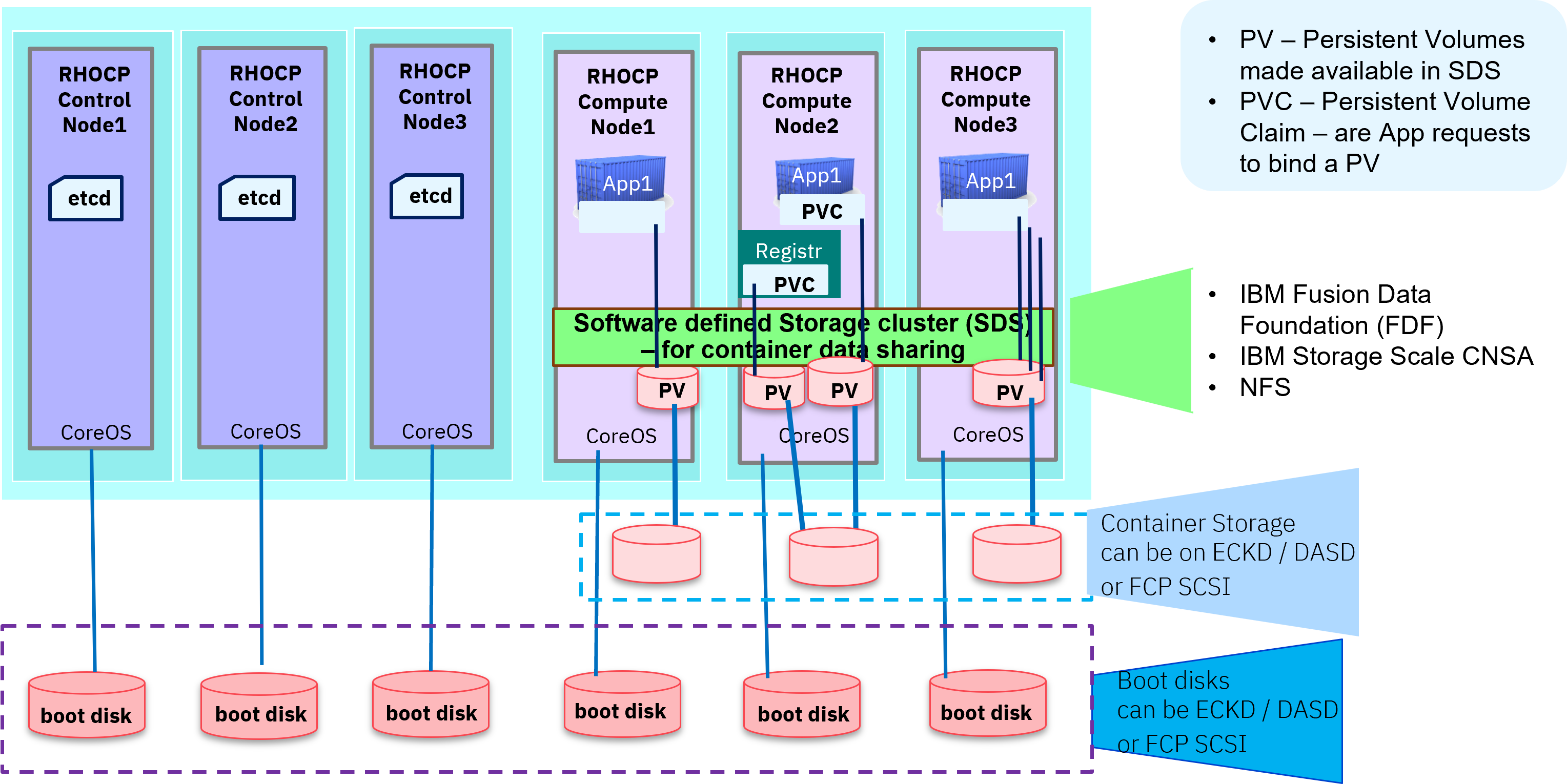
To install an RHOCP cluster, you can decide for different storage to be used. The installation of the hypervisor and the RHOCP guests is implemented on local storage disks.
The local storage can be FICON-attached DASD storage that uses Extended Count Key Data (ECKD) format or it can be Fibre Channel (FCP) attached storage that uses SCSI block device format.
For the RHOCP internal container image registry, it is mandatory to have a shared storage with ReadWriteMany (rwm) capabilities.
For shared storage (rwm), you can use these Software Defined Storage (SDS) options:
- IBM Container Native Storage Access (CNSA) : A CSI-based cross cluster mount capability to attach an RHOCP cluster to an IBM Storage Scale clustered file system. The IBM Storage Scale cluster provides shared file system storage capabilities for container applications and non-containerized applications, and can be shared between different hardware architectures.
- IBM Fusion Data Foundation (also known as Red Hat OpenShift Data Foundation): This option is a shared storage approach based on Ceph and the corresponding CephFS file system. IBM Fusion Data Foundation provides block, file, and object storage via different interfaces. You can use local attached storage for IBM Fusion Data Foundation, or you can use Cross Cluster Mount CEPH clusters to attach RHOCP to.
- NFS-mounted storage: This type is only for tests and proof of technologies, due to performance and security reasons.
PoT and PoC Environments
Single-node Openshift (SNO) can be used as the smallest RHOCP cluster setup with a minimal configuration for test and development workloads, without HA capability available. It is built on a single node in a virtualized environment or in an LPAR. The SNO cluster can be extended with extra compute nodes when needed, but remains without HA capabilities due to a single control node. The setup is depicted in the following diagram. The minimum resource requirements are:
The minimum system requirements for a single node cluster are:
- Hypervisor
- z/VM hypervisor 7.2
- EAV Function - the Extended Address Volume (EAV) function is needed to support the required higher capacity DASDs
- HyperPAV recommended - Parallel Access Volume PAV is highly recommended for disk performance
- RHEL 8.6 KVM
- Multipathing is recommended for local disk performance
- z/VM hypervisor 7.2
- Control plane and Compute node together:
- 2 IFLs represeting 4 vCPU with SMT2 enabled (SMT2 - Simultaneous Multi Threading)
- 16 GB RAM
- Networking options
- OSA, RoCE
- in a z/VM based implementation, z/VM VSWITCH is an additional option
- in a KVM based implementation, the BOND device enables extra bandwith and failover option
- Storage
- RHOCP Node 120 GB (workload dependent)
- Clustered file system storage
- NFS, greater than 100 GB
- IBM Storage Scale via IBM Cloud Native Storage Access (CNSA)
- IBM Fusion Data Foundation
- Storage for monitoring/logging has to be added
For a Proof of Technology or Proof of Concept project, an RHOCP Cluster setup in its minimal configuration can be a three-node cluster or as depicted in the following diagram, the resource requirements are the same:
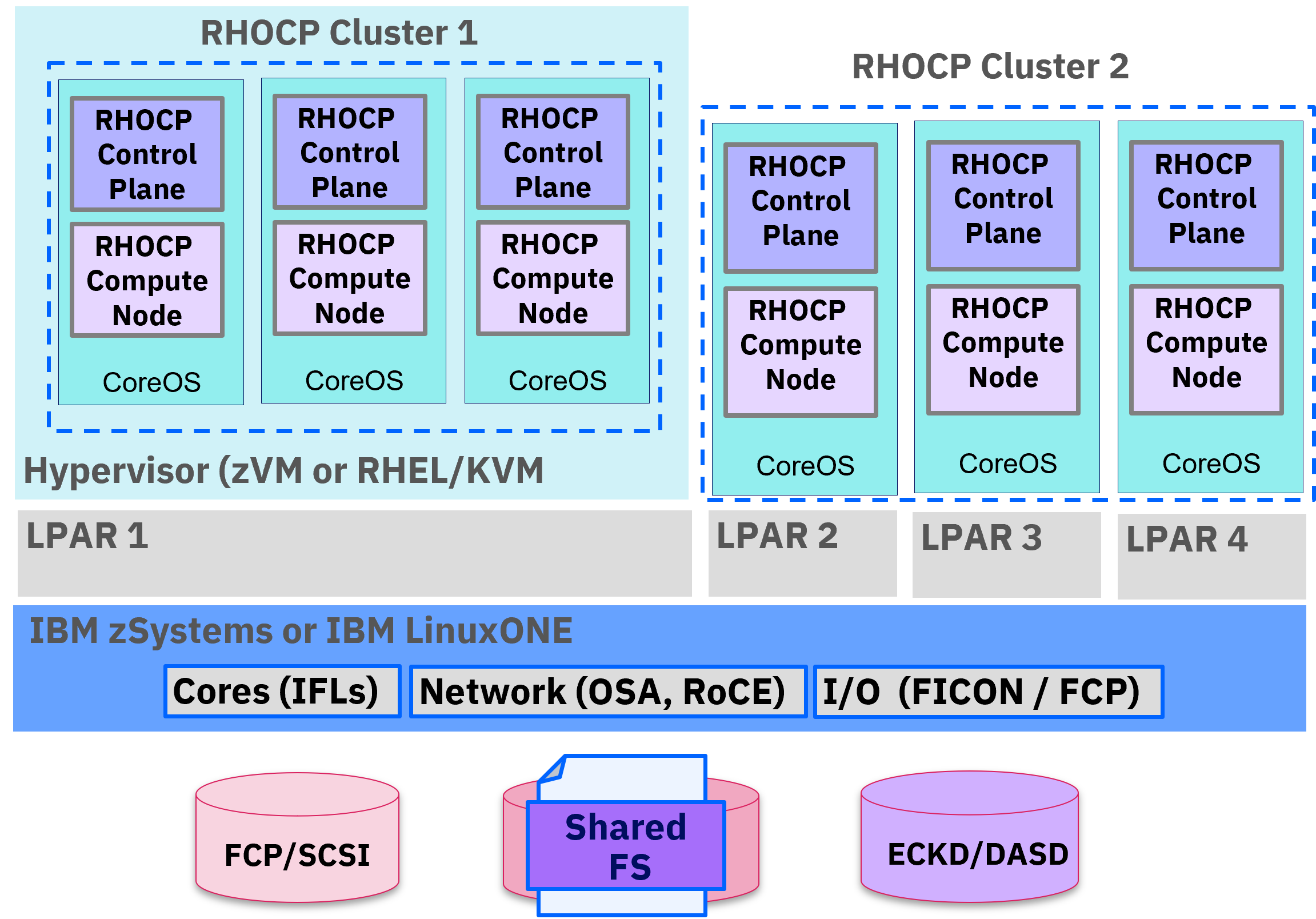
The minimum system requirements for z/VM guests of an RHOCP cluster are:
- Hypervisor
- z/VM hypervisor 7.2
- EAV Function - the Extended Address Volume (EAV) function is needed to support the required higher capacity DASDs
- HyperPAV recommended - Parallel Access Volume PAV is highly recommended for disk performance
- RHEL 8.6 KVM
- Multipathing is recommended for local disk performance
- z/VM hypervisor 7.2
- Control plane nodes
- 4 vCPU
- 16 GB RAM
- Compute nodes
- 2 vCPU
- 8 GB RAM (workload dependent)
- Networking options
- OSA, RoCE
- the internal Hipersockets network capabilities
- in a z/VM based implementation, z/VM VSWITCH is an additional option
- in a KVM based implementation, the BOND device enables extra bandwith and failover option
- Storage
- RHOCP control plane, 120 GB each
- RHOCP Node 120 GB (workload dependent)
- Clustered file system storage
- NFS, greater than 100 GB
- IBM Storage Scale via IBM Cloud Native Storage Access (CNSA)
- IBM Fusion Data Foundation
- Storage for monitoring/logging has to be added
For further information,the following RHOCP resource is available Installing a cluster on IBM Z and IBM® LinuxONE[].
Production Environments
Due to a design with High Availability in mind by design, in a production environment an RHOCP cluster needs to be deployed with three control plane nodes or control planes spread across multiple LPARs in one or multiple physical machines.
RHOCP provides powerful orchestration capabilities for the container workload you are deploying. In order to make that happen seamlessly, it is essential to provide sufficient resources to your cluster.
For production environments it is highly recommended to provide at least the preferred or recommended hardware and system requirements mentioned below.
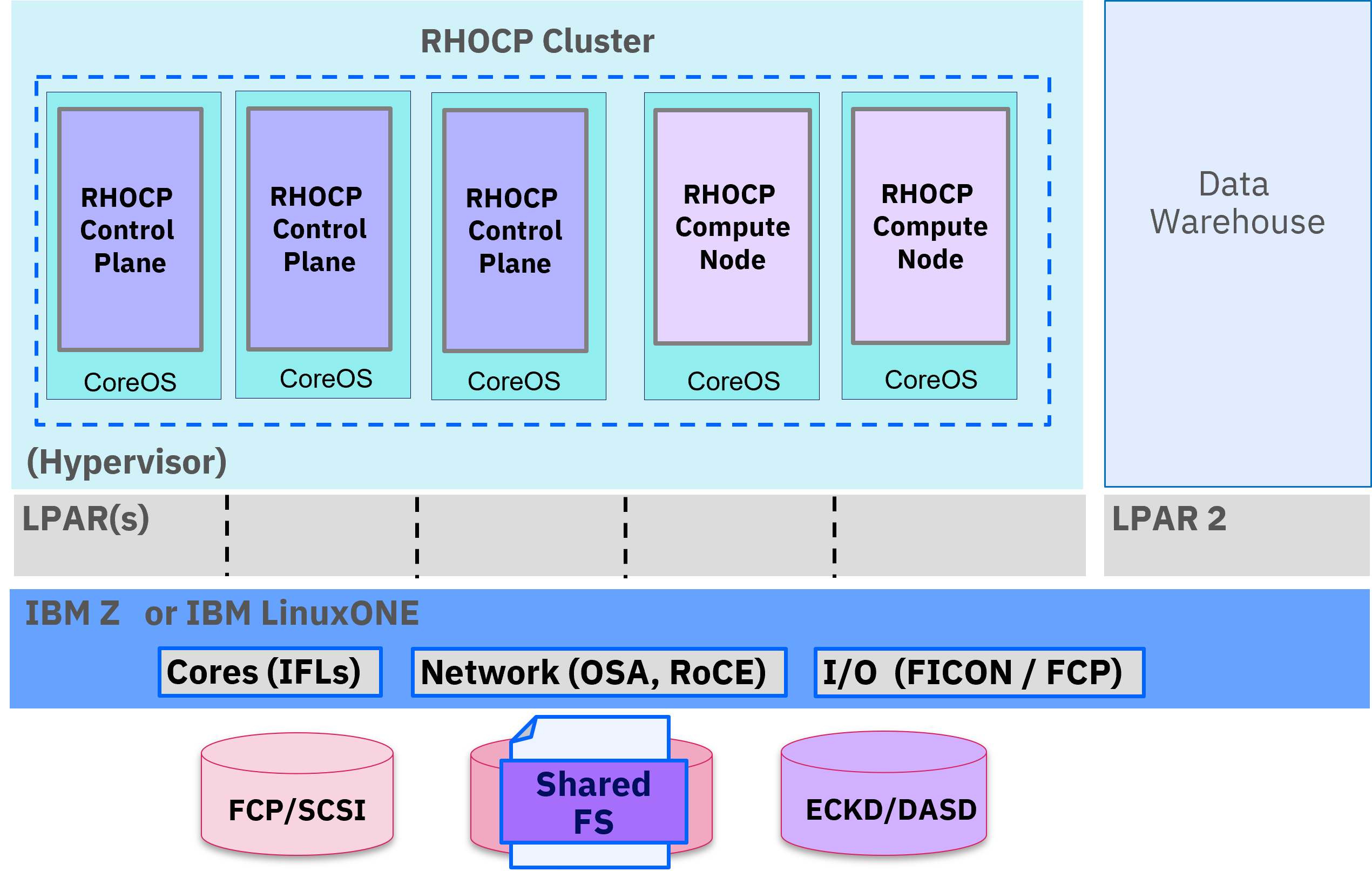
Hardware requirements:
- 3 LPARs with a total of at least 6 IFLs that support SMT2
- OSA or RoCE network adapters in HA configuration
- HiperSockets, which are attached to a node
- In a z/VM environment the HiperSockets network can use the z/VM VSWITCH bridge to enable the communication to a z/VM VSWITCH
- In a RHEL KVM environment you can use bridged MacVTap network to implement Pickpockets. For details see 'Defining the MacVTap network' in Virtualization Cookbook for IBM Z.
Operating system requirements:
- Instances of hypervisors on each LPAR
On your hypervisor instances, set up:
- 3 guest virtual machines for RHOCP control plane machines, one per hypervisor
- At least 6 guest virtual machines for RHOCP compute machines, distributed across the hypervisor instances
Disk storage for the hypervisor guest virtual machines:
- FICON attached disk storage (DASDs).
- For z/VM hypervisor, these can be z/VM minidisks, fullpack minidisks, or dedicated DASDs. To reach the minimum required DASD size for Red Hat Enterprise Linux CoreOS (RHCOS) installations, you need extended address volumes (EAVs) in z/VM. It is highly recommended to use Parallel Access Volume access (HyperPAV) and High Performance FICON (zHPF) to ensure optimal performance.
- FCP-attached disk storage
- For FCP/SCSI attached storage it is highly recommended to use Multipathing
Storage / Main Memory:
- 16 GB for the RHOCP control plane machines
- 8 GB for the RHOCP compute machines (workload dependent)
- 16 GB for the temporary RHOCP bootstrap machine
For the latest and complete listing of prerequisites refer to the Red Hat OpenShift Container Platform documentation.
It is also strongly advisable to monitor production systems carefully in terms of performance and resource consumption and make sure that RHOCP does not encounter bottlenecks in available hardware.
To ensure appropriate sizing for production workloads refer to preferred system requirement in the Red Hat OpenShift Container Platform documentation
Considerations for Business continuity via High Availability and Disaster Recovery
In addition to the setup of a full production environment, it is strongly advisable to consider aspects of high availability and disaster recovery.
- High availability ensures availability through redundancy of resources to ensure continuous
operation and make sure that workloads can be processed continuously without disruptions, with
unplanned or planned outages, even when software is being restarted or updated. For example,
individual containers are replaced with new versions of your applications.
High availability includes applications (containers), middleware, operating system / virtualization / hypervisor, as well as infrastructure hardware availability.
- Disaster recovery adds the need for a consideration that an entire datacenter is affected and cannot operate. This situation requires the redundancy of the entire environment in the disaster recovery datacenter to ensure business continuity. Typically, this is implemented by a second and more often even a third data center.
The corresponding detailed design considerations are listed in a separate section of this document.