Overview of pureQuery Runtime
InfoSphere Optim pureQuery Runtime provides application programming interfaces (APIs) that developers can use to rapidly deploy new applications or new features in existing applications. pureQuery Runtime also provides a runtime environment that enhances the performance of existing Java or C database client applications without requiring changes to the code.
- Improve application performance. pureQuery Runtime simplifies the use of best practices for SQL and JDBC.
- Optimize existing JDBC, DB2® ODBC/CLI, and Microsoft .NET applications without changing application code.
- Rapidly build Java data access applications with IBM Data Studio.
- Improve the security, performance, and manageability of data access applications.
- Facilitate developer and DBA collaboration.
- Provide critical client application information to a database administrator so that the DBA can locate the clients and optimize their interaction with the database.
Managing SQL statements that are run by applications
You can use the pureQuery APIs in Java applications to simplify Java code and use the DAO pattern. You can also use pureQuery client optimization to control SQL statements that are issued by applications without changing application code.
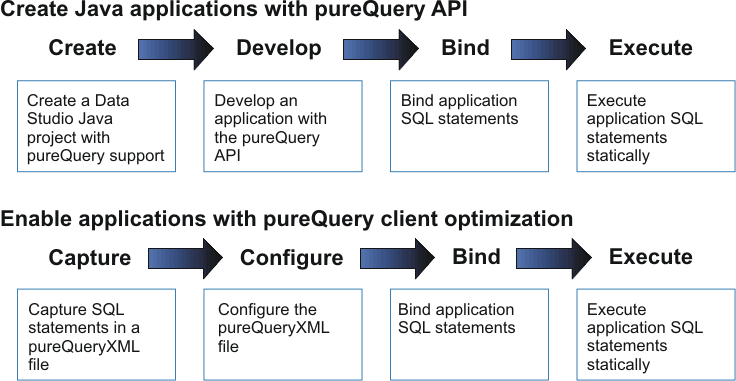
- When you develop Java applications
with the pureQuery API,
you can:
- Use the pureQuery API to develop code with the data access object (DAO) pattern regardless of whether SQL statements are executed dynamically or statically.
- Perform batch operations for INSERT, UPDATE, and DELETE statements efficiently.
- Process SQL statements from web server files (EAR, WAR, JAR, and ZIP files) so that the statements can be run statically.
- With the pureQuery client
optimization, you capture the SQL statements that are issued by Java, ODBC/CLI,
and .NET applications without changing the application source
code. After you capture the statements, you can manage the execution
of the statements. For example:
- Run SQL statements that are issued by the application either dynamically or statically on a DB2 database.
- Run only previously captured statements.
- Run alternate statements.
Architecture
pureQuery Runtime controls the execution of SQL statements that are issued by applications at the database driver level. When you deploy pureQuery Runtime, you set pureQuery Runtime properties to control the execution of SQL statements. After you install InfoSphere Optim pureQuery Runtime in your production environment, you can deploy your pureQuery Java applications. You can also deploy DB2 ODBC/CLI and Microsoft .NET applications. The following illustration shows a Java application that is enabled with pureQuery Runtime in a simple three-tier web application environment:
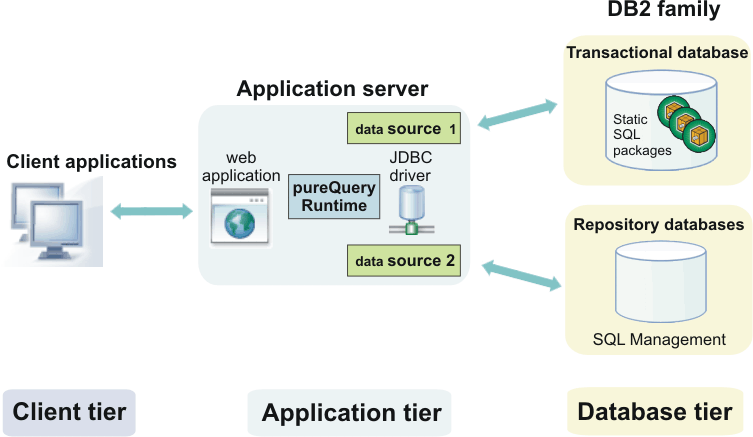
The illustration shows optional SQL Management repository databases. The repository contains artifacts that are used by pureQuery Runtime. For example, you store the pureQuery Runtime property settings in the repository. As the illustration shows, pureQuery Runtime requires access to the repository. pureQuery Runtime can use a separate data source to access the repository database so that the transactional database performance is not affected.
pureQuery Runtime components
pureQuery Runtime provides a runtime environment for applications. You can use this runtime environment to control the execution of SQL statements. For applications that connect to DB2 databases, you can run the statements statically. Running SQL statements statically on a DB2 database can improve application performance and security.
- pureQuery Runtime libraries work together with the Java database driver to provide special processing capabilities.
- pureQuery Runtime libraries are installed on each server where the client application runs.
- pureQuery Runtime libraries must be made accessible to the application server.
- Configuration settings can be specified in a database connection object or in a configuration file.
The pureQuery Runtime installation program installs the Java libraries and optionally configures the application server environment. pureQuery Runtime installation program does not install the data server JDBC drivers. The drivers are installed separately. For example, Data Studio installs the JDBC drivers for development use.
- pureQuery capabilities are incorporated into IBM Data Server database drivers.
- Configuration settings can be specified in a database connection object or in a configuration file.
pureQuery Runtime also includes Java based utilities that are used when you develop applications with the API or when you use pureQuery client optimization. The utilities are part of the pureQuery Runtime Java libraries.