Using the Column Map Proc Editor
In the Column Map Proc Editor you can create, modify, or delete Column Map Procedures as objects stored in the Optim™ Directory or defined within a Column Map. You can also export a file that contains information needed to create a Column Map Procedure or import a similar file in order to create a Column Map Procedure.
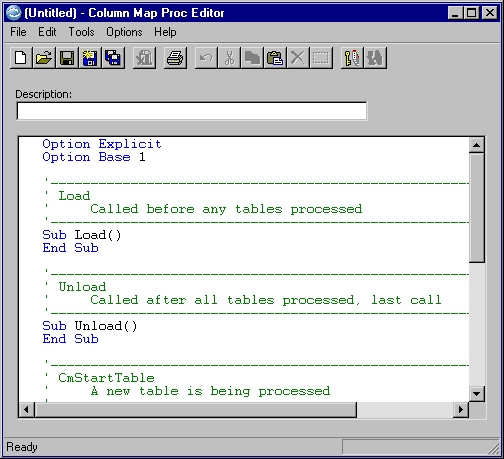
Description
Text to describe or explain the purpose of the Column Map Procedure (up to 40 characters).
Edit window
When you open the editor, the window displays either:
- The last edited Column Map Procedure (if any exists). You can edit an existing procedure, or save it as a new procedure and edit as necessary.
- The DEFAULT.BAS Column Map Procedure stored in the SOFTECH\RT\BIN directory. This code template is displayed each time you select New from the File menu within the editor, whether from the main menu or from within the editor.
Template Column Map Procedure
Intended for use as a guideline, the template Column Map Procedure includes the following native functions:
| Function | Description |
|---|---|
Sub Load ... ... End Sub |
The Load function can be included in a Column Map Procedure. This optional function is called before any tables are processed. You can use this function for initialization or other tasks that apply generally in the procedure. |
| Function CmStartTable () As Integer ... ... End Function |
The CmStartTable function can be included in a Column Map Procedure. This optional function is called before each table is processed. You can use this function for initialization or other tasks that affect or apply to each table processed in the procedure. |
| Function CmTransform () As Integer ... Target.Value = Source.Column
_ ... End Function |
The CmTransform function must be included in a Column Map Procedure. This required function is called for each row that is processed and provides instructions for the data transformation to be performed. |
| Function CmEndTable ... ... End Function |
Only one instance of the CmEndTable function can be included in a Column Map Procedure. This optional function is called after each table is processed. You can use this function for tasks required after each table is processed. |
| Sub Unload() ... ... End Sub |
Only one instance of the Unload function can be included in a Column Map Procedure. This optional function is called after all tables are processed. You can use this function for tasks required before termination of the procedure. |
Of the native functions, only the CmTransform function
is required; others are optional. The CmTransform function
in the template simply copies each source value to a target value.
You can add your own functions to be called by one or more native
functions or otherwise edit the template to generate destination values
or reports that meet your requirements.
Return codes
The CmStartTable and CmTransform functions
must return one of the following codes:
| Return Code | Mnemonic | Explanation |
|---|---|---|
| 0 | PST_CM_EXIT_SUCCESS | Procedure executed successfully |
| 1 | PST_CM_EXIT_REJECT_ROW | Procedure rejected row |
| 2 | PST_CM_EXIT_ABORT_PROCESS | Procedure detected abort condition |
Available functions and statements and additional reserved words are listed in the following tables. See the Optim Basic Language Reference for syntax and other information about the statements and functions.
General statements and functions
| Abs | Access | Alias | And | Any |
| App | AppActivate | Asc | Atn | As |
| Base | Begin | Binary | ByVal | Call |
| Case | CBool | CDate | ChDir | ChDrive |
| Choose | Chr | Const | Cos | CurDir |
| CDbl | CInt | CLng | CSng | CStr |
| CVar | Close | CreateObject | Date | DateSerial |
| DateValue | Day | Declare | Dim | Dir |
| Do...Loop | DDEInitiate | DDEExecute | Double | Else |
| ElseIf | End | EndIf | EOF | Eqv |
| Erase | Err | Error | Exit | Exp |
| Explicit | False | FileCopy | FileLen | Fix |
| For | For Each...Next | For...Next | Format | FreeFile |
| Function | Get | GetAttr | Get Object | Global |
| GoTo | Hex | Hour | If...Then...Else...[End If] | Imp |
| Input | Input # | InputBox | InStr | Int |
| Integer | Is | IsArray | IsEmpty | IsNull |
| IsNumeric | IsDate | IsObject | Kill | LBound |
| LCase | Left | Len | Let | LOF |
| Log | Long | Loop | LTrim | Line Input # |
| Mid | Minute | MkDir | Mod | Month |
| Name | Next | Not | Now | Oct |
| On | Open | Object | Option | Optional |
| Or | On Error | Option Base | Option Explicit | |
| Print # | Put | Randomize | Rem | ReDim |
| RmDir | Rnd | Rtrim | Right | Seek |
| SendKeys | Set | SetAttr | Second | Select |
| Select Case | Shell | Sin | Sqr | Stop |
| Str | Sng | Single | Space | Static |
| Step | Stop | Str | String | StrComp |
| Sub | Tan | Time | Timer | TimeSerial |
| Then | Trim | True | To | Type |
| TimeValue | UBound | UCase | Until | Val |
| Variant | VarType | Write # | Weekday | With |
| While...Wend | Xor | Year |
Functions and statements by type
Flow of control
| Do...Loop | End | Exit For | Exit Loop |
| For Each...Next | For...Next | GoTo | If...Then...Else...[End If] |
| OnError | Select Case | Stop | While...Wend |
Conversion
| Asc | CBool | CDate | CDbl |
| Chr | CInt | Clng | CSngr |
| CStr | CVar | Date | DateSerial |
| DateValue | Day | Fix | Format |
| Hex | Hour | Int | Minute |
| Month | Oct | Second | Str |
| TimeSerial | TimeValue | Val | Weekday |
| Year |
File I/O
| ChDir | ChDrive | Close | CurDir |
| Dir | EOF | FileCopy | FileLen |
| FreeFile | Get | GetAttr | Input |
| Kill | Line Input | LOF | MkDir |
| Name | Open | Print # | Put |
| RmDir | Seek | SetAttr | Write # |
Math
| Abs | Atn | Cos | Exp |
| Fix | Int | Log | Rnd |
| Sgn | Sin | Sqr | Tan |
Procedures
| Call | Declare | End Function | End Sub |
| Exit | Function | Global | Sub |
Strings
| Asc | Chr | InStr | LCase |
| Left | Len | Let | LTrim |
| Mid | Option Compare | Right | RTrim |
| Space | StrComp Format | String | Trim |
| UCase |
Variables and Constants
| Const | Dim | Global | IsDate |
| IsEmpty | IsNull | IsNumeric | Option Explicit |
| Static | VarType |
Error trapping
| On Error | Resume |
Date/Time
| Date | Now | Time | Timer |
DDE
| DDEExecute | DDEInitiate | DDETerminate |
Arrays
| Dim | Erase | Global | Lbound |
| Option Base | Option Explicit | ReDim | Static |
| Ubound |
Miscellaneous
| AppActivate | CreateObject | GetObject | Randomize |
| Rem | SendKeys | Shell |
Objects
Application properties
| Arg | ArgCount | CompanyName | ComputerName |
| DataDir | Environ | Error | Instance |
| LogEvent | Opsys | OpsysBuild | OpsysCSD |
| OpsysRelease | Request | RequestList | RtBuild |
| RtRelease | Script | ServerUserId | StartLogging |
| TempDir | ThreadHandle | ThreadId |
Column properties
| Available | IsNull | Length | Name |
| Nullable | Precision | Scale | Type |
| Value |
Source properties
| Column | ColumnList | CreateFile | CreatorId |
| DBAlias | IsColumn | OwnerId | Table |
Target properties
| Column | SetFromFile | Value |
Global functions
| Function | Syntax |
|---|---|
| GetAsBinary | GetAsBinary(column,length) |
| GetAsDate | GetAsDate(column,pointer) |
| GetAsDecimalChar | GetAsDecimalChar(column,precision[,scale]) |
| GetAsDecimalCharSz | GetAsDecimalCharSz(column,precision,scale) |
| GetAsOracleDate | GetAsOracleDate(column,pointer) |
| GetAsSybaseDateTime | GetAsSybaseDateTime(column,pointer) |
| GetAsSybaseDecimal | GetAsSybaseDecimal(column,pointer) |
| GetAsSybaseMoney | GetAsSybaseMoney(column,pointer) |
| GetAsSybaseSmallDateTime | GetAsSybaseSmallDateTime(column,pointer) |
| GetAsSybaseSmallMoney | GetAsSybaseSmallMoney(column,pointer) |
| GetAsTime | GetAsTime(column,pointer) |
| GetAsVarBinary | GetAsVarBinary(column,pointer) |
| GetAsVarChar | GetAsVarChar(column,pointer) |
| GetAsVarCharSz | GetAsVarCharSz(column,pointer) |
| GetGlobalWork | GetGlobalWork(area,length) |
| PutAsBinary | PutAsBinary(column,length) |
| PutAsDate | PutAsDate(column,pointer) |
| PutAsDecimalChar | PutAsDecimalChar(pointer) |
| PutAsDecimalCharSz | PutAsDecimalCharSz(pointer) |
| PutAsOracleDate | PutAsOracleDate(column,pointer) |
| PutAsSybaseDateTime | PutAsSybaseDateTime(column,pointer) |
| PutAsSybaseDecimal | PutAsSybaseDecimal(column,pointer) |
| PutAsSybaseMoney | PutAsSybaseMoney(column,pointer) |
| PutAsSybaseSmallDateTime | PutAsSybaseSmallDateTime(column,pointer) |
| PutAsSybaseSmallMoney | PutAsSybaseSmallMoney(column,pointer) |
| PutAsTime | PutAsTime(column,pointer) |
| PutAsVarBinary | PutAsVarBinary(column,pointer) |
| PutAsVarChar | PutAsVarChar(column,pointer) |
| PutAsVarCharSz | PutAsVarCharSz(column,pointer) |
| SetGlobalWork | SetGlobalWork(pointer,length) |
Variable data types
| Variable | Type Specifier | Usage | Size |
|---|---|---|---|
| String | $ | Dim Str_Var As String | 0 to 16,000 char |
| Integer | % | Dim Int_Var As Integer | 2 bytes |
| Long | & | Dim Long_Var As Long | 4 bytes |
| Single | ! | Dim Sing_Var As Single | 4 bytes |
| Double | # | Dim Sbl_Var As Double | 8 bytes |
| Variant | Dim X As Any | 4 bytes | |
| Boolean | Dim X As Boolean | True or False | |
| Byte | Dim X As Byte | 0 to 225 | |
| Object | Dim X As Object | 4 bytes | |
| Date | Dim D As Date | 8 bytes | |
| Currency | Dim Cvar As Currency | 8 bytes | |
| User Defined Types | size of each element |
Arithmetic operators
Arithmetic operators
follow mathematical rules of precedence. You can use +
or &
for
string concatenation.
| Operator | Function | Usage |
|---|---|---|
| ^ | exponentiation | x = y^2 |
| - | negation | x = -2 |
| * | multiplication | x% = 2 * 3 |
| / | division | x = 10/2 |
| Mod | modulo | x = y Mod z |
| + | addition | x = 2 + 3 |
| - | subtraction | x = 6 - 4 |
Relational operators
| Operator | Function | Usage |
|---|---|---|
| < | less than | x < Y |
| <= | less than or equal to | x <= Y |
| = | equals | x = Y |
| >= | greater than or equal to | x >= Y |
| > | greater than | x > Y |
| <> | not equal to | x <> Y |
Logical operators
| Operator | Function | Usage |
|---|---|---|
| Not | Logical Negation | If Not (x) |
| And | Logical And | If (x>y) And (x<Z) |
| Or | Logical Or | If (x=y) Or (x=z) |
Operator precedence
| Operator (in order from highest to lowest) | Description |
|---|---|
| () | parenthesis |
| ^ | exponentiation |
| - | unary minus |
| /,* | division/multiplication |
| mod | modulo |
| +, -, & | addition, subtraction, concatenation |
| =, <>, <, >,<=,>= | relational |
| not | logical negation |
| and | logical conjunction |
| or | logical disjunction |
| Xor | logical exclusion |
| Eqv | logical equivalence |
| Imp | logical implication |
Menu commands
In addition to the standard commands, you can select the following commands from the File menu:
- Compile
- Compile the Column Map Procedure and indicate errors. This command is also available from the right-click menu.
- Export
- Open the Supply an Export File Name dialog and export the Column Map Procedure displayed in the Column Map Proc Editor. See Export a Column Map Procedure.
- Import
- Open the Supply an Import File Name dialog and display the Column Map Procedure in the Column Map Proc Editor. While you can import files created using an external editor, imported code may require modification to be compiled for use with a Column Map. See Import a Column Map Procedure.
In addition to the standard commands, you can select the following command from the Edit menu:
- Goto Line
- Move the cursor to a specified line in the Column Map Procedure. This command is also available from the right-click menu and is useful for locating a line referenced by number in an error message.