Recovery email
What is a Recovery Email?
A Recovery Email is a personal email address that IBMid users can associate with their IBMid account. It is used as a backup method to regain access to the IBMid in case of forgotten passwords or login issues. This feature enhances account security and allows users to recover their credentials without needing to contact support.
This feature is only available to IBMid non-federated users.
Federated users — Those who authenticate through their company’s identity provider—cannot add a recovery email, as their login is managed externally.
Why use a Recovery Email?
These are the benefits of using a Recovery Email
- Quick Password Recovery - Enables fast self-service password resets.
- Enhanced Security - Adds an extra layer of protection to your IBMid.
- Reduced Downtime - Minimizes disruption by allowing immediate access recovery.
- User Empowerment - Encourages users to manage their own account recovery.
- Convenient Identity Verification - Simplifies the process of verifying your identity during login issues.
Add Recovery Email
To add a recovery email head over to the profile section. Once you are there:
- You will be prompted to add it.

- If you don’t get the prompt, you can scroll down until you find the Recovery section and click on edit.

- Add the email and click on update.
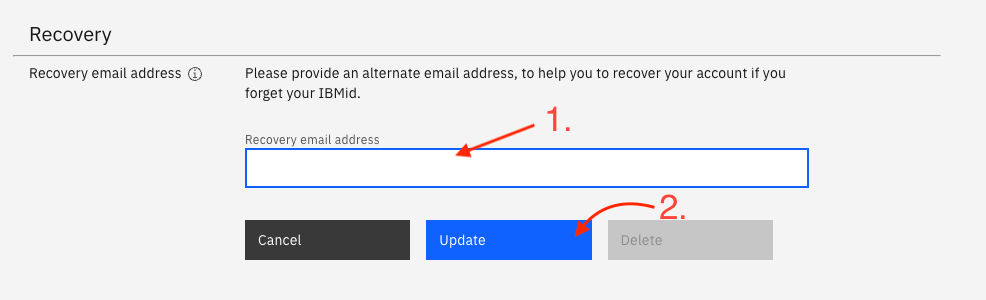
Note: Make sure that you are using a different email as the one you are signed in as. - Verify the code that was sent to your recovery email.

- Once finished you can see your recovery email and you are able to update it whenever following the same steps as before.
