Crypto Module Notebook Function menu
- Refresh Notebook. This option refreshes the notebook by reading information from the host. Performing a refresh might change the mode of the notebook.
- Manage Signature Keys. Use this option
to predefine the smart card readers that are checked for administrator
signature keys when signatures are needed for administrative commands
to the host crypto module. If no smart card readers are selected
using this option, you are prompted to insert a smart card with an
administrator signature key in smart card reader 1 for each required
signature. The result can be frequent prompts to insert or replace
a smart card in smart card reader 1.
If this option predefines smart card readers as the source of signature keys, commands that require administrator signatures automatically use the smart cards in those readers to generate signatures whenever signatures are needed. If the smart card reader does not initially contain a smart card, you are prompted to insert a smart card and enter the PIN. After a valid smart card is inserted in the reader and the PIN is entered, the card can be used to generate additional signatures without further user action.
All smart card readers are automatically selected as sources of administrator signature keys under this option when the TKE workstation crypto adapter is initialized for smart card use.
- Release Crypto Module. An update lock maintained
by ICSF prevents attempts to update a host crypto module by more than
one TKE workstation at a time. If communication between TKE and a
host crypto module is abnormally terminated, the update lock might
not be released. If the TKE attempts to reconnect to the host crypto
module, it is not able to obtain the update lock and displays a warning
indicating the user ID that currently owns the update lock. Selecting
the Release Crypto Module option releases the
update lock and reassigns it to the current user. Be aware, however,
that releasing a crypto module can damage an on-going operation initiated
by another user. Use this option only if you are certain that the
crypto module must be released.
A dialog prompts you to confirm that you want to release the crypto module.
Figure 1. Window to release crypto moduleYou can confirm release of the crypto module by clicking Yes.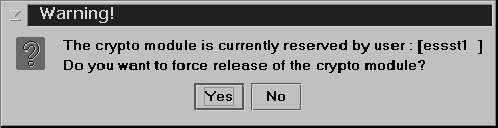
- Display Crypto Module Settings.
This produces a summary report of how the crypto module is configured,
which can include what module and domain administrators are defined,
the module and domain attributes, the master key register status and
hash values for each domain, and the domain control points for each
domain. You are asked to select what information to collect and display.
The information is displayed on a new panel with tabs for each of the selected categories. A Save button allows you to save the information in a file, and a Print button allows you to print the information.
In a domain group notebook, the displayed information is for the crypto module containing the master domain.
 Upload EP11 Audit Data. This function copies the audit data
from the EP11 module into the file of your choice. The file can be placed directly onto a USB flash
memory drive that is formatted for Trusted Key Entry data or onto your TKE local hard
drive.Note: The format of the audit data can be found in Enterprise PKCS#11 (EP11) Library structure in the PCIeCC2 Enterprise PCKS #11 (EP11) section at www.ibm.com/security/cryptocards/pciecc2/library.shtml. The event types that can generate an audit record are found in section 5.4.3 of this document. You can map these audit event names to the audit event values found in section 8.9.1 of this document.
Upload EP11 Audit Data. This function copies the audit data
from the EP11 module into the file of your choice. The file can be placed directly onto a USB flash
memory drive that is formatted for Trusted Key Entry data or onto your TKE local hard
drive.Note: The format of the audit data can be found in Enterprise PKCS#11 (EP11) Library structure in the PCIeCC2 Enterprise PCKS #11 (EP11) section at www.ibm.com/security/cryptocards/pciecc2/library.shtml. The event types that can generate an audit record are found in section 5.4.3 of this document. You can map these audit event names to the audit event values found in section 8.9.1 of this document.
- Compare Group. This option is displayed only when working with a domain group. It compares members of the group and identifies any differences between them. Group members should be configured the same (for example, all member domains should have the same set of installed administrators and the same signature threshold) in order for group operations to complete successfully on all group members.
- Close. This option closes the crypto module notebook.