Learn how to use the MobileFirst LTPA-based SSO security check to use a back-end service to authenticate users by using SSO LTPA tokens.
See The MobileFirst LTPA-based SSO security check and Configuring the LTPA-based SSO security check.
LTPA Overview
A lightweight third-party authentication (LTPA) token is a type of security token that is used by IBM® WebSphere® Application Server and other IBM products. LTPA can be used to send the credentials of an authenticated user to back-end services. It can also be used as a single sign-on (SSO) token between the user and multiple servers.
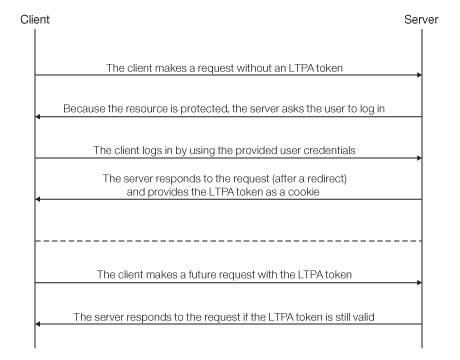
After a user logs in to the server, the server generates an LTPA token, which is an encrypted hash that contains authenticated user information. The token is signed by a private key that is shared among all the servers that want to decode it. The token is usually in cookie form for HTTP services. By sending the token as a cookie, the need for subsequent user interaction is avoided.
LTPA tokens have a configurable expiration time to reduce the possibility of session hijacking.
Reverse proxy with LTPA
Your infrastructure can also use the LTPA token to communicate with a back-end server that acts on behalf of the user. In a reverse-proxy topology, the user cannot directly access the back-end server. The reverse proxy can be used to authenticate a user's identity, and then send the LTPA token of the authenticated user to back-end servers. This configuration ensures that access to MobileFirst Server cannot be obtained until a user is authenticated. This is useful, for example, when you do not want to use IBM MobileFirst™ Platform Foundation to handle vital user credentials, or when you want to use an existing authentication setup. Enterprise environments should use a reverse proxy, such as IBM WebSphere DataPower® or IBM Security Access Manager, in the DMZ, and place the MobileFirst Server in the intranet.
In a reverse-proxy implementation, MobileFirst Server must be configured for LTPA authentication to get the user identity.
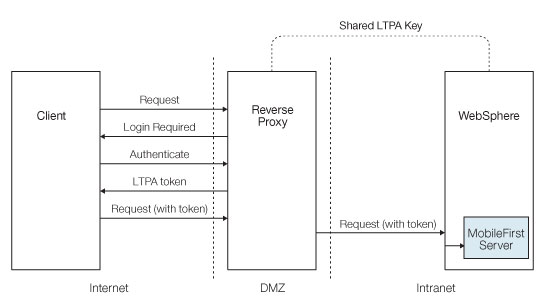
MobileFirst integration with a reverse proxy
- General architecture
-
Reverse proxies typically front MobileFirst Server instances as part of the deployment, as shown in Figure 3, and follow the gateway pattern.
Figure 3. Integration with reverse proxy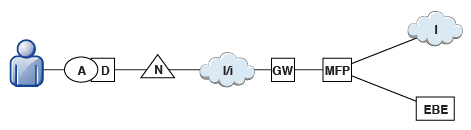
The MFP icon represents an instance of MobileFirst Server. The GW icon represents a reverse-proxy gateway, such as WebSphere DataPower. In addition to protecting MobileFirst resources from the Internet, the reverse proxy provides termination of HTTPS (SSL) connections and authentication. The reverse proxy can also act as a policy enforcement point (PEP).
When a gateway is used, an application (A) on a device (D) uses the public URI that is advertised by the gateway instead of the internal MobileFirst Server URI. The public URI can be exposed as a setting within the application, or can be built in during promotion of the application to production, before the application is published to public or private application stores.
- Authentication at the gateway
- If authentication ends at the gateway, IBM MobileFirst Platform Foundation can be informed of the authenticated user by a shared context, such as a custom HTTP header or a cookie. By using the extensible authentication framework, you can configure IBM MobileFirst Platform Foundation to use the user identity from one of these mechanisms, and establish a successful log in. Figure 4 shows a typical authentication flow for this gateway topology.Figure 4. Authentication flow
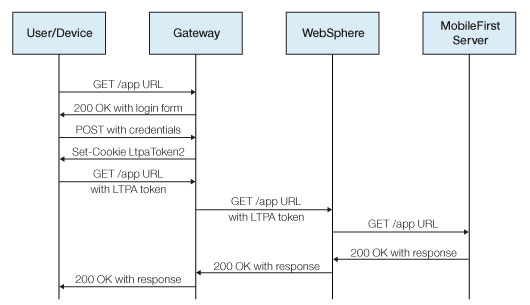
This configuration was successfully tested with WebSphere DataPower for LTPA-based authentication. On successful authentication, the gateway forwards an LTPA token (in the form of an HTTP cookie) to WebSphere Application Server, which validates the LTPA token and creates a caller principal. IBM MobileFirst Platform Foundation can use this caller principal, as needed.
The MobileFirst LTPA-based SSO security check
The predefined MobileFirst LTPA-based single-sign on (SSO) security check (LtpaBasedSSO) enables integration of IBM MobileFirst Platform Foundation with the WebSphere Application Server LTPA protocol. This security check allows you to integrate instances of MobileFirst Server within an LTPA-based gateway topology, as described in the previous sections, and use a back-end service to authenticate users by using an SSO LTPA token.
This predefined security check can be used as any other security check in the MobileFirst security framework (see Security checks): you can map a custom scope element to this check, and use the check (or a scope element that contains it) in a protecting resource scope or in a mandatory application scope. See OAuth resource protection.
You can also configure the behavior of this security check for your application, as outlined in the next topic.