Storage services
Use Storage services to insert, retrieve, update, and remove entries from a data store.
When using the storage services, keep in mind that the short-term store is not intended to be used as a general-purpose storage engine. Rather, it is primarily provided to support shared storage of application resources and transient data in webMethods Integration. It is recommended not to use the short-term store to process high volume of data records, or to permanently archive records.
These services are a tool for maintaining state information in the short-term store. It is up to the developer of the flow service to make sure that the flow service keeps track of its state and correctly handles restarts.
Locking Considerations
The following sections describe in general how the storage services handle locking requests.
- Entry Locking
-
To maintain data integrity, the short-term store uses locking to ensure that multiple threads do not modify the same entry at the same time. For insertions and removals, the short-term store sets and releases the lock. For updates, the client must set and release the lock. Using locking improperly, that is, creating a lock but not releasing it, can cause deadlocks in the short-term store.
The following guidelines can help you avoid short-term store deadlocks:
- Release locks in the thread through which they were set. In other words, you cannot set a lock in one thread and release it in another. The safest way to do this is to release each lock in the flow service that acquired it.
- Unlock entries before the flow service completes. Entries remain locked until released using a put or an explicit unlock. To accomplish this, always pair a call to get or lock with a call to put or unlock so that every lock is followed by an unlock. In addition, use a try-catch pattern in your flow service so that an exception does not prevent the flow service from continuing and releasing the lock.
- Data Store Locking
-
When a storage service locks an entry, the service also implicitly locks the data store in which the entry resides. This behavior prevents another thread from deleting the entire data store and the entries it contains while your thread is working with the entry. When the locked entry is unlocked, the implicit lock on the data store is also released.
Be careful when explicitly unlocking data stores. Consider the following example:
-
User_A locks an item. This creates two locks: an explicit lock on the entry, and an implicit lock on the data store.
-
User_A later unlocks the data store explicitly while still holding the lock on the entry.
-
User_B locks, then deletes the data store, including the entry locked by User_A in the first step.
When User_A explicitly unlocked the data store in step 2, User_B was able to delete the entry the User_A was working with.
-
- Automatic Promotion to Exclusive Lock
-
If a storage service tries to acquire an exclusive lock on an object, but finds a shared lock from the same thread already in place on the object, the service will try to promote the lock to an exclusive lock.
If a storage service that requires an exclusive lock encounters a shared or exclusive lock held by another thread, it will wait until the object becomes available. If the object remains locked for the period specified by the waitlength parameter passed by the service, the service will fail.
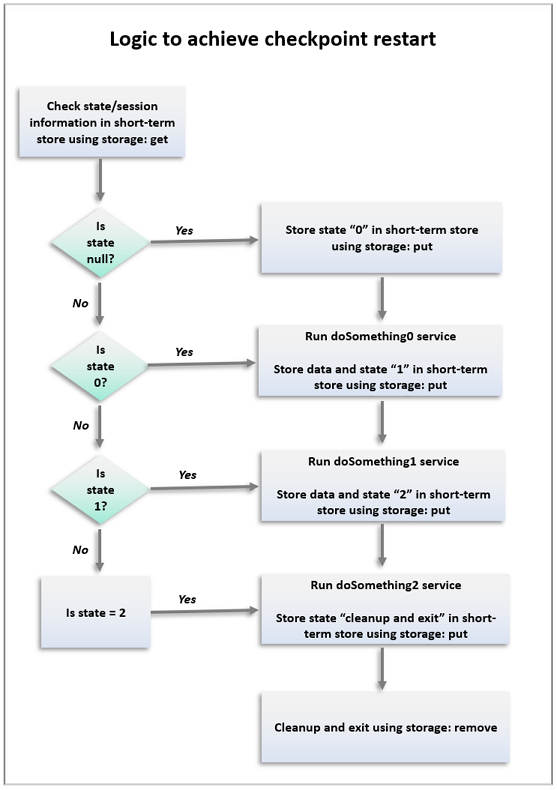
Sample flow service for checkpoint restart
The following diagram shows how to create checkpoint restarts into your flow services. It explains the logic of a flow service and shows where the various storage services are used to achieve checkpoint restarts.
add
Inserts a new entry into a data store.
If the key already exists in the data store, the service does nothing.
Input parameters for add
- storeName: String. Name of the data store in which to insert the entry.
- key: String. Key under which the entry is to be inserted.
- value: Document. Value to be inserted.
Output parameters for add
- result: String. Flag indicating whether the entry was successfully added. A value of:
- true indicates that the new entry was inserted successfully.
- false indicates that the entry was not inserted (usually because an entry for key already exists).
- error: String. Error message generated while inserting the new entry into the data store.
deleteStore
Deletes a data store and all its contents. Any data in the data store is deleted. If the data store does not exist, the service takes no action.
Input parameters for deleteStore
- storeName: String. Name of the data store to delete.
- waitLength: String. Length of time, in milliseconds, that you want to wait for this data store to become available for deletion if it is already locked by another thread.
Output parameters for deleteStore
count: String. Number of data store entries that were deleted. If the store does not exist, this value is 0.
Usage notes for deleteStore
This service obtains an exclusive lock on the data store, but no locks on the individual entries in the data store. If this service finds a shared lock from the same thread on the data store, the service will automatically promote the lock to an exclusive lock. The exclusive lock prevents other threads from acquiring locks on the data store or entries within the data store during the delete operation.
get
Retrieves a value from a data store and locks the entry and the data store on behalf of the thread that started the service.
Input parameters for get
- storeName: String. Name of the data store from which you want to retrieve the entry.
- key: String. Key of the entry whose value you want to retrieve.
- waitLength: String. Length of time, in milliseconds, that you want to wait for this entry to become available if it is already locked by another thread.
- lockMode: String. Type of lock you want to place on the
entry. Set to:
- Exclusive: To prevent other threads from reading or updating the entry while you are using it. The service also obtains a shared lock on the data store. An exclusive lock on an entry allows you to modify the entry.
- Read : Is obsolete. If this value is specified, the service obtains a shared lock.
- Share: To prevent other threads from obtaining an exclusive lock on the entry. The service also obtains a shared lock on the data store. A shared lock on an entry allows you to read, but not modify, the entry. This is the default.
Output parameters for get
value: Document. Retrieved entry. If the requested entry does not exist, the value of this parameter is null.
Usage notes for get
-
If you request an exclusive lock and the service finds a shared lock from the same thread on the entry, the service will automatically promote the shared lock on the entry to an exclusive lock.
-
When this service locks an entry, it also acquires a shared lock on the associated data store to prevent another thread from deleting the data store, and the entries it contains, while your thread has the entry locked.
-
When storing and retrieving the flow state in the short-term store for checkpoint restart purposes, ensure that the value of key is unique to the transaction.
keys
Obtains a list of all the keys in a data store.
Input parameters for keys
storeName: String. Name of the data store from which you want to obtain a list of keys.
Output parameters for keys
keys[]: String List. Keys for the data store specified in storeName.
lock
Locks an entry and/or data store on behalf of the thread invoking this service.
Input parameters for lock
- storeName: String. Name of the data store containing the entry.
- key: String. Key of the entry that you want to lock. If key
is not supplied and you request:
- A shared lock, the service obtains a shared lock on the data store, allowing other threads to read and modify entries, but not to delete them.
- An exclusive lock, the service obtains an exclusive lock on the data store, preventing other threads from locking the data store and the entries, thereby preventing those threads from reading, modifying, or deleting the entries or the data store.
If both storeName and key are specified and you request:
- A shared lock, the service obtains a shared lock on the data store and the entry.
- An exclusive lock, the service obtains a shared lock on the data store and an exclusive lock on the entry.
- waitLength: String. L.ength of time, in milliseconds, that you want to wait for this entry to become available if it is already locked by another thread.
- lockMode: String. Type of lock you want to place on the entry
or data store. Set to:
- Exclusive: To prevent other threads from obtaining a lock on the data store or entry. An exclusive lock on an entry allows you to modify the entry, and prevents other threads from reading or modifying the entry. An exclusive lock on a data store also locks the entries in the data store. In addition, an exclusive lock on a data store allows you to delete the data store.
- Read: Is obsolete. If this value is specified, the service obtains a shared lock.
- Share: To prevent other threads from obtaining an exclusive lock on an entry or a data store. A shared lock on an entry allows you to read, but not modify, the entry. A shared lock on a data store prevents another thread from deleting the data store. This is the default.
Output parameters for lock
None,
Usage notes for lock
- If you have not specified a key, and your flow service does not invoke put or unlock, or your flow service throws an exception before invoking put or unlock, the entire data store remains locked.
- If the key does not exist in the data store at the time your flow service executes, the lock service inserts the key with an empty value and takes the lock on the entry.
- If you request an exclusive lock on an entry, the service obtains an exclusive lock on the entry and a shared lock on the data store. If this service finds a shared lock from the same thread on the entry, the service will automatically promote the shared lock on the entry to an exclusive lock.
- If you request a shared lock on an entry, the service obtains a shared lock on the entry and a shared lock on the data store.
- If you request a shared lock on an entry or a data store and this service finds an exclusive lock from the same thread, the existing exclusive lock will be reused. The exclusive lock will not be demoted to a shared lock.
- If you request an exclusive lock on a data store, and this service finds a shared lock from the same thread on the data store, the service will automatically promote the shared lock on the data store to an exclusive lock.
put
Inserts or updates an entry in a data store. If the key does not exist in the data store, the entry is inserted.
If the requested entry is not currently locked by the thread that started this service, the put service will automatically attempt to lock the entry for the duration of the put operation.
The service obtains an exclusive lock on the entry and a shared lock on the data store. If the service finds a shared lock from the same thread on the entry, the service will automatically promote the shared lock to an exclusive lock.
This service releases the lock when the put operation has completed.
Input parameters for put
- storeName: String. Name of the data store into which you want to insert or update the entry.
- key: String. Key where you want to insert or update the entry.
- value: Document. Value to be inserted or updated.
- waitLength: String. Length of time, in milliseconds, that you want to wait for this entry to become available if it is already locked by another thread. If the wait length expires before a lock is obtained, the service fails and throws an exception. This parameter is used only when your service did not explicitly lock the entry beforehand.
Output parameters for put
error: String. Error message generated while inserting the new entry into the data store.
Usage notes for put
When storing and retrieving the flow state in the short-term store for checkpoint restart purposes, ensure that the value of key is unique to the transaction.
remove
Removes an entry from a data store. This service obtains an exclusive lock on the entry and a shared lock on the data store.
Input parameters for remove
- storeName: String. Name of the data store from which to remove an entry.
- key: String. Key of the entry that you want to remove.
- waitLength: String. Length of time, in milliseconds, that you want to wait for this entry to become available for deletion if it is already locked by another thread.
Output parameters for remove
- result: String - Flag indicating whether the entry was successfully removed. A
value of:
- true indicates that the entry was removed successfully.
- false indicates that the entry was not removed (usually because an entry for key does not exist).
unlock
Unlocks an entry or a data store.
When a flow service retrieves an entry using the get service, the entry is locked to prevent modification by other users before the flow service completes. The entry remains locked until the lock owner invokes a put service. To unlock a service without using the put service, use the unlock service.
In addition, if a flow service uses the lock service to lock an entry or data store, you must use the unlock or put service to release the lock.
Input parameters for unlock
- storeName: String. Name of the data store in which to unlock an entry.
- key: String. Key of the entry that you want to unlock. If key is not supplied, the lock will be removed from the data store specified in storeName, but any locks on entries in the data store will remain.
Output parameters for unlock
None.