Customer actions
If you are an existing customer, review the actions to perform before or after a webMethods Integration upgrade.
Pre-upgrade requirement
Install all applicable latest on-premises fixes before upgrading to avoid known stability or functionality issues.
Workflow connector path update
Workflows with connectors that use absolute file paths containing sagadmin are
no longer supported.
As part of the upgrade, an additional script will be run to replace sagadmin
with wmadmin in file path references. However, failures can happen during the
upgrade window until the script is effective. To avoid potential failures, update absolute paths to
relative paths.
sagadmin.- Use relative paths for files instead of absolute paths.
- Follow the steps to configure a relative path.
- Double-click the relevant action icon on the canvas to open the Action configure page.
- In the File Path field, do not specify an absolute path.
- Map the filepath key of the required action from the Incoming
data panel to the File Path field. You can alternatively use
./for relative path.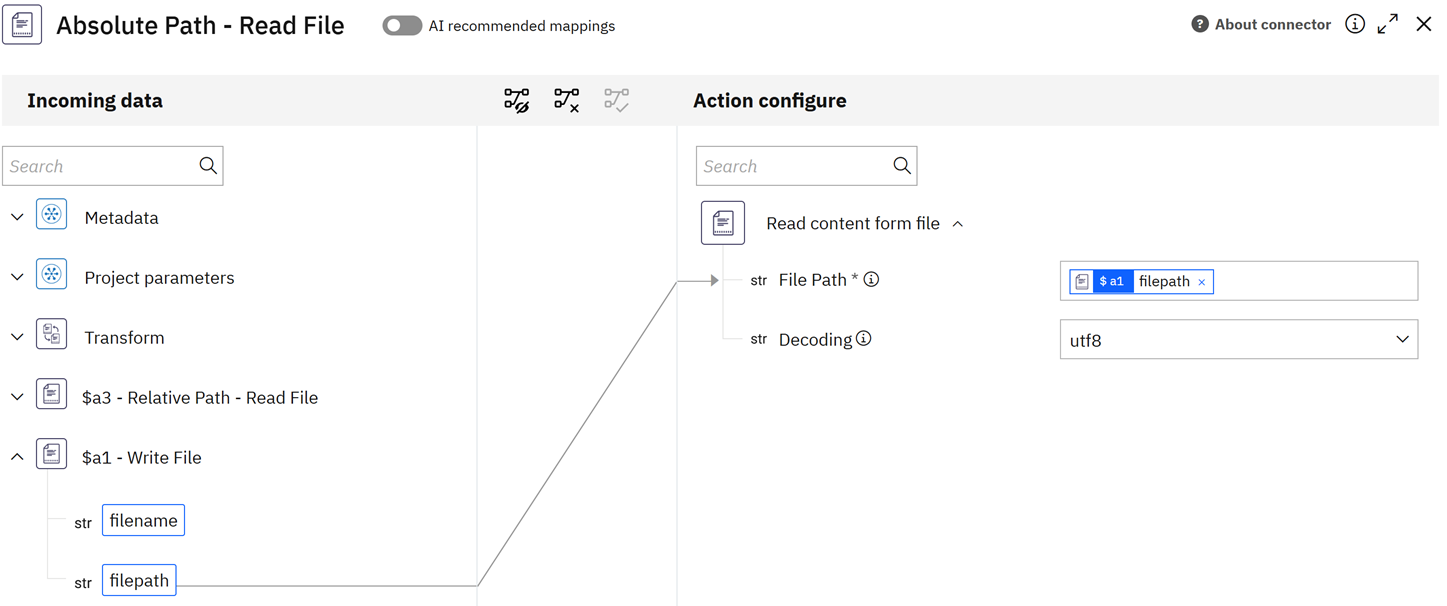
What happens if the recommendation is not followed?
As part of the upgrade process, a script will update the paths automatically. However, workflows that rely on absolute paths may fail during the upgrade window. Post-upgrade, workflows are expected to run without failures.
What if the absolute file path is used as an input through a webhook?
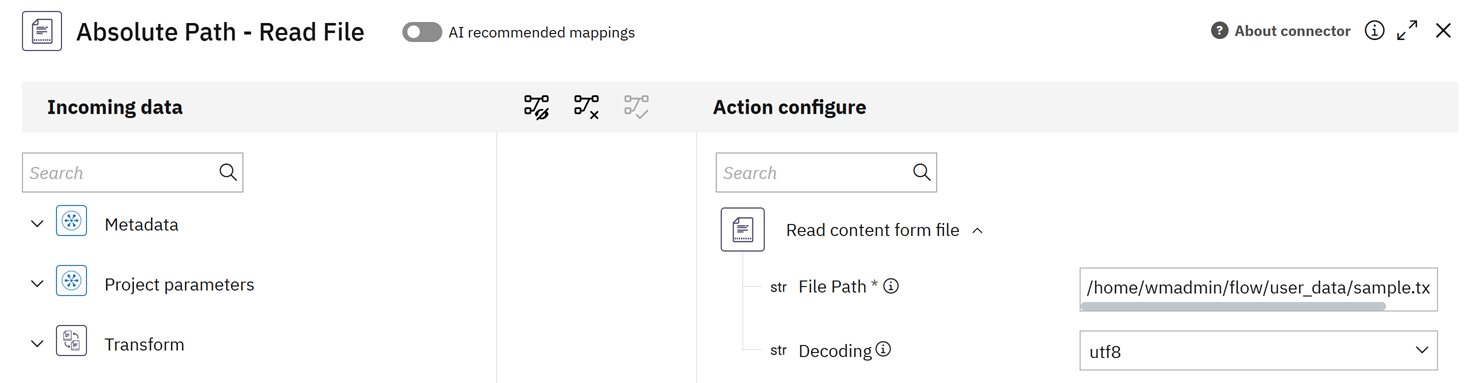
sagadmin, it must be updated to wmadmin. Example
Older absolute path: /home/sagadmin/flow/user_data/demo.txt
New absolute path: /home/wmadmin/flow/user_data/demo.txt
Node.js version upgrade
The runtime environment for all custom connectors that are developed by using the Connector Builder (CLI) has been upgraded from Node.js v18 to Node.js v22. As a result, all new deployments will now run on Node.js v22.
- Ensure all npm dependencies are compatible with Node.js v22. Incompatible or deprecated packages may cause build or runtime failures. Update versions where necessary.
- Check the source code for compatibility with Node.js v22. Some APIs, language features, or deprecated modules may behave differently compared to Node.js v18.
- Validate and test the connectors in a development or staging environment before deploying to production.
Security update for Decrypt PGP File action
The Decrypt PGP File action of the File connector has been updated to v2, which uses the latest openpgp npm library, due to security vulnerabilities in the previous version (v1).
You must reconfigure the action using Decrypt PGP v2 to ensure it uses the latest and more secure version of the library.
Security update for Transform connector
In v2, the input format has changed. Previously, the v1 version accepted an Excel sheet directly. The updated v2 version now requires a workbook object as input. To use it, first add the Spreadsheet Reader action to read the XLS file, and then pass the resulting workbook object to the XLS to JSON v2 action.
Update for hybrid connectivity issue
In a hybrid environment, an on-premises Universal Messaging (UM) client fails to reconnect to a Cloud UM server after receiving a security exception.
To avoid regression defects and resolve the hybrid connectivity issue between the on-premises environment and Universal Messaging (UM), install the following latest fixes:
- For Integration Server 10.15: Universal Messaging Common Libraries 10.15 Fix 28
- For Integration Server 11.1: NUMCommonLibraries 11.1 Fix 3
Update on API key usage for public API requests
When authenticating public API requests, a service ID API key supports only execution use cases and does not allow CRUD operations (Create, Read, Update, Delete). To perform CRUD operations, you must use a personal API key.