Event processing (EP) adapter configuration editor
Use the EP adapter configuration editor to configure your EP adapter. You can select an EP adapter and choose your configuration settings.
For help about using the editor, see Creating an EP adapter file.
The tab in the EP adapter configuration editor is as follows:
Adapter tab
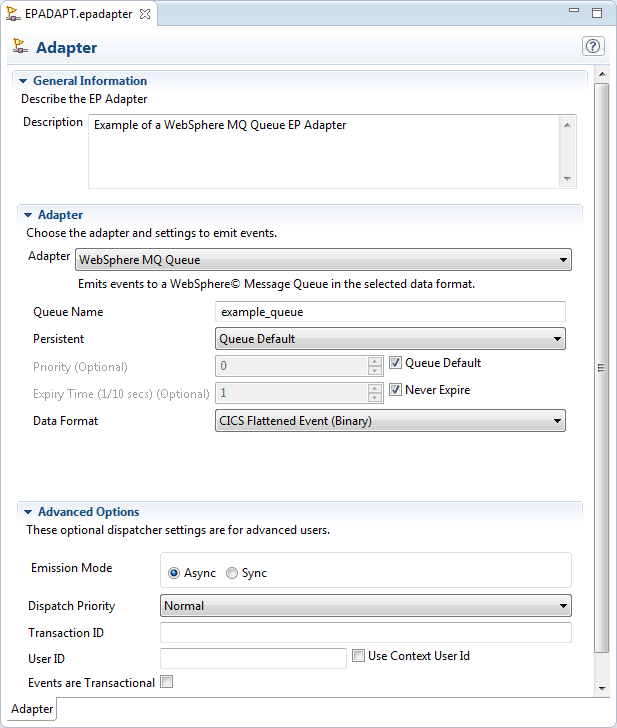
- General Information
- Description
- A description of the EP Adaptor.
- Adapter
- In this section, you choose the type of EP adapter and supply
information required by your chosen EP adapter.
- WebSphere MQ Queue
- Emits events to an IBM® MQ message queue in an XML format for consumption by IBM Operational Decision Manager or IBM Business Monitor, or in binary CICS flattened event (CFE) format for consumption directly from IBM MQ.
- Transaction Start
- Emits events to a named CICS® transaction. Data is passed to the transaction in a container-based event format. You can specify the CICS system to run the transaction. If the event data is not required, you can use an existing transaction.
- TS Queue
- Emits events to a named CICS TS queue in one of the XML formats: Common Base Event, Common Base Event REST, Decision Server Insights Event, or WebSphere Business Events; or in a non-XML (CFE) format. Use this EP adapter to validate that the correct events are being captured with the correct data, and to emit events to any consumer that reads from a TS queue.
- Custom (User Written)
- Emits events in any format that you require. A custom EP adapter is a CICS program that you write to provide a combination of formatting and routing of an event that is not supported by the supplied EP adapters. The custom EP adapter must not carry out any other processing, such as consumption of the event.
- HTTP
- Emits events to an HTTP 1.1 compliant server using HTTP POST in XML format for consumption by products such as IBM Operational Decision Manager or IBM Business Monitor.
Note:Event bindings created using CICS TS Version 4.2 or later no longer include the eventDispatcherSpecification element except when the adapter specification is embedded.
When you use the CICS event binding editor with CICS TS Version 4.2, you can choose the embedded or external EPADAPTER definition. To be compatible with CICS TS Version 4.1, you must use the embedded EPADAPTER definition.
Installing an event binding into CICS TS Version 4.2 or later causes CICS to extract the EPADAPTER configuration from the event binding and create it automatically.
- Advanced options
- Supplying information in this section is not required to complete the event binding. If you need to influence the way in which CICS runs the EP adapter, you can change the emission mode, priority, transactionality, user ID, transaction ID, and CICS system ID. Some options are not available for all EP adapter types. The section displays the correct set of options for your chosen EP adapter and message format.