Custom business rule for updating action approval states
To decide whether an action must be run, Turbonomic periodically checks the state values of the associated action approval records in ServiceNow. To update the action approvals states based on the approval or rejection of their corresponding change requests, the ServiceNow administrator can create a custom business rule to set the approval state:
APPROVEDREJECTED
Before you implement the custom rule, you must clear the Active checkbox for the UpdateApprovalBasedOnRequestStateChanges default business rule.
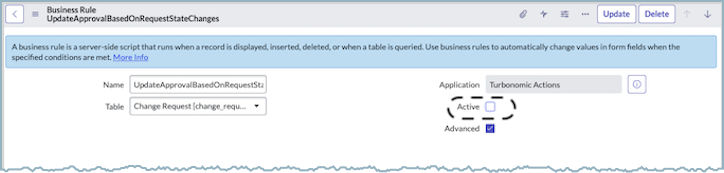
To create the custom rule, select System Definition > Business Rules and create a rule for the Change Request table that is similar to the following example.

Main fields
| Field name | Value |
|---|---|
Name |
Custom State Updates of Action Approvals |
Table |
Change Request [change_request] |
Application |
Turbonomic actions |
Active |
ON |
Advanced |
ON |
When to run
| Field name | Value |
|---|---|
When |
after |
Order |
100 |
Insert |
OFF |
Update |
ON |
Delete |
OFF |
Query |
OFF |
For the other fields, use the defaults.
Advanced
On the Advanced tab of this business rule, the state of the action approvals that are linked to a particular CR are set to APPROVED or REJECTED.
Add JavaScript code similar to the following, where you specify the CR values that you want the rule to populate:
(function executeRule(current, previous /*null when async*/) {

    var actionApproval = new GlideRecordSecure(
                                'x_turbo_turbonomic_turbonomic_action_approval');
    actionApproval.addQuery('change_request_id', current.sys_id);
    actionApproval.query();

    while (actionApproval.next()) {
        var dao = new x_turbo_turbonomic.TurbonomicActionDAO();
        var actionStateId = '';
        var changeRequestState = current.state + '';
        var actionApprovalState = dao.getActionStateById(actionApproval.state_id);

        switch (changeRequestState) {
            case CUSTOM_CR_APPROVED_STATE:
                if (actionApprovalState == 'PENDING_APPROVAL') {
                    actionStateId = dao.getActionStateId('APPROVED');
                    actionApproval.setValue('state_id', actionStateId);
                    actionApproval.update();
                }
                break;

            case CUSTOM_CR_CANCELLED_STATE:
                if (actionApprovalState == 'PENDING_APPROVAL') {
                    actionStateId = dao.getActionStateId('REJECTED');
                    actionApproval.setValue('state_id', actionStateId);
                    actionApproval.update();
                }
                break;

            default:
                gs.debug('Turbonomic action approval state changes are not required for the change request');
        }
    }

})(current, previous);
Next steps
- For the approved actions that are being run, monitor the action approvals state changes, and close the corresponding CRs by marking them as successful or unsuccessful. For more information, see Custom Business Rule for Closing Change Requests.