Task 6: Calling the rules from a client application
Before you begin
About this task
When you deployed the rules to Rule Execution Server, you sent them in a ruleset to the execution server. The Miniloan application can now call the ruleset from the server.
When the application opens, it displays default input data:
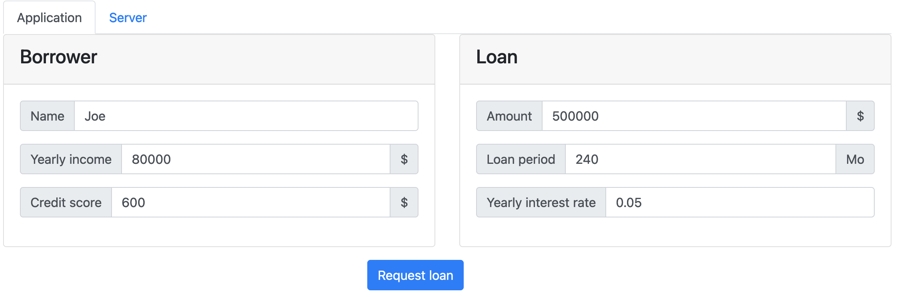
In the Server tab, the parameters are set to call the ruleset from the decision service in the development environment:

The application uses the REST API, and JavaScript Object Notation (JSON) for input and output data. When the Request loan button is clicked, the application processes the default data and produces the following results:

Installing the client application on a custom server
Follow these steps to set up the Miniloan application.
Before you begin
- WebSphere Liberty application server. Contact your
system administrator for assistance. You can find installation information at Installing Liberty
 .
. - Source files from the GitHub repository Getting started in IBM® Operational Decision Manager on Cloud
. You downloaded the files in
Task 1: Preparing to do the tutorial.
- Maven from Apache Maven
Project
Step 1: Setting up the sample application
You use Maven to build and deploy the Miniloan application.
Procedure
Step 2: Using the sample application
Now, you can run the Miniloan application.
Procedure
-
Use the following URL in your web browser to open the application:
http://localhost:9080/odm-cloud-miniloan-server-0.1-SNAPSHOT/Miniloan opens and displays the default input values:
-
Open the Server tab to configure the connection to your decision server
ruleset. Enter the decision service URL that corresponds to your environment
(/odm/dev, /odm/test or /odm/prod), a
user email address or a service credential, its password, and the ruleset corresponding to your
deployment.
-
Click Request loan to process the default values.
The application processes the request and returns the following message in JSON:
You can get additional information by selecting Trace enabled in the Server tab and processing the default values again. The new information shows that one rule, eligibility.minimum_income, is run.
Step 3: Stopping and rebuilding the application server
About this task
When you stop using the application or want to rebuild it, follow these instructions:
Procedure
Results
You have completed the getting started tutorial. The tutorial showed you the artifacts a decision service branch, how to update and test rules, and how to deploy the rules from the decision service to an execution server. You also looked at using the rules with a client application.