Graphics

Do not translate the text in this topic. The purpose of this topic is to force the IDWB transform to include the graphic files in the transform output for the plug-in (HTML).

Figure 1. SAP and Data Protection for SAP for DB2® configuration files on UNIX or Linux
The graphic shows the files that are involved in the setup and arrows point to entries in the files, which must match the names in other files. This setup is explicitly described in the text before and after this graphic.
Figure 2. SAP and Data Protection for SAP for Oracle configuration files on UNIX or Linux
This graphic depicts the interrelationships of the SAP and configuration files on UNIX or Linux.
Figure 3. Tablespace scaling
The graphic shows the first two disks of the same size with an overall table space fill rate of 98%. After the Redirected Restore the overall table space fill rate is 70%, which is shown in the lower part of the graphic. The graphic is described in detail in the following text.
Figure 4. Parallel (multiple) paths
This graphic shows the principle of multiple network paths. By using several network adapters, the network is able to handle multiple network connections at the same time. This environment allows the backup of data from the database server to the IBM Spectrum Protect server through more than one network connection in parallel (parallel network paths).
Figure 5. Multiplexing
This graphic shows the principle of multiplexing. On the left side of the graphic, the database server allows parallel access to the database. The network and the IBM Spectrum Protect server are not affected.
Figure 6. Parallel (multiple) sessions
This graphic shows the principle of multiple sessions. Several backup sessions access the database in parallel on the database server. The data is transferred in parallel through the network and the IBM Spectrum Protect backup server writes the data simultaneously to several tape drives.
Figure 7. Multiple servers
This graphic shows the principle of using multiple servers. The data to be backed up is sent through the network to more than one IBM Spectrum Protect server (backup server). The servers write the data to their attached backup tapes.
Figure 8. Performance optimizing by using sensors
This graphic shows the flow of data from disk to the backup tape.
Figure 9. Data transfer for a backup and restore
This graphic forms the basis for the following tuning. Starting from left to right, there is the database server with its database. The database server connects through the network to the IBM Spectrum Protect (backup) server. The backup server has tape units that are attached to it, which are used for the backups.
Figure 10. Showing data throughput and I/O usage
The graphic shows the View Performance Data panel. It consists of two charts. The upper shows the Data Throughput by giving the transfer rate. The lower chart is split in two, the one showing Utilization of Disk I/O while the other shows the utilization of the network I/O.
Figure 11. Indicating a network or IBM Spectrum Protect bottleneck
The panel shows what transfer rate and utilization would look like in the case of a typical network or IBM Spectrum Protect bottleneck. The next section provides a description of the details.
Figure 12. Indicating a disk bottleneck
The panel shows what transfer rate and usage look like in the case of a typical disk bottleneck.

Here it is shown what programs are used to back up the different types of data (started by BRBACKUP) like data files, control files and redo logs. It also (started by BRARCHIVE) backs up the offline redo logs. It then transfers this data to the backup server where IBM Spectrum Protect is running. The SAP system data, Oracle system data, and operating system data are backed up directly by the IBM Spectrum Protect client. The data is then sent directly to the IBM Spectrum Protect server.

Figure 13. Data Protection for SAP data transfer
The picture shows a general landscape of the flow of data in a backup situation and lists the items that influence the performance. The landscape consists of the SAP database server, the network, and the IBM Spectrum Protect server. For the SAP database server with its database, the items Disk performance, I/O configuration, and CPU power are important for performance. The SAP database server uses the network to send the data to be backed up. The network performance is influenced by Bandwidth and the type of protocol. Finally, the Backup Server (IBM Spectrum Protect server) receives the data and saves the physical backup to tape. On this server, CPU power, I/O configuration, and the tape performance are factors that influence the overall backup performance.

This graphic shows the backup process. The data passes from disk through to the network and finally to tape.

The graphic shows that before data is sent for backup in any of the described ways, it is compressed. This compression decreases the amount of data that is being sent.

The image shows what transfer rate and usage would look like in the case of a balanced configuration.

This graphic shows an example setup with two hosts, each with two network adapters that are connected to a network and configured for mutual takeover.

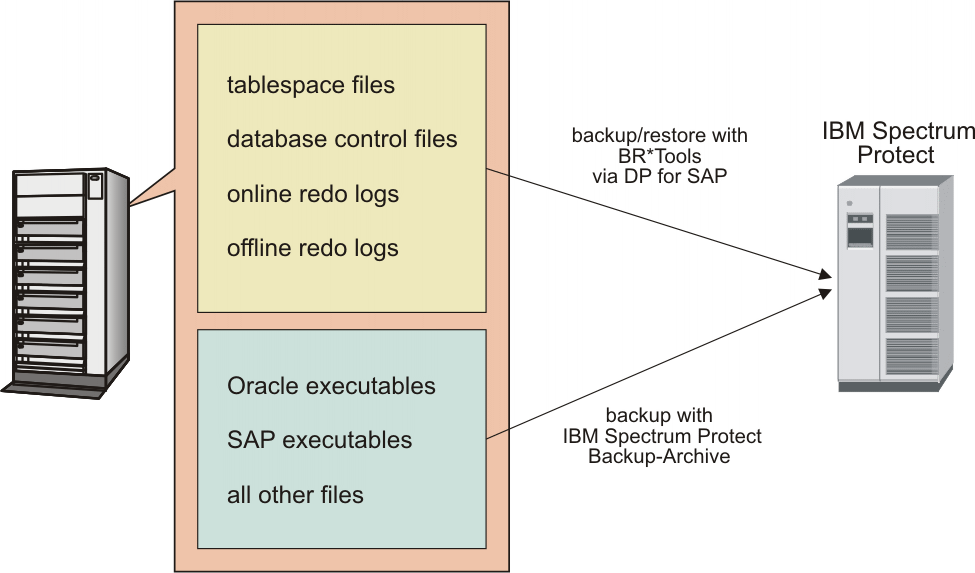
The graphic emphasizes that BR*Tools and Data Protection for SAP are used to back up and restore table spaces, control files and online and offline redo log files.

The graphic shows how a link between the Oracle database and IBM Spectrum Protect operates. A backup or restore command is submitted through the BR*Tools. Depending on how SAP was configured, either backint alone or backint and RMAN (which in turn uses the shared media management library) link to the IBM Spectrum Protect API. Through the API data is sent or received from the IBM Spectrum Protect on the IBM Spectrum Protect server. ProLE is needed for using this API. In addition, the graphic shows that with its ProLE can easily be administered from a remote Administration Assistant Client, attached to the Administration Assistant Server.

The graphic shows how operates as a link between DB2 and IBM Spectrum Protect. A backup/restore command is submitted through the DB2 Control center with the DB2 command line processor. The DB2 agent accepts the command and data blocks are being read from the DB2 database through a DB2 Vendor API. With its shared library that is being called, the shared library is dynamically linked and the data blocks are transferred from DB2 to this shared library. From this shared library, the data blocks are being written to the IBM Spectrum Protect server.

The graphic shows the entities that are involved and their interactions when it is employed with BR*Tools that use the BACKINT interface. Entities include the following, the Oracle instance, the BR*Tools, the BR*Tools file repository, and the BACKINT interface, the IBM Spectrum Protect, the database containers. Interactions are numbered 1 - 5 according to their sequence during a backup operation. They comprise control flow and data flow. There is control flow between the Oracle Instance and BR*Tools (number 1), between BR*Tools and the BACKINT interface (number 2), from to the repository (number 3) and from the BR*Tools to the repository (number 5). There is data flow between the database containers and (number 3) and between and the IBM Spectrum Protect server (number 4). The interactions that are required for backup are described in detail.

The graphic shows the entities that are involved and their interactions when employing with BR*Tools that use the Oracle RMAN interface. Entities are: the database instance with the Oracle server process that contains an instance of, the Oracle RMAN process, the RMAN repository that contains the Recovery Catalog Database, and the control file, the BR*Tools, the BR*Tools file repository, the IBM Spectrum Protect with the storage media, the database containers. Interactions are numbered from 1 to 5 according to their sequence during a backup operation. They comprise control flow and data flow. There is control flow between the Oracle server process and the RMAN process (number 1), between the Oracle RMAN process and BR*Tools (number 1), from to the BR*Tools repository (number 3), from BR*Tools to the repository (number 5) and from the RMAN process to the RMAN repository (number 5). There is data flow between the database containers and within the Oracle server process (number 3) and between and the IBM Spectrum Protect server (number 4). The interactions that are required for backup are described in detail.

This graphic shows the actions that are triggered by a backup database and a restore database command. It shows how the DB2 Server Process and IBM Spectrum Protect interact. This process is described in detail in the following text.

The graphic shows how the Backup Object Manager handles the requests for different of data objects. To fulfill various backups and restore requests for either database data or files, the Backup Object Manager uses the ProLE. ProLE gets information from the Configuration File and the Profile and sends the respective command to IBM Spectrum Protect. For a database backup request, ProLE triggers the Shared Library to read data blocks from the DB2 database through the DB2 Agent. ProLE then writes these data blocks to IBM Spectrum Protect. For a restore, this process works analogous. For log files that are restored to the file system, the Backup Object Manager directly reads the data from IBM Spectrum Protect and writes it to the file system. In this case, the Shared Library is not used.

This graphic shows the other possibility of managing log files, namely by using the built-in DB2 Log manager. The graphic is divided into two sections. The upper section shows the backup of DB2 log files from the log directory through the DB2 Log Manager and how these data are passed to the IBM Spectrum Protect server. The lower section shows the retrieval of log files from IBM Spectrum Protect by and restoring these files to the log directory by the DB2 Log Manager. Both the archiving and retrieval are described in detail in the following text.

This graphic shows those database objects for which a backup can be done by using. These objects are DB2 configuration files and DB2 containers, which are handled by DB2 Backup. Offline log files, for which a backup can be made either by using SAP BACKUP or the DB2 Log Manager. For Online log files, there is no backup.

The graphic shows an example of backup activities that would be required for a strategy with daily backups. Over a period of 28 hours it lists what updates are to be done in which sequence and how long they might take. After online users are no longer busy and batch updates are done, the backup window opens from 10 p.m. to 2 a.m. These 4 hours are filled with 3 hours for DB backup with 1 hour for DB backup logging (duration several seconds), log file migration to tape (duration several minutes), SAP system file backup (duration about 15 minutes) and IBM Spectrum Protect database backup (duration about 30 minutes). The example spans more than 24 hours to show that next day schedules might be different.