LU 6.2 flow diagrams
The following diagrams show the flows for transactions that are sent from an LU 6.2 device.
The following figures show:
- The flow between a synchronous or asynchronous LU 6.2 application program and an IMS™ application program in a single (local) IMS system
- The flow between a synchronous or asynchronous LU 6.2 application program in a single (local) IMS system and an IMS application program in a remote IMS system across a multiple systems coupling (MSC) link
- A backout scenario with SYNC_LEVEL=SYNCPT
Differences in buffering and encapsulation of control data with user data may cause variations in the flows. The control data are the 3 returned fields from the Receive APPC verb: Status_received, Data_received, and Request_to_send_received. Any variations based on these differences will not affect the function or use of the flows.

Figure 2 shows the flow of a local synchronous transaction when Sync_level is Confirm.
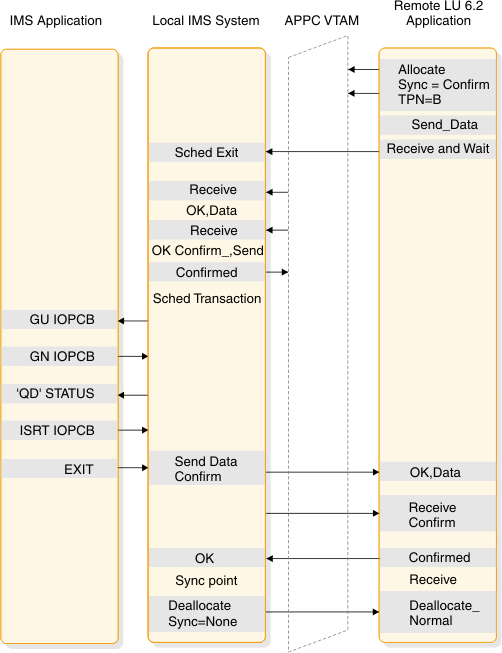
Figure 3 shows the flow of a local asynchronous transaction when Sync_level is None.
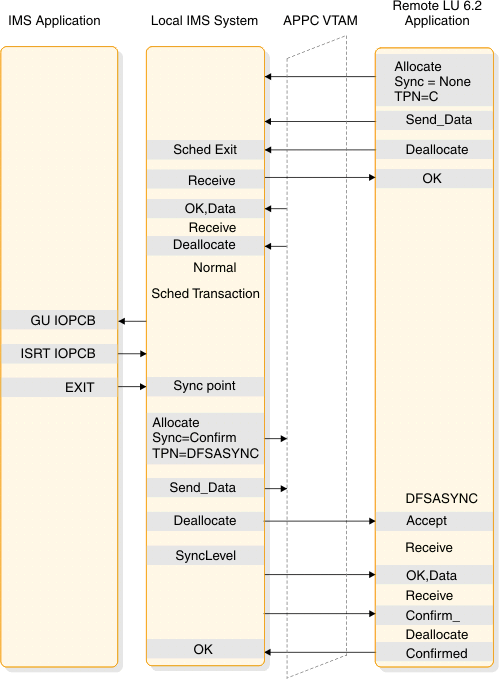
Figure 4 shows the flow of a local asynchronous transaction when Sync_level is Confirm.
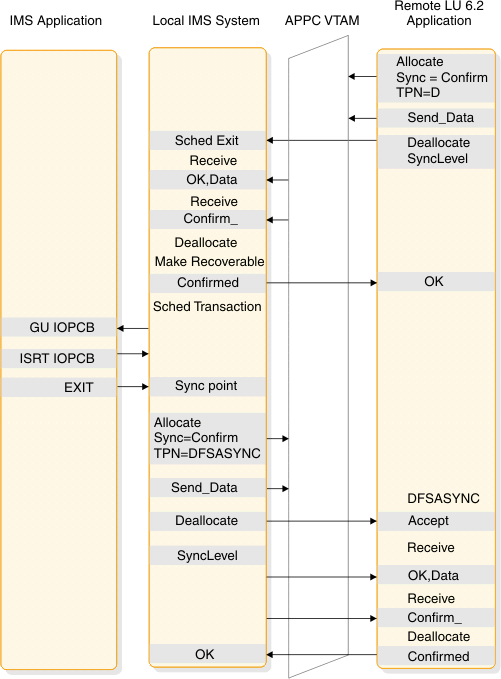
The following figure shows the flow of a local conversational transaction When Sync_level is None.
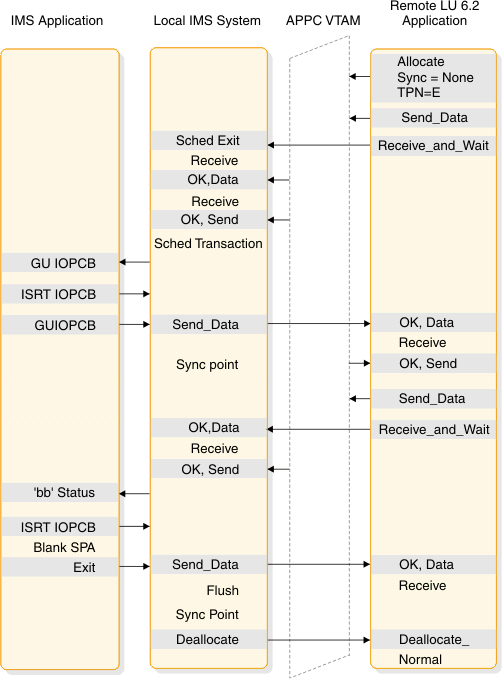
The following figure shows the flow of a local IMS command when Sync_level is None.

The following figure shows the flow of a local asynchronous command when Sync_level is Confirm.
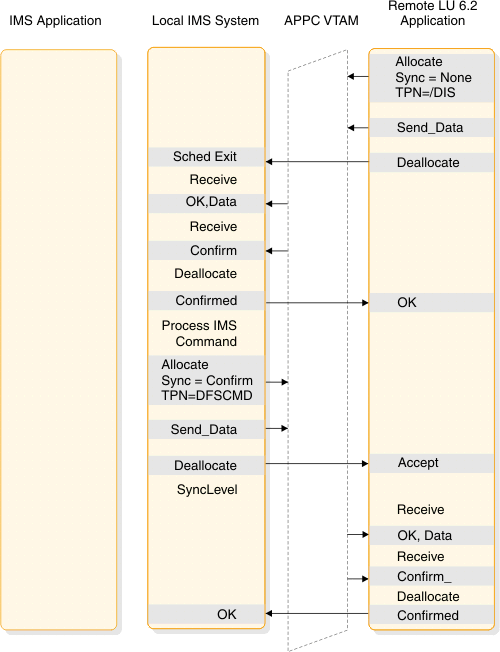
The following figure shows the flow of a message switch When Sync_level is None.
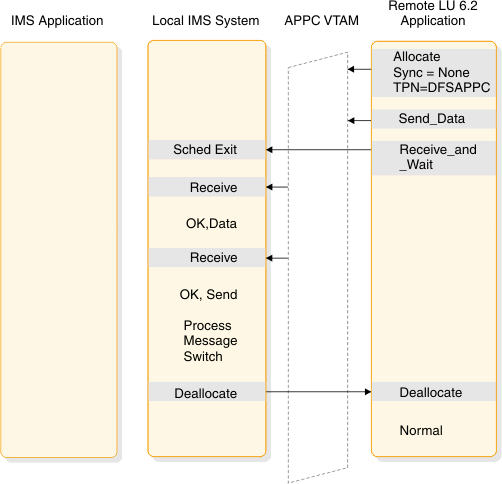
Synchronous is used to verify that no error has occurred while processing DFSAPPC. If an error occurred, the error message returns before DEALLOCATE.
The following figure shows the flow of a CPI-C driven program when Sync_level is None.
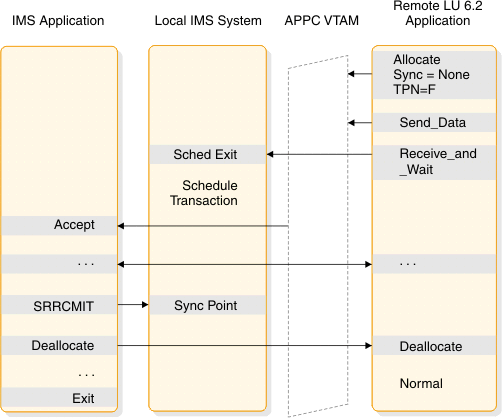
The following figure shows the flow of a remote synchronous transaction when Sync_level is None.
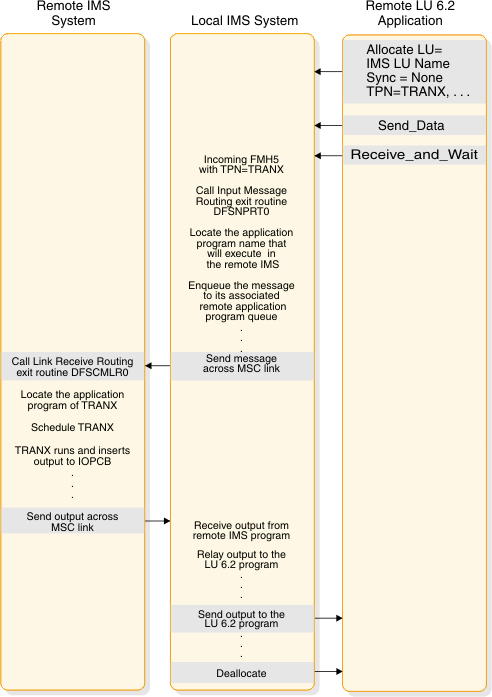
The following figure shows the flow of a remote asynchronous transaction when Sync_level is None.
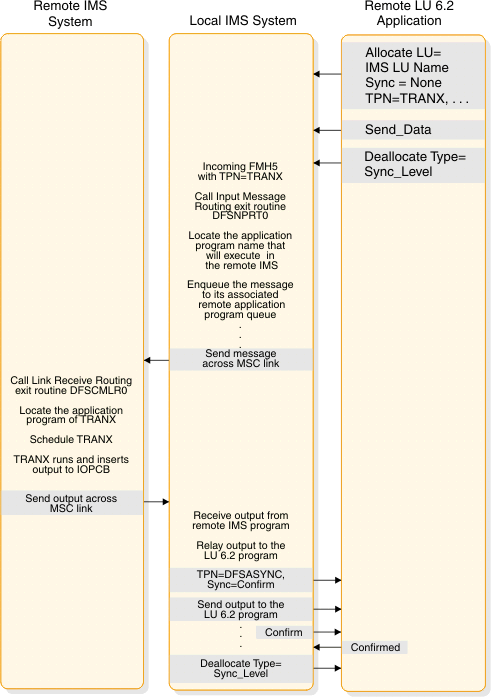
The following figure shows the flow of a remote asynchronous transaction when Sync_level is Confirm.
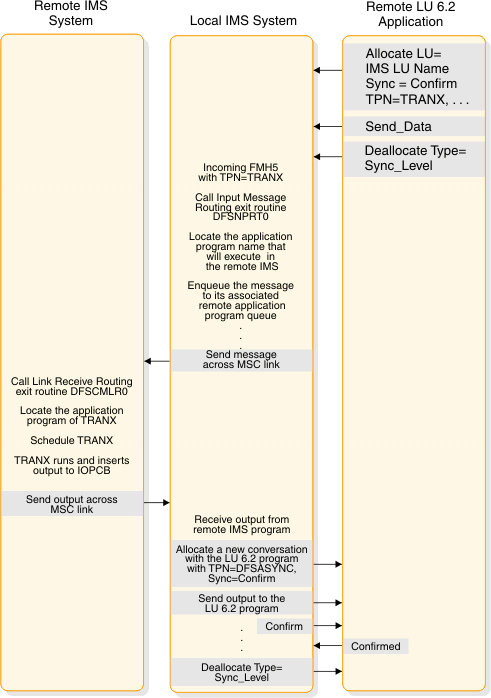
The following figure shows the flow of a remote synchronous transaction when Sync_level is Confirm.

The scenarios shown in the following figure provide examples of the two-phase process for the supported application program types. The LU 6.2 verbs are used to illustrate supported functions and interfaces between the components. Only parameters pertinent to the examples are included. This does not imply that other parameters are not supported.
The following figure shows a standard DL/I program commit scenario when Sync_Level=Syncpt.

- 1 Sync_Level=Syncpt triggers a protected resource update.
- 2 This application program inserts output for the remote application to the IMS message queue.
- 3 The GU initiates the transfer of the output.
- 4 The remote application sends a Confirmed after receiving data (output).
- 5 IMS issues ATRCMIT (equivalent to SRRCMIT) to start the two-phase process.
The following figure shows a CPI-C driven commit scenario when Sync_Level=Syncpt.
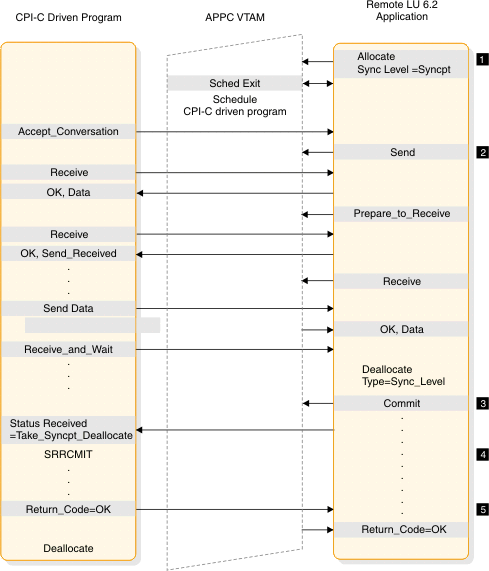
- 1 Sync_Level=Syncpt triggers a protected resource update.
- 2 The programs send and receive data.
- 3 The remote application decides to commit the updates.
- 4 The CPI-C program issues SRRCMIT to commit the changes.
- 5 The commit return code is returned to the remote application.
The following figure shows a standard DL/I program backout scenario when Sync_Level=Syncpt.
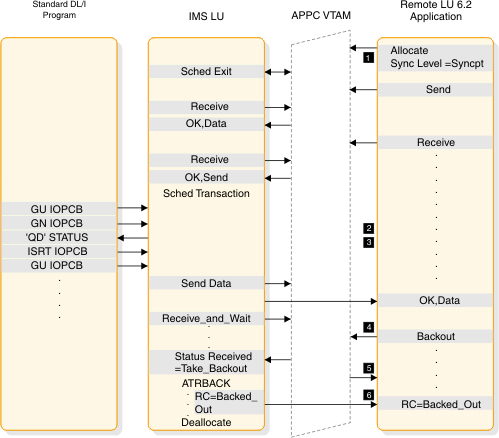
- 1 Sync_Level=Syncpt triggers a protected-resource update.
- 2 This application program inserts output for the remote application to the IMS message queue.
- 3 The GU initiates the transfer of the output.
- 4 The remote application decides to back out any updates.
- 5 IMS abends the application with a U119 to back out the application.
- 6 The backout return code is returned to the remote application.

- 1 Sync_Level=Syncpt triggers a protected-resource update.
- 2 This application program inserts output for the remote application to the IMS message queue.
- 3 The GU initiates the transfer of the output.
- 4 The remote application sends a Confirmed after receiving data (output).
- 5 IMS issues ATBRCVW on behalf of the DL/I application to wait for a commit or backout.
- 6 The remote application decides to back out any updates.
- 7 IMS abends the application with U0711 to back out the application.
- 8 The backout return code is returned to the remote application.

- 1 Sync_Level=Syncpt triggers a protected-resource update.
- 2 This application program inserts output for the remote application to the IMS message queue.
The following figure shows multiple transactions in the same commit when Sync_Level=Syncpt.
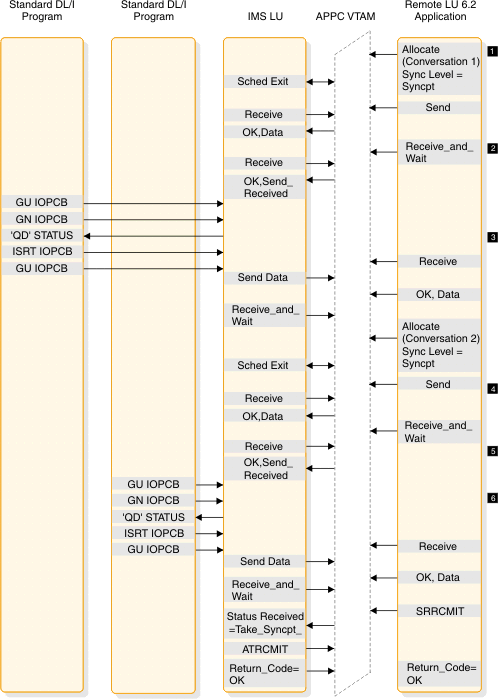
- 1 An allocate with Sync_Level=Syncpt triggers a protected resource update with Conversation 1.
- 2 The first transaction provides the output for Conversation 1.
- 3 An allocate with Sync_Level=Syncpt triggers a protected resource update with Conversation 2.
- 4 The second transaction provides the output for Conversation 2.
- 5 The remote application issues SRRCMIT to commit both transactions.
- 6 IMS issues ATRCMIT to start the two-phase process on behalf of each DL/I application.