TEXT
Specify the content of subpanels of TYPE=TEXT.
TEXT= can include
a small set of HTML and proprietary markup tags (see Tags for formatting text). If the text consists
of more that one word, it must be enclosed in single quotation marks.
Variables can be used in the text.Example
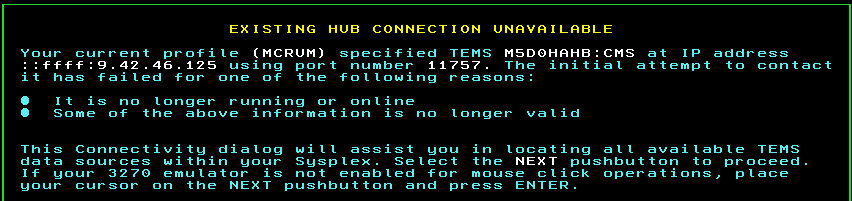
The following definition illustrates the use of HTML and proprietary tags in the definition of a subpanel: <SUBPANEL>
TYPE=TEXT
MINMAX=NO
EXPANDCOLAPS=N
BOXBOTTOM=NO
TEXT='<color=yellow
<H1><center>Existing Hub Connection Unavailable</H1></color>
<br>
Your current profile
<color=white>(&ZPROFILE)</color>
specified TEMS
<color=white>&ZHUBNAME</color>
using port number
<color=white>&ZHUBPORT.</color>
The initial attempt to contact it has failed
for one of the following reasons:
<ul>
<li>It is no longer running or online </li>
<li>Some of the above information is no longer valid</li>
</ul>
<p>
This Connectivity dialog will assist you in locating all available
TEMS data sources within your Sysplex.
Select the
<color=white>NEXT</color>
pushbutton to proceed. If your 3270 emulator is not
enabled for mouse click operations,
place your cursor on the NEXT pushbutton and press ENTER.
<br>'