DISPLAYCOLS
Lists the columns that are returned from the
QUERY command that are to be displayed on the subpanel. Columns containing
integers or percentages can be displayed in either numeric or analog
(bar graph) form. This setting must be specified after the QUERY statement for the subpanel.
- Possible values
- ALL displays all columns specified in the query
- A comma-separated list of column names specified in the query,
enclosed in single quotes.
column_name
If the column width is dynamic (COLUMN=DYNAMIC) and the data is an integer or a timestamp, you can optionally specify a display format:column_name(options),column_name(options),column_name(options)
The display options available depend upon the data type of the column:- The following options can be used for columns of any data type:
- Width=nnnn or Width=nnn%
- Specifies the width of the column of data in number of characters or as a percentage of the number of characters that can appear on the screen. For example, W=16 or W=25%.
- CAPTION=&varname or 'textstring'
- Specifies the column caption that overrides the column caption for the attribute being graphed. Use the SET command to specify the value for the variable name.
- INDENT
- Indents a caption in a detail subpanel. For example:
results in the following subpanel:DISPLAYCOLS='SYSTEMID,CICSNAME(ASCII),WSERVCLAS, WPERFINDX(CAPTION="Region's_Worst_Perf._Index"), CPUUTIL(INDENT),TODUPDT,TRANRATE,PCNTMXT, ENQWAIT(INDENT),REMQUEUE,SOS(INDENT), STGVIOL(CAPTION="Stg._Violations_last_hour"), AIDS,ICES(INDENT), CSTRINGW,CBUFFW,WSFAULT,WSTIMOUT, CICSTODB(TIME),VERSION(INDENT)'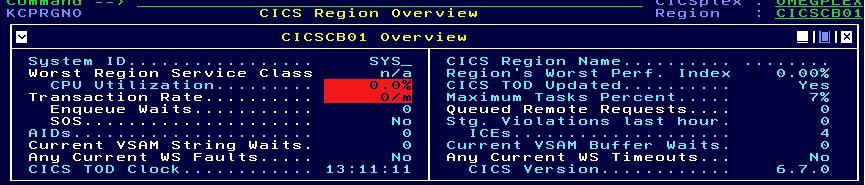
If the column contains Date/Time (T,16) data, you can use the following format options for the display:
- DATETIME
- Displays YY/MM/DD HH:MM:SS
- DATE
- Displays as YY/MM/DD
- TIME
- Displays as HH:MM:SS
- None
- Data is shown in any of the following formats, based on the value:
- 12m 31d
- 31d 23h
- 23h 59m
- 59m 59s
- 59.1234s
- 1.12345s
For example:DISPLAYCOLS='CICSPLEX,PLEXRATE,EIBTIME(DATETIME),PLEXMAXT'- If the column is an IPV6 address, then the options are:
- None
- Displays the IPV6 according to normal rules
- IPV6
- Displays an IP address with the ::ffff: stripped off
DISPLAYCOLS=HUBIPADDRESS(IPV6) - If the column contains integer data, you can use the following
options:
- BAR
- Displays an integer as an analog horizontal bar. The bar is green
if the value is 33% or less of the column width; yellow up between
33% and 66% of the column width; and red if the value is over 66%
of the column width. Control the bar display with the following options:
- THRESH=NO
- Suppresses color indicators for thresholds.
- UNIT=nnn
- Specifies how many integers a single character represents. The default is 1. Decimal places are not supported.
SET KOB_HEADER="Graphical Display" DISPLAYCOLS='CICSPLEX,PLEXRATE,PLEXCPUP,PLEXCPUP(W=22%,BAR,UNIT=20, CAPTION=&KOB_HEADER),PLESOS,PLEXMAXT,PLEXENQW,PLEXHSCI' - HEXDISP
- Converts values to hexadecimal for display. HEXDISP supports an
offset. For example, if you have an integer field column containing
the decimal value 254:
.(HEXDISP) displays 000000FE (HEXDISP+1) displays 0000FE (HEXDISP+2) displays 00FE (HEXDISP+3) displays FE - HEXVAR
- Converts values being passed in variables set by KEYCOLS to hexadecimal.
For example,
column_name(HEXVAR) - BKMG (Bytes to Kilo to Mega to Giga).
- Converts values expressed in bytes to kilobytes, megabytes, or gigabytes, as appropriate. For example, column_name(BKMG).
- KMGT
- Converts values expressed in kilobytes to megabytes, gigabytes, or terabytes, as appropriate. For example, column_name(KMGT).
- NOUNIT
- No units are displayed. For example, column_name(NOUNIT).
- PERCENT
- Appends a percent symbol (%) after the value on the screen.
- If the column contains strings or enumerations:
- ALIGNRIGHT
- Align text to the right hand side of the column.
- If the column contains just text strings:
- ASCII
- Forces an ASCII translation of a field prior to display.
- SCROLL
- Enables cursor-sensitive lateral scrolling for
up to 10 columns on a subpanel. Supported only for strings, where
WIDTH= (or W=) is specified. Places left and right arrows in the column
heading. Pressing PF10 or PF11 in the data area of a lateral data
scroll column also performs lateral data scrolling for just that column.
For example, the following subpanel definition:
produces the following subpanel:DISPLAYCOLS='HUBNAME(W=20,SCROLL.) DRAIPAD(IPV6,W=16,SCROLL), HUBIPAD(IPV6,W=16,SCROLL), HUBPORT(ALIGNRIGHT)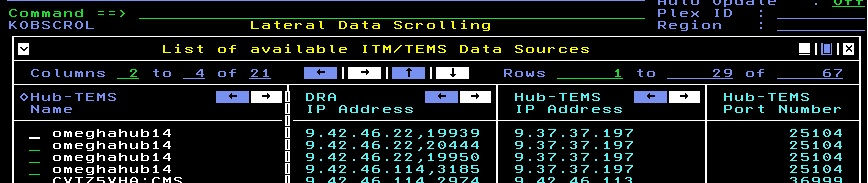
- The following options can be used for columns of any data type:
-
For columns that consist of multiple sub-columns:
- VALUE='X'
- Display the specified character instead of the actual data value. For example X may be a blank, underscore, and so on.
- SUBWIDTH=n
- For an RLE-Composite column, this specifies the display width of a single sub-column.
- SUBGROUP=n
- For an RLE-Composite column, this specifies the number of sub-columns to concatenate together.
- SUBGAP=n
- For an RLE-Composite column, this specifies the number of blanks between sub-groups.
- Default value
- ALL