OMEGAMON Enhanced 3270 user interface component summary
The following OMEGAMON® components facilitate the display of data in the OMEGAMON Enhanced 3270 user interface (enhanced 3270UI).
- OMEGAMON Agents
- The OMEGAMON agents (for example, OMEGAMON AI for CICS or OMEGAMON AI for z/OS, among others) deliver capability that builds on the enhanced 3270UI infrastructure to provide OMEGAMON capability on the enhanced 3270UI.
- Hub Tivoli Enterprise Monitoring Server
-
Monitoring servers are part of the Tivoli® Management Services infrastructure that is shared by OMEGAMON agents. The enhanced 3270UI requires Tivoli Management Services V6.3.2 or higher.
The hub monitoring server is the monitoring server that acts as the focal point for data collection and distribution; it communicates with monitoring agents, with the enhanced 3270UI, and with other Tivoli Management Services components.
Monitoring servers that communicate only with the monitoring agents that report to them and with the hub monitoring server are referred to as remote monitoring servers. The hub monitoring server receives data requests from the enhanced 3270UI through the data retrieval agent (KOBAGENT) and drives OMEGAMON agents for data collection and retrieval. The hub monitoring server must be seeded with OMEGAMON agent data.
- OMEGAMON Enhanced 3270 user interface address space
- The enhanced 3270UI address space provides data retrieval and user interface 3270 interaction functions. One or more enhanced 3270UI can be deployed in a specific z/OS® Sysplex.
- OMEGAMON Enhanced 3270 user interface data retrieval agent (KOBAGENT)
- This component runs in any z/OS monitoring server or Tivoli OMEGAMON Agent address space. The enhanced 3270UI data retrieval agent receives data requests from the enhanced 3270UI and connects to the hub monitoring server to drive data collection by OMEGAMON monitoring agents.
There must be at least one enhanced 3270UI data retrieval agent that is deployed and running in the Sysplex where components of a specific configuration (hub or remote monitoring servers and agents) are running to enable enhanced 3270UI data retrieval and display. The enhanced 3270UI must also run in the same Sysplex as the OMEGAMON Enhanced 3270 user interface data retrieval agent.
The components that are mentioned earlier must be installed, configured, started, and running to enable successful rendering of OMEGAMON agent data on the enhanced 3270UI. The OMEGAMON agent configuration step that adds support for the monitoring agent to the hub monitoring server must be performed to enable successful rendering of OMEGAMON agent data on the enhanced 3270UI.
Communications and data retrieval
The enhanced 3270UI uses WLM Services to discover Data Retrieval Agents that are running in its Sysplex. The interface uses TCP/IP services to communicate with Data Retrieval Agents.
The Data Retrieval Agent uses TCP/IP services to communicate with the hub monitoring server. The Data Retrieval Agent uses WLM Services to register or publish their existence within the Sysplex.
The OMEGAMON monitoring agents use TCP/IP or SNA services to communicate with the monitoring servers. The monitoring agents register with the hub monitoring server as part of the startup process.
The enhanced 3270UI uses VTAM services when you log on and communicate with the interface. You log on to the enhanced 3270UI through a VTAM APPLID that is opened during startup of the interface.
- OMEGAMON Enhanced 3270 user interface address space
- OMEGAMON Enhanced 3270 user interface Data Retrieval Agent (KOBAGENT)
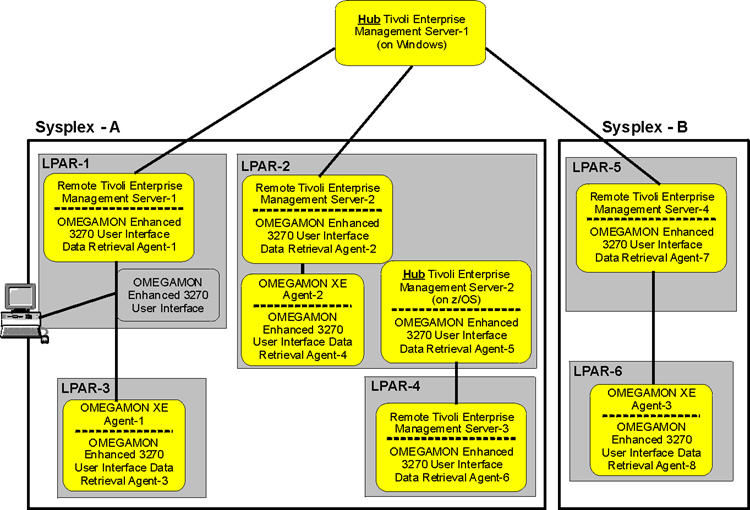
Minimal configuration
- OMEGAMON Enhanced 3270 user interface logon profile
- You must create one or more custom logon profiles. These profiles specify the settings for the hub monitoring server from which data is collected. The
RKOBPROF DDstatement in the enhanced 3270UI started task JCL procedure specifies the data set that contains the site and user logon profile settings. The customized site or user profiles are stored as members of therte.UKOBDATFdata set. When you log on, the enhanced 3270UI looks for a profile member nameduser_id(the ID of the logged on user) or CUASITE (a site-customized profile) to establish profile settings for the session.You can establish a site or
user_idnamed logon profile member by copying (and renaming) the KOBCUA product provided profile member from the targetthilev.TKOBDATFlibrary or the runtimerte.TKOBDATFdata set to the runtimerte.UKOBDATFdata set.From Tivoli Management Services Version 6.3.2 (APAR OA42127), you can use the User Profile Member workspace to customize user profiles. For more information about customizing a user profile, see Customizing a user profile.
For an alternative method of creating and customizing a logon profile, see Profile viewing and cloning.
- Hub monitoring server settings
-
- Tivoli Management Services V6.3.2 (APAR OA42127) or later.
- The settings for the hub monitoring server settings are specified in the logon profile member. By default, the following setting statements are provided:
HUBNAME=HUBNAME
HUBIPADDRESS=::ffff:HUBADDRESS
HUBPORTNUMBER=HUBPORTNUMBER
Edit the profile member copy to specify the wanted hub settings; locate and update the statements.
For example:HUBNAME=HUB1:CMS HUBIPADDRESS=::ffff:9.44.44.22 HUBPORTNUMBER=55555
- Tivoli Management Services V6.3 or earlier (pre-APAR OA42127).
- The settings for the hub monitoring server settings are specified in the logon profile member. By default, the settings are provided as commented statements:
/* HUBNAME=HUBNAME
/* HUBIPADDRESS=::ffff:HUBADDRESS
/* HUBPORTNUMBER=HUBPORTNUMBER
Edit the profile member copy to specify the wanted hub settings; locate, uncomment, and update the statements; for example, remove the leading /* and move the setting statements to begin in column one.
For example:HUBNAME=HUB1:CMS HUBIPADDRESS=::ffff:9.44.44.22 HUBPORTNUMBER=55555
- HUBNAME
- The configured name of the hub monitoring server. The monitoring server might be configured to run on the z/OS or distributed system; for example, Linux. Often a hub monitoring server is configured to run on distributed systems that employs a mixed-case or all lowercase naming convention. The value that is specified in your profile setting statements must match the case of the configured value.
- HUBIPADDRESS
- The TCP/IP address of the host system where the hub monitoring server runs. The setting must be an TCP/IP address as shown in the preceding example; do not specify a TCP/IP host name.
- HUBPORTNUMBER
- The TCP/IP port number of the configured hub monitoring server. The default port number is 1918.
Component startup and operation
- OMEGAMON Enhanced 3270 user interface address space
- Although startup of the enhanced 3270UI address space is relatively fast, it is ideally the last component in the startup sequence; because the interface requires that all other components in its environment (the OMEGAMON monitoring agents, the Data Retrieval Agent, and the hub and or remote monitoring servers) be initialized and running before it is able to retrieve data.
- OMEGAMON Enhanced 3270 user interface local registry
- The enhanced 3270UI startup process discovers registered Data Retrieval Agents and connects to related hub monitoring servers to establish a local registry of data source information; that is, managed systems names and managed system lists. After startup, by default, the registry is refreshed on a 5-minute interval.
- OMEGAMON agent and OMEGAMON Enhanced 3270 user interface Data Retrieval Agent
- The OMEGAMON agent address spaces run both an instance of the product agent and also an instance of an enhanced 3270UI Data Retrieval Agent. The Data Retrieval Agent uses WLM services to publish or register its existence. The product agent registers with the hub monitoring server; these registration processes facilitate enhanced 3270UI discovery of OMEGAMON agents. Some OMEGAMON agents, such as OMEGAMON AI for z/OS, run under a remote z/OS monitoring server; the enhanced 3270UI Data Retrieval Agent also runs under remote z/OS monitoring servers.
- OMEGAMON agent startup process
- There might be cases where an OMEGAMON agent startup process requires up to 10 minutes to complete startup and registration. As a result, the enhanced 3270UI cannot retrieve data for that agent during this period.
- OMEGAMON agent recycle
- There might be cases where an OMEGAMON agent address space is terminated (for example, LPAR shutdown, goes offline) and, in some cases, the agent is performing the role of a proxy agent. As a result, the enhanced 3270UI cannot retrieve data for that agent until the offline agent condition is resolved; for example, in a multi-LPAR configuration another agent assumes the proxy-agent role.
- Hub Tivoli Enterprise Monitoring Server
- To enable the enhanced 3270UI data retrieval, the hub Tivoli Enterprise Monitoring Server must be:
- Running Tivoli Management Services V6.3.2 or higher
- Seeded with IBM® OMEGAMON for Db2 Performance Expert on z/OS V5.3.0 or higher agent data
- Started and connectable through TCP/IP; listening on the configured TCP/IP port
- Be connected or online IBM OMEGAMON for Db2 Performance Expert on z/OS V5.3.0 or higher agents