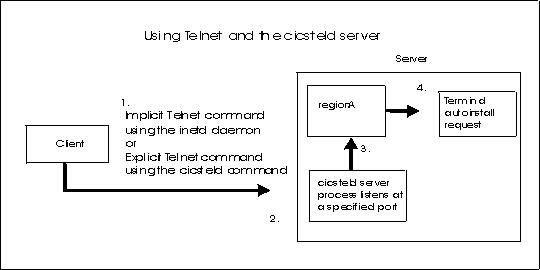
Figure 1 shows a CICS® system that is using a Telnet session to enable communications
between the client machine and the server machine. Figure 1. An example of a Telnet session in CICS
Area 1 in Figure 1 shows the two
methods that can be used to initiate a Telnet session. The inetd daemon can be run. In addition, the cicsteld command can
be issued from the command line. Both these methods start the cicsteld process on the server from within their programs. The inetd daemon is configured by using the cicscp create telnet_server command. See Configuring the inetd daemon using the cicscp command.
Area 2 shows a cicsteld process that is started on the
server when the cicsteld command is issued. This process listens
at a specified port for any client requests.
When the cicsteld process receives a client request, a
connection is made to the region. This is shown in Area 3.
When a region receives a connection request from a client that
is using the Telnet server process, the region issues a terminal autoinstall
request. This is shown in Area 4. When the terminal is installed,
a CICS session can be started, and CICS commands
can be issued.
Note: When the cicsteld server
process receives an automatic transaction initiation (ATI) transaction,
the keyboard remains locked if an ATI transaction is about to start.
When the ATI transaction starts and issues a terminal request such
as SEND, the keyboard is unlocked.