Modeling delays, escalations, and timeouts by using timer events
To specify when an activity occurs or when another path in the process should be taken,
use intermediate and boundary events of the timer type.
About this task
To control when activities occur within a process flow or when a process flow takes a specific
path in a process, use timer events. The following are some situations where you can use timer events:
- Create a delay to prevent an event or activity from immediately triggering.
- Create an escalation to handle when an activity fails to complete in a timely fashion.
- Create a timeout to prevent a flow from waiting indefinitely.
Note: The inspector only shows the timer events for parent processes. The inspector doesn't
show a timer or message event if they are in a nested process such as a link process.
Each
timer event has an associated timer. The time interval for the timer is calculated according to the
configuration that you specify in the implementation properties for the timer event. Normally, when
the specified time interval elapses, the timer event triggers and the sequence flow goes out from
the timer event to a subsequent node. However, when a process instance is suspended, the timer
events do not trigger. However, all the timers within the timer events continue to track the passage
of time. If a timer elapses while the instance is suspended, the associated timer event waits for
the process instance to resume before it triggers.To model delays, use timer intermediate events that have sequence flow lines that are entering it
and sequence flow lines that are leaving it. 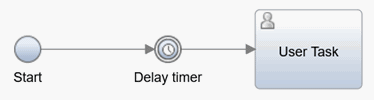 The process waits for the timer in the timer event to elapse before it proceeds to the next
node. For example, if your process has an activity that emails offers to customers and an activity
that has the sales team contact these customers two days later, model a delay by using a timer
intermediate event between the two activities. The delay ensures that two days pass between the
emails and when the sales team starts contacting the customers.
The process waits for the timer in the timer event to elapse before it proceeds to the next
node. For example, if your process has an activity that emails offers to customers and an activity
that has the sales team contact these customers two days later, model a delay by using a timer
intermediate event between the two activities. The delay ensures that two days pass between the
emails and when the sales team starts contacting the customers.
Tip: If the timer-use-activity-schedule property is set to
true, the Work Schedule, Holiday Schedule, and time zone settings of the root
process are used, even if the timer is contained in a linked process.
To model escalations, use timer boundary events. Timer boundary events are attached to an
activity in a process.  When a running process instance reaches an activity that has a timer boundary event, a timer
starts. When the timer elapses, the process follows the sequence flow from the timer boundary event
to a subsequent activity. For an example, see the Hiring Sample.
When a running process instance reaches an activity that has a timer boundary event, a timer
starts. When the timer elapses, the process follows the sequence flow from the timer boundary event
to a subsequent activity. For an example, see the Hiring Sample.
To model timeouts, use timer intermediate events that are included in event gateways. If the
other intermediate events in the event gateway group do not trigger before the timer elapses, the
timer intermediate event triggers instead. When you add an event gateway, a timer intermediate event
and a message event are automatically added to the event gateway group. You configure the timer
intermediate event to specify the timeout period.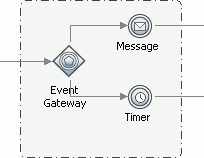 For information about creating an event gateway, see Modeling event gateways.
To reschedule a timer, see the rescheduleTimer method in JavaScript API in processes and service flows.
Procedure
To model a delay, escalation, or timeout: