Deleting User Groups in bulk from the IBM MaaS360 Portal

The Bulk Delete User Groups workflow allows administrators to delete all or specific user groups from the IBM® MaaS360® Portal.

Before you begin

The administrator must deprovision user visibility in the Cloud Extender® and in Azure Configuration (if configured) before any delete actions are taken on users that belong to the Corporate Directory.

About this task

Administrators can delete user groups that belong to the Corporate Directory or the MaaS360 Directory. When a delete action is taken on a user group, the user group is permanently deleted from the IBM MaaS360 Portal within 24 hours.

Procedure

  1. From the IBM MaaS360 Portal Home page, select Users > Groups. The User Directory page is displayed.
  2. Click Bulk Delete User Groups.
  3. Choose one of the following options to delete users in bulk:
    • Delete all user groups
    • Delete specified user groups
  4. Choose one of the following options for the user groups that you want to delete in bulk:
    • Corporate Directory: The selected user group that is uploaded from Active Directory, LDAP, or Azure AD is permanently deleted.
    • MaaS360 Directory: The selected user group that is stored in the IBM MaaS360 Portal is permanently deleted.
  5. To delete specific user groups from the Corporate Directory or the MaaS360 Directory, follow these steps:
    1. Download the sample file.
    2. Enter the names of the groups that you want to delete.
    3. Browse and upload the file that contains the list of the groups that you want to delete.
  6. Optional: Add comments about the actions that you are taking on the user groups that you are deleting.
  7. Click Continue.

Results

All or specific user groups from the chosen Corporate Directory or MaaS360 Directory are deleted from the IBM MaaS360 Portal.

Example
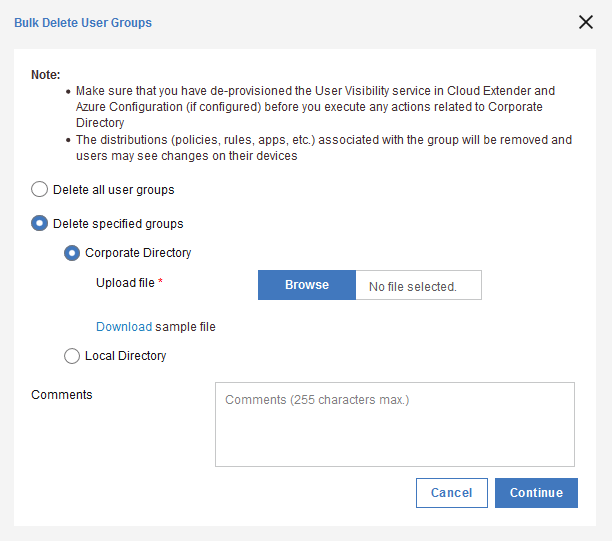
Viewing an example of bulk delete user group