Importing entities from a reference table
You can import entity data directly into the IBM® QRadar® User Entity Behavior Analytics (UEBA) app from a QRadar reference table.
Before you begin
You can access the Entity import wizard. For more information, see Importing entities and Using reference data in QRadar.
About this task
Reference table import enables direct integration with QRadar reference tables, allowing entity information to be synchronized automatically with UEBA.
This import method is ideal for environments where entity data is continuously maintained and updated within QRadar reference tables. During configuration, administrators select a reference table and map the fields that contain entity information. UEBA retrieves and processes the configured data based on the defined polling schedule.
Reference table imports are validated as data is retrieved from QRadar.
To ensure a successful import, each record must contain at least one valid asset identifier:
- IP address, or
- MAC Address
Records that do not contain a valid asset identifier are skipped and are not imported into UEBA.
The following configuration options are available:
| Option | Description |
|---|---|
| Configuration Name | Unique identifier for the import configuration |
| Polling Interval | Frequency of synchronization for reference table imports |
| Retrieval Limit | Maximum number of entities processed per polling cycle |
| Reference Table Synchronization | Option to synchronize imported data with a QRadar reference table |
Procedure
- From the navigation menu, click .
- Click Create Import.
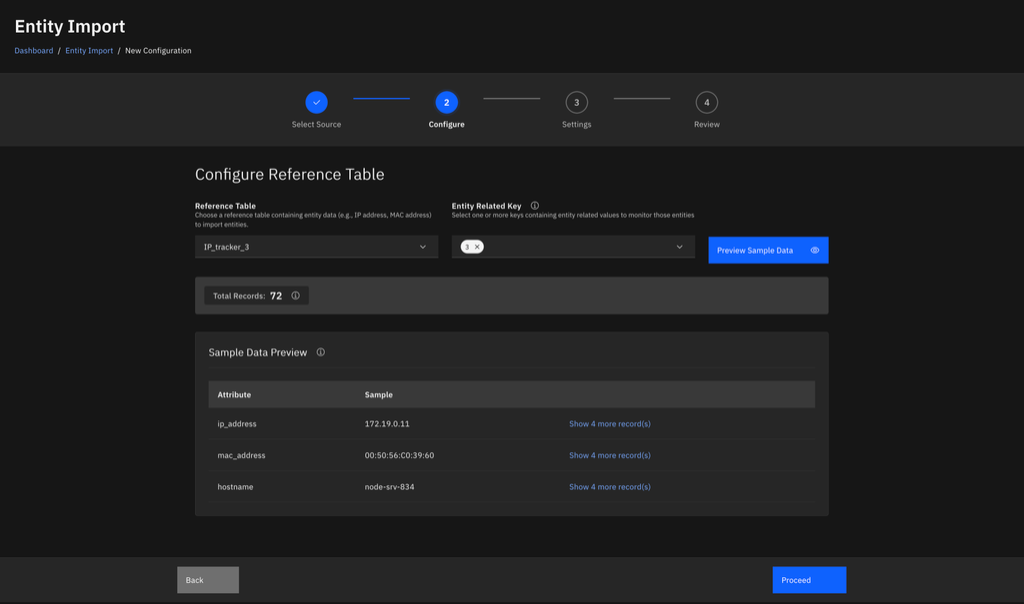
- Select Reference Table as the import source.
- Select the QRadar shared reference table that contains the entity data.
- Click Preview Sample Data.
- Configure the synchronization settings, including the polling interval.
- Save and enable the import configuration.
- Verify that scheduled polling is enabled.
-
Monitor the import status to confirm that entities are being imported successfully.
Results
UEBA automatically retrieves and processes entity data during each polling cycle.
For reference table imports, administrators can trigger an immediate synchronization by using Poll Now. When the polling interval is set to 0, polling operates in manual mode only. Users can run polling by using the Poll Now button on the list page.
What to do next
You can add more import configurations.