Database Connection Issues
You might find that your business process throughput slows down in Sterling B2B Integrator during data bursts (sudden increase in data volumes) or connection or cursor leaks (unreleased database connections). These data bursts can also result in an increased number of failed pool requests.
Symptoms and Causes of Failed Database Connection Requests
The symptoms of an increasing
number of failed pool requests may include:
- Slow business process throughput (volume being processed in a specific time period).
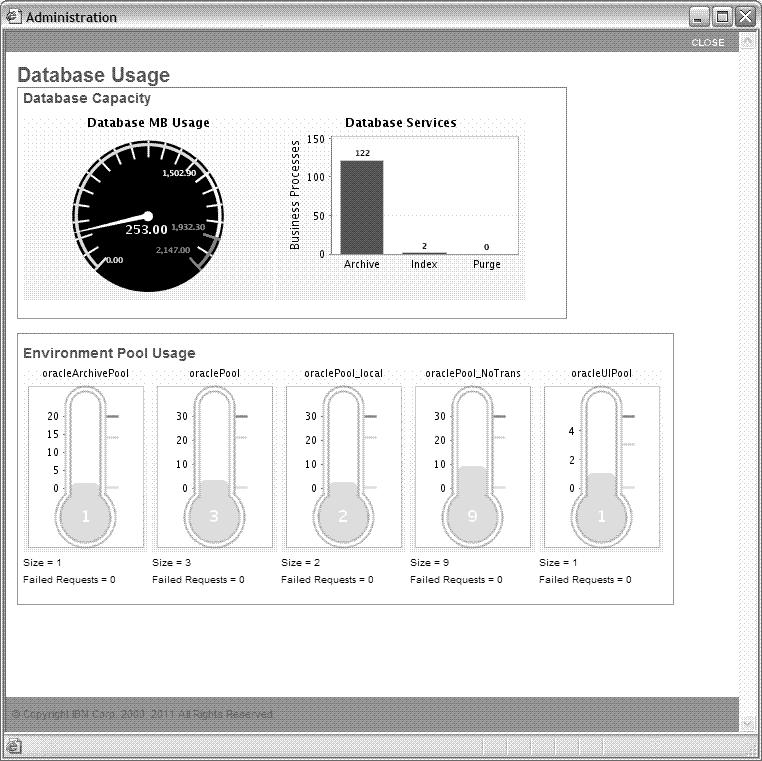
- Increasing number of failed pool requests as seen in the Database Usage Report by navigating to . This report shows the number of pool requests and failed requests.
Determining the cause of an increasing number of failed
pool requests necessitates you to investigate many areas of the system
and the way in which you are implementing Sterling B2B Integrator. The causes
of an increasing number of failed pool requests may include:
- Increased data volume, causing more business processes to compete for the connections.
- Data bursts – High rates of data in short transmission periods.
- Connection or cursor leaks – Database connections that are opened for a business process and then kept open by that business process instead of being released back to Sterling B2B Integrator for use by other business processes. This leads to fewer available connections to the database.
- Improperly tuned performance properties – Fewer database pools configured than is required by your processing volumes. For more information, refer to View and Restore Performance Configuration Settings.
To determine the cause of failed database connection
requests:
- Monitor the Database Usage report.
- Monitor database tools specific to your database. For more information about this, refer to your database documentation.
Monitor the Database Usage Report
This report shows the number of failed requests for each pool type. You can use this information to determine which pool settings to change in the Performance Tuning Utility.
- From the Administration menu, navigate to as shown in the following figure.
- The System Troubleshooting page is displayed as shown in the following figure. Click Database Usage.

The Database Usage Report (details) is displayed, as shown in the following figure.
Resolve Database Connection Issues by Increasing the Database Pool Size
You can
change the size of the database pools to allow more connections to
the database and resolve the following issues:
- Increased volume levels
- Data bursts
- Connection or cursor leaks
To increase the size of specific database pools in Sterling B2B Integrator, navigate to .
For more information about increasing the database pool size, refer to Performance Tuning Utility.