Submit an order as a technical user
A technical user is a machine configured to submit orders on behalf of a non-technical (human user) EBICS Client user using a back-end file system. The technical user is associated with a non-technical user.
- User as a technical subscriber
- File system adapter or a similar technical adapter
The scenario illustrates using a file system adapter configured on Sterling B2B Integrator.
A technical user submits the orders by placing a compressed file that contains an XML file, ordermetadata.xml and optionally the payload data in a collection folder specified when configuring a file system adapter.
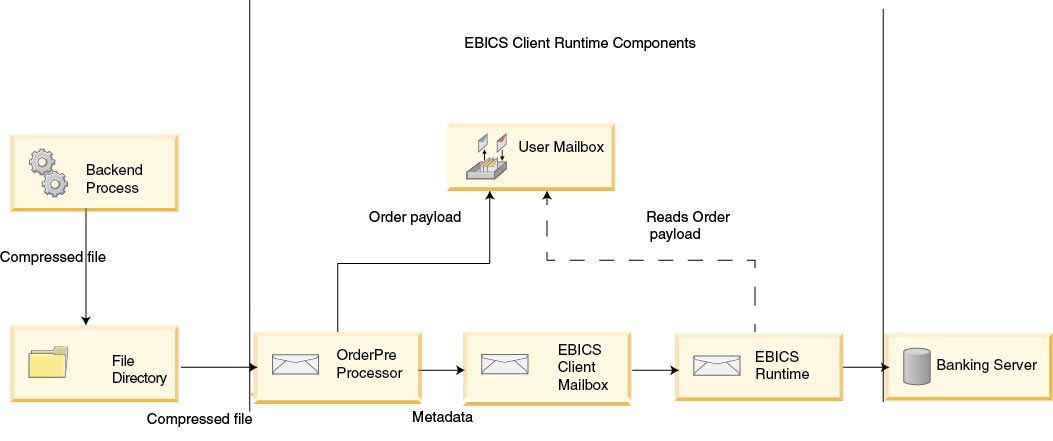
The following diagram illustrates the process flow when a technical user submits orders. The backend process generates the ordermetadata.xml, packages the payload metadata in a compressed format and places it in a directory so that a technical adapter, such as the file system adapter can pick up the file and send it to EBICS Client for processing the data. The EBICS Client Runtime components include the User Mailbox, OrderPreProcessor, EBICS Client Mailbox, and EBICS Runtime. The OrderPreProcessor extracts the contents of the compressed file and transfers the XML metadata to the EBICS Client Mailbox that in turn sends it to the EBICS Runtime component for processing the metadata. The OrderPreProcessor component sends the payload data to the mailbox of the EBICS Client user. Based on the values specified in the XML, EBICS Client sends the order request to the banking server.
- HostID
- details of the bank involved in the transaction
- UserID
- non-technical user who wants to submit the FUL order
- SystemID
- technical user who is a delegate of the non-technical user
- PartnerID
- details of the partner associated with the user
- OrderType
- details of the order type and file format
<?xml version="1.0" encoding="UTF-8"?>
<orderMetaData xmlns:xsi='http://www.w3.org/2001/XMLSchema-instance'
xsi:nonNamespaceSchemaLocation='new_omd.xsd'>
<HostID>TESTBNKPK12</HOSTID>
<PartnerID>PARTNERPK12</PartnerID>
<UserID>USERPK12</UserID>
<SystemID>TECHUSER</SystemID>
<orderIdPrefix>D</orderIdPrefix>
<SecurityMedium>0200</SecurityMedium>
<OrderType>FUL</OrderType>
<FileFormat>pain.001.001.02.ict</FileFormat>
<autoSubmit>TRUE</autoSubmit>
<mode>test</mode>
</orderMetaData>
If the order type is INI or HIA, the system ID and the user ID have the same value in the ordermetadata.xml file.
<?xml version="1.0" encoding="UTF-8"?>
<orderMetaData xmlns:xsi='http://www.w3.org/2001/XMLSchema-instance'
xsi:nonNamespaceSchemaLocation='new_omd.xsd'>
<HostID>TESTBNKPK12</HOSTID>
<PartnerID>PARTNERPK12</PartnerID>
<UserID>TECHUSER</UserID>
<SystemID>TECHUSER</SystemID>
<orderIdPrefix>W</orderIdPrefix>
<SecurityMedium>0200</SecurityMedium>
<OrderType>INI</OrderType>
</orderMetaData>jar cFM <zip_fileName> ordermetadata.xml <payload_fileName
with non-ASCII characters>. If the file name of the payload has only ASCII characters, then either the jar utility or any application such as WinZip or WinRAR can be used to create a compressed file.