Replacing an adapter in the 9040-MR9 system

To replace an adapter in the system, complete the steps in this procedure.

Procedure

  1. Ensure that you have the electrostatic discharge (ESD) wrist strap on and that the ESD clip is plugged into a ground jack or connected to an unpainted metal surface. If not, do so now.
  2. Ensure that the target slot is empty.
  3. If necessary, remove the adapter from the antistatic package.
    Attention: Avoid touching the components and gold connectors on the adapter.
  4. Place the adapter, component-side up, on a flat, antistatic surface.
    Attention: A pin on the tailstock of the adapter resembles a removable screw. Do not remove this pin. It is required for correct alignment and seating.
  5. Choose from the following options:
    • To replace an adapter into a cassette that has adapter retainers and strips, continue with step 6.
    • To replace an adapter into a cassette that does not have adapter retainers and strips, continue with step 8.
  6. If your cassette has two adapter retainers with strips, complete the following steps to install or replace an adapter into the cassette:
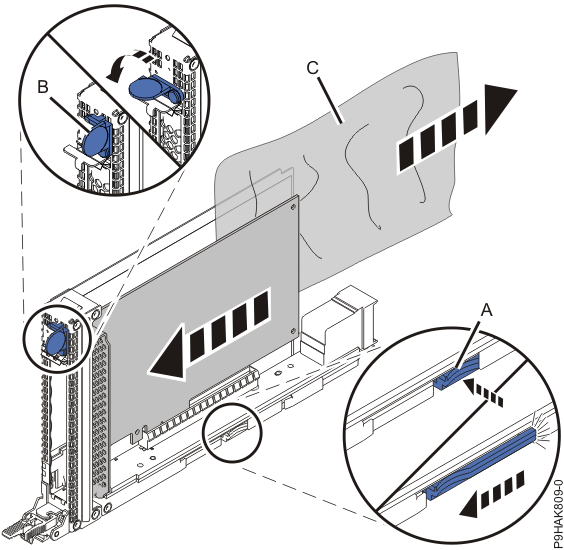
    1. If the adapter retainers (A) haven't already been removed, remove the adapter retainers (A) by putting them in the open position and moving them all the way off the strips.
    2. Press and slide the release bar (B) to open the cassette.
    3. Place an ESD safety sheet (C) over the strips.
      Note: You can use the ESD package that the new adapter was in. If necessary, cut it to size.
      Figure 1. Placing an ESD safety sheet over the strips on the 9040-MR9 cassette
      Placing an ESD safety sheet over the strips on the 9040-MR9 cassette
    4. Insert the adapter into the cassette.
    5. Press and slide the release bar (A) to close the cassette.
    6. Close the tailstock clamp (B) by rotating the clamp in the direction that is shown.
    7. Pull the ESD safety film (C) out.
      Figure 2. Installing an adapter in the cassette for the 9040-MR9 system
      Installing an adapter in the cassette for the 9040-MR9 system
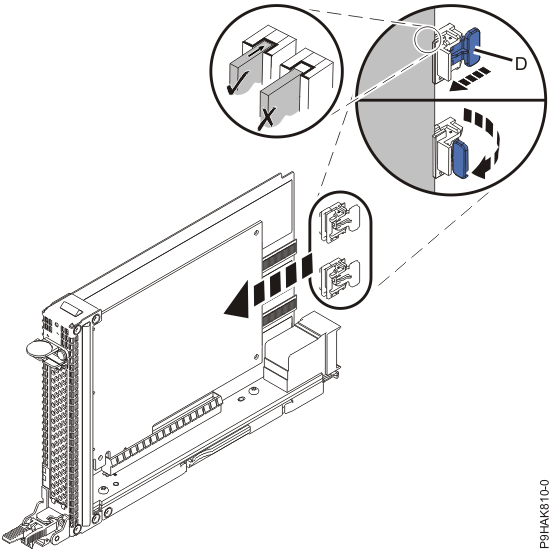
    8. With the adapter retainers (D) in the open position, slide the retainers onto the strips.
    9. Position the adapter retainers (D) so that they support the adapter and put them in the locked position by rotating them in the direction that is shown.
      Note: Ensure that the adapter is secured in the adapter retainer channel.
      Figure 3. Securing an adapter with the adapter retainers for the 9040-MR9 system
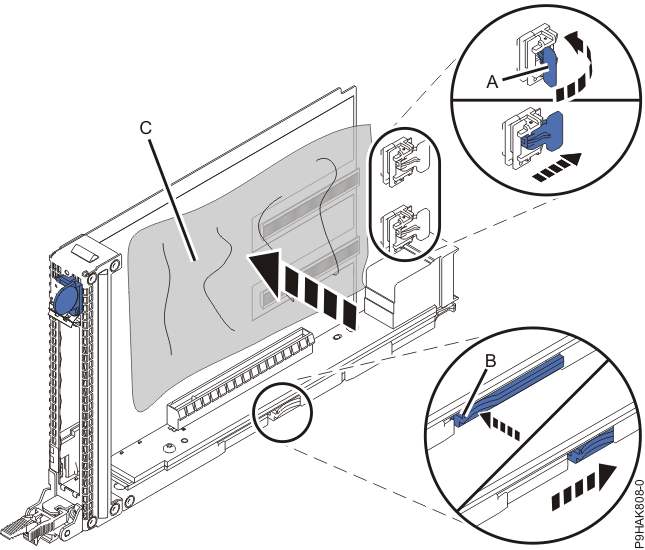
      Installing an adapter in the cassette for the 9040-MR9 system
  7. Continue with step 9.
  8. If your cassette does not have the two adapter retainers and strips, complete the following steps to install or replace an adapter into the cassette:
    1. Press and slide the release bar (A) to open the cassette.
    2. Insert the adapter into the cassette.
    3. Press and slide the release bar (A) to close the cassette.
    4. Close the tailstock clamp (B) by rotating the clamp in the direction that is shown.
      Figure 4. Installing an adapter in the cassette for the 9040-MR9 system
      Installing an adapter in the cassette for the 9040-MR9 system
  9. Place the cassette with the adapter in it on an antistatic surface.
  10. Choose from the followings options:
    1. If the system power is turned off, continue with step 14.
    2. If the system power is turned on and you are using the AIX® operating system, continue with step 11.
    3. If the system power is turned on and you are using the Linux® operating system, continue with step 13.
  11. If you are using the AIX operating system, use the diag command on the console to prepare the slot to accept an adapter.
    1. Select Add a PCI Hot Plug adapter from the Hot Plug Manager menu.
    2. Select the slot from where you removed the adapter.
    3. Press Enter again to put the slot into the action state.
      A fast-flashing amber LED at the rear of the system near the adapter indicates that the slot is identified and is ready to receive the adapter.
  12. Continue with step 14.
  13. If you are using the Linux operating system, use the drmgr command on the console to prepare the slot to accept an adapter.
    For example, to install the adapter in slot U7879.001.DQD014E-P1-C3, type:
    drmgr -c pci -a -s locationcode

    In this example, you would replace locationcode with U7879.001.DQD014E-P1-C3.

    Follow the instructions on the display to complete the task.

  14. Slide the cassette into the slot by completing the following steps:
    Attention:

    Ensure proper alignment when you insert an adapter cassette into the system.

    1. Align the cassette on the cassette rail in the cassette slot.
    2. Slide the cassette forward until the cassette is fully seated.
    3. To lock the cassette in its slot, squeeze the latch lever (A) toward the latch (B) and rotate the latch (B) in the direction that is shown.
      Figure 5. Installing a cassette in the 9040-MR9 system
      Installing a cassette in the 9040-MR9 system