Placing an 8001-22C or 8005-22N system into the service position
Learn how to place an IBM® Power® System S822LC for Big Data (8001-22C) or the IBM CS822 (8005-22N) system into the service position.
Before you begin
The systems must be removed from the rails for servicing.
Notes:
- When you slide a system out of a rack, ensure that all stability plates are firmly installed to prevent the rack from toppling. Slide only one system out at a time.
- When the rails are fully extended, the rail safety latches lock into place. This action prevents the system from being pulled out too far.
Procedure
- Unlock the drive bay handle (B) by pushing in the handle release
(A) as shown in Figure 1. The handle
(B) snaps out towards you. If the handle does not snap out all the way, the
drive does not slide out of the system. If the drive does not match the serial number you wrote down in the previous
step, reinstall the drive in the bay you removed it from, and check the other drive bays. Figure 1. Removing a drive

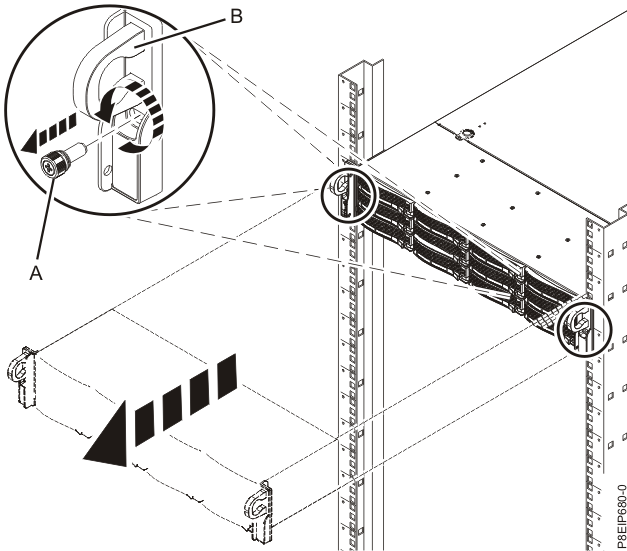
- Remove the front screws (A) that secure the system to the rack from both
sides of the system as shown in Figure 2. Figure 2. Removing the front screws and removing the system from the rack