Use this procedure to install the parts included with feature
Storage Backplane - 6 SFF Drives/SATA DVD/175MB RAID/Dual IOA/External
SAS Port (FC 5268 and FC EJ0F). This procedure is intended for installing
new features.
Notes: The FC 5268 is supported for the 8231-E2B and
FC EJ0F is supported for the 8231-E1C, 8231-E1D, 8231-E2C, 8231-E2D, or 8268-E1D. The
FC EJ0F does
not have a RAID enablement card.
If your system already has a disk drive backplane installed,
you must remove the disk drive backplane before you proceed with installing
this feature. For instructions, see Removing the 8231-E2B, 8231-E1C, 8231-E1D, 8231-E2C, 8231-E2D, or 8268-E1D disk drive
backplane.
Identify the system that you will be working on by
using the identify the system process to turn on the system locate
(blue) indicator. For more information, see Control panel LEDs and Enabling enclosure indicators.
Attention: To
maintain system availability and to prevent possible data loss, it
is important to understand that these features have implications on
the serial-attached SCSI (SAS) configuration and data accessibility
of the system. Review the
SAS subsystem topic
to understand the various SAS configuration and service considerations.
Before servicing or installing
any features, review the I/O configurations for each logical partition
on your system. It is important to understand the differences between
the various configurations and the resulting service considerations.
In addition, consider possible impacts to the following areas:
- Logical partitions and their I/O adapter assignments
- RAID array configurations
- Physical disk locations
- Path to your boot device
Attention: If you are servicing a failing part, see the following
service procedures:
- For the RAID enablement card, see Removing
the 8231-E2B RAID/cache
enablement card.
- For the RAID/cache storage controller, see Removing the 8231-E2B, 8231-E1C, 8231-E1D, 8231-E2C, 8231-E2D, or 8268-E1D RAID/cache
storage controller and Replacing the 8231-E2B, 8231-E1C, 8231-E1D, 8231-E2C, 8231-E2D, or 8268-E1D RAID/cache
storage controller.
Before installing or replacing
a feature, ensure that the software required to support the feature
is installed on your system.
For information about
software prerequisites, see IBM Prerequisite.
If the required software is not installed, see the following web sites
to download it, and then install it before continuing:
If your system is managed by the Hardware Management Console (HMC), use the HMC to install a feature
in the server. For instructions, see Installing a feature using the Hardware Management Console.
If
you do not have an HMC,
complete the following steps:
To install the parts included with feature Storage Backplane
- 6 SFF Drives/SATA DVD/175MB RAID/Dual IOA/External SAS Port, complete
the following steps:
- Perform the prerequisite tasks, as described in Before you begin.
Important: Do not disconnect power to the system.
- Stop the system. For instructions, see Stopping a system or logical
partition.
- Place the system into the service position. For instructions,
see Placing a rack-mounted 8231-E2B, 8231-E1C, 8231-E1D, 8231-E2C, 8231-E2D, or 8268-E1D system
into the service position.
- Remove the service access cover. For instructions, see Removing the
service access cover for the 8231-E2B, 8231-E1C, 8231-E1D, 8231-E2C, 8231-E2D, or 8268-E1D system.
- Use the service indicator light-emitting
diodes (LEDs) to help identify the part. For instructions, see Identifying a part.
- Disconnect the power source from
the system by unplugging the system.
Note: This system might be equipped with a second power supply.
Before continuing with this procedure, ensure that the power source
to the system has been completely disconnected.
(L003)
or
- Attach the wrist strap.
Attention: - Attach a wrist strap to an unpainted metal surface of your hardware
to prevent electrostatic discharge (ESD) from damaging your hardware.
- When using a wrist strap, follow all electrical safety procedures.
A wrist strap is for static control. It does not increase or decrease
your risk of receiving electric shock when using or working on electrical
equipment.
- If you do not have a wrist strap, just prior to removing the product
from ESD packaging and installing or replacing hardware, touch an
unpainted metal surface of the system for a minimum of 5 seconds.
- For the 8231-E2B,
locate the slots for the RAID enablement card (P1-C12), RAID/cache
storage controller (P1-C18), and cache battery card (P1-C13).
Figure 1. Slot location for RAID enablement, storage controller,
and cache battery card installation for 8231-E2B
- Locate the slots for the RAID/cache storage controller
(P1-C18), and cache battery card (P1-C13).
Figure 2. Slot location for storage controller
and cache battery card installation for 8231-E1C, 8231-E1D, 8231-E2C, 8231-E2D, or 8268-E1D
- For 8231-E2B,
install the RAID enablement card as follows:
Note: For
8231-E1C, 8231-E1D, 8231-E2C, 8231-E2D, or 8268-E1D, go to step
11.
- Align the RAID enablement card (A) with
the slot in the system. The RAID enablement card has a metal plate
attached to it as shown in the following figure.
- Slide the RAID enablement card into the system until the tab locks
into place as shown in the following figure.
Figure 3. Rack-mounted
model RAID enablement card replacement
- Install the RAID/cache storage controller as
follows:
- Align the RAID/cache storage controller with the slot in the system.
- Slide the RAID/cache storage controller into the system until
the tabs (B) align with the slots in the metal
guide, and the latch (A) locks into place as
shown in the following figure.
Figure 4. Replacing
a RAID/cache storage controller in a rack-mounted 8231-E2B
Figure 5. Replacing a RAID/cache storage controller in a rack-mounted 8231-E1C, 8231-E1D, 8231-E2C, 8231-E2D, or 8268-E1D
- Install the cache battery card as follows:
Attention: Ensure that the cache battery card is disconnected
for at least 60 seconds before you connect the new battery card.
- Align the cache battery card with the slot in the system.
- Slide the cache battery card into the system until the tabs (B) align
with the slots in the metal guide, and the latch (A) locks
into place as shown in the following figure.
Figure 6. Cache battery card replacement for 8231-E2B
Figure 7. Cache battery card replacement
for 8231-E1C, 8231-E1D, 8231-E2C, 8231-E2D, or 8268-E1D
- Replace the system interposer card with the high-function
system interposer card. For instructions, see Replacing the 8231-E2B, 8231-E1C, 8231-E1D, 8231-E2C, 8231-E2D, or 8268-E1D storage interposer card with the power off.
- Install the disk drive backplane. For instructions, see Replacing the 8231-E2B, 8231-E1C, 8231-E1D, 8231-E2C, 8231-E2D, or 8268-E1D disk drive
backplane.
- Install the disk drives or solid-state
drives. For instructions, see Installing a disk drive or solid-state
drive.
- Install the SATA DVD drive. For instructions, see Installing a Slimline media device
in the 8231-E2B, 8231-E1C, 8231-E1D, 8231-E2C, 8231-E2D, or 8268-E1D.
- Install the SAS I/O attachment cable.
- Connect the mini-SAS connector of the SAS cable to the internal
SAS connection port (C) on the storage interposer until it snaps in
place.
- Route the cable (A) in
front of the memory riser cage, and along the channel in the side
wall until the SAS port connector is near the opening on the rear
of the chassis.
- Align and guide the slot in the bracket of the SAS port connector (B) over
the guide pin in the chassis, then slide the SAS port connector into
the opening on the rear of the chassis until the tab on the bracket
snaps in place.
Figure 8. SAS I/O attachment cable
for 8231-E2B
Figure 9. SAS I/O attachment cable for 8231-E1C, 8231-E1D, 8231-E2C, 8231-E2D, or 8268-E1D
Figure 10. Installing the SAS I/O cable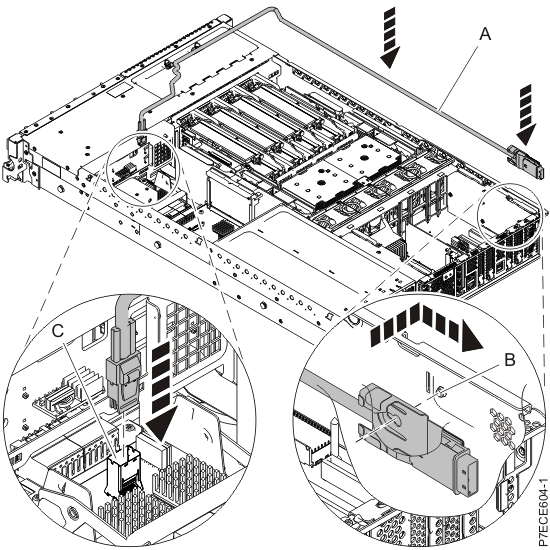
- Replace the service access cover. For instructions, see Installing
the service access cover for the 8231-E2B, 8231-E1C, 8231-E1D, 8231-E2C, 8231-E2D, or 8268-E1D system.
- For a rack-mounted system, put the system into the operating
position. For instructions, see Placing the rack-mounted 8231-E2B, 8231-E1C, 8231-E1D, 8231-E2C, 8231-E2D, or 8268-E1D system
into the operating position.
- Reconnect the power source.
- Start the system as described in Starting a system or logical partition.
- Verify the installed part:
- If you replaced the part because of a service action,
verify the installed part as described in Verifying a repair.
- If you installed the part for any other reason, verify the installed
part as described in Verifying the installed part.
 Subscribe to this information


