Serial-attached SCSI (SAS) cables provide serial communication for transfer of data for directly attached devices, such as hard disk drives, solid-state drives, and CD-ROM drives.
Serial-attached SCSI (SAS) is an evolution of the parallel SCSI device interface into a serial point-to-point interface. SAS physical links are a set of four wires used as two differential signal pairs. One differential signal transmits in one direction while the other differential signal transmits in the opposite direction. Data might be transmitted in both directions simultaneously. SAS physical links are contained in ports. A port contains one or more SAS physical links. A port is a wide port if there are more than one SAS physical link in the port. Wide ports are designed to enhance performance and provide redundancy incase an individual SAS physical link fail.
The following table contains a list of the supported SAS cable types and their designed usage.
| Cable type | Function |
|---|---|
| AA cable | This cable is used to connect between the top ports on two tri-port SAS adapters in a RAID configuration. |
| AI cable | This cable is used to connect from a SAS adapter to internal SAS disk slots using an FC3650 or FC3651 cable card or to the System External SAS port on models 8204-E8A (FC3669) or 8203-E4A (FC3670). This cable is also used between the adapter connector and cable card connector on an FC5909 or FC5911 combination adapter and cable card. |
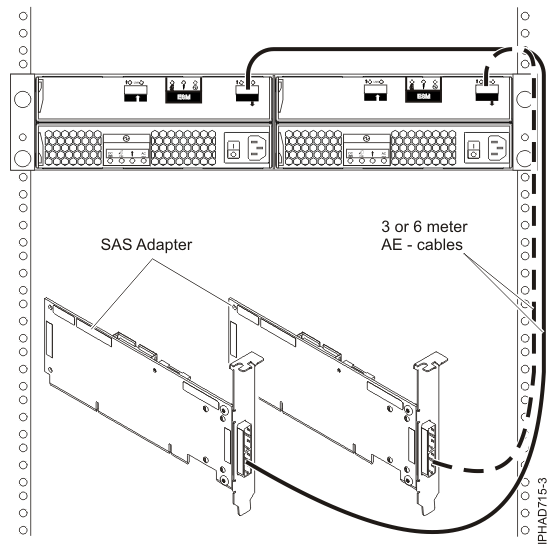
| AE cable | These cables are used to connect a SAS adapter to a media expansion drawer. These cables can also be used to connect two SAS adapters to a disk expansion drawer in a unique JBOD configuration. |
| AT cable | This cable is used with a PCIe 12X I/O drawer to connect from a PCIe SAS adapter to the internal SAS disk slots. |
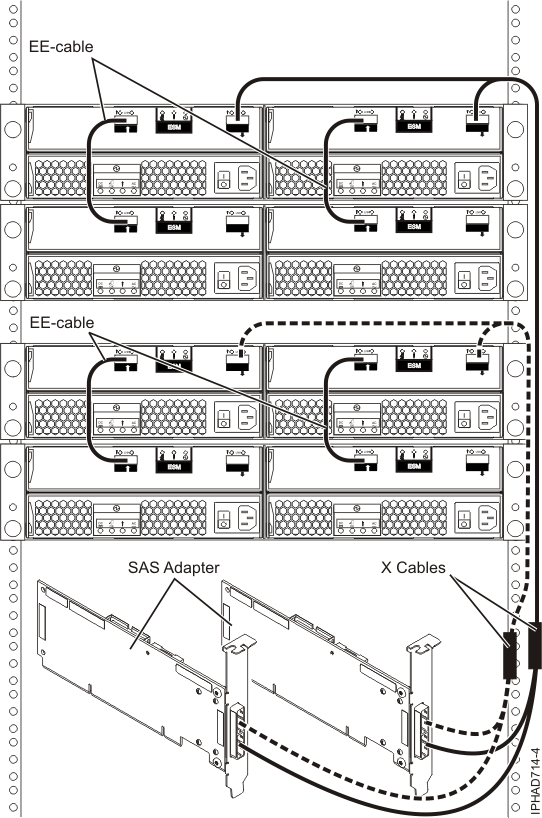
| EE cable | This cable is used to connect one disk expansion drawer to another in a cascaded configuration. Disk expansion drawers can only be cascaded one level deep, and only in certain configurations. |
| YO cable | This cable is used to connect a SAS adapter to a disk expansion drawer. It is also used to connect a 9125-F2A system I/O unit to a disk expansion drawer. The cable must be routed along the right side of the rack frame (as viewed from the rear) when connecting to a disk expansion drawer. |
| YI cable | This cable is used to connect a system external SAS port to a disk expansion drawer. The cable must be routed along the right side of the rack frame (as viewed from the rear) when connecting to a disk expansion drawer. |
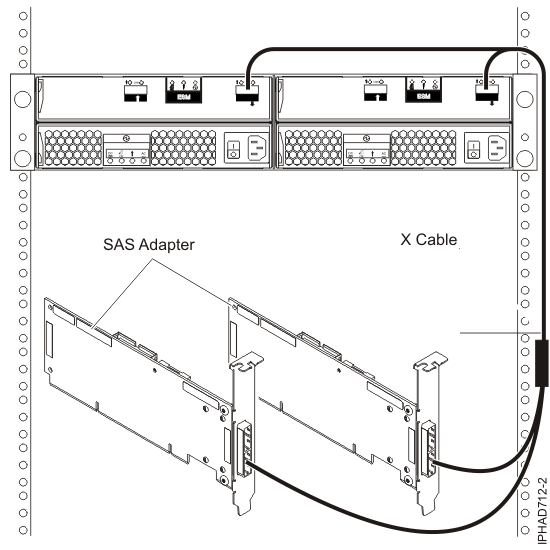
| X cable | This cable is used to connect two SAS adapters to a disk expansion drawer in a RAID configuration. The cable must be routed along the right side of the rack frame (as viewed from the rear) when connecting to a disk expansion drawer. |
| YR cable | This cable is used to connect two SAS adapters to internal SAS disk slots using an FC3651 cable card. |
The following table contains specific information about each supported SAS cable.
| Name | Length | IBM® part number | Feature code |
|---|---|---|---|
| SAS AA cable | 3 m (9.8 ft) 6 m (19.6 ft) |
44V8231 44V8230 |
3681 3682 |
| SAS 4x AI cable | 1 m (3.2 ft) | 44V4041 | 3679 |
| SAS 4x AE cable | 3 m (9.8 ft) | 44V4163 | 3684 |
| 6 m (19.6 ft) | 44V4164 | 3685 | |
| SAS 4x AT cable | 0.6 m (1.9 ft) | 44V5132 | 3688 |
| SAS 4x EE cable | 1 m (3.2 ft) | 44V4147 | 3652 |
| 3 m (9.8 ft) | 44V4148 | 3653 | |
| 6 m (19.6 ft) | 44V4149 | 3654 | |
| SAS YO cable | 1.5 m (4.9 ft) | 44V4157 | 3691 |
| 3 m (9.8 ft) | 44V4158 | 3692 | |
| 6 m (19.6 ft) | 44V4159 | 3693 | |
| 15 m (49.2 ft) | 44V4160 | 3694 | |
| SAS YI cable | 1.5 m (4.9 ft) | 44V4161 | 3686 |
| 3 m (9.8 ft) | 44V4162 | 3687 | |
| SAS X cable | 3 m (9.8 ft) | 44V4154 | 3661 |
| 6 m (19.6 ft) | 44V4155 | 3662 | |
| 15 m (49.2 ft) | 44V4156 | 3663 | |
| SAS YR cable | 1 m (3.2 ft) | 44V4818 | 3667 |
| Split disk backplane cable card for a 3/3 split 9117-MMA | 44V3557 | 3650 | |
| Split disk backplane cable card for a 6/0 split 9117-MMA | 44V3435 | 3651 | |
| Disk backplane to rear bulkhead, cascading. (internal cable) 8204-E8A, 9409-M50 | 42R5751 | 3668 | |
| Split disk backplane to rear bulkhead (internal cable) 8204-E8A | 44V5252 | 3669 | |
| Split disk backplane to rear bulkhead (internal cable) 8203-E4A | 44V5253 | 3670 | |
| Disk backplane to rear bulkhead, cascading. (internal cable) 8203-E4A, 9408-M25 | 44V3382 | 3674 |
The following table contains cable label information. The graphic labels are designed to match the correct component port to which the cable end is to be attached.
| Name | Connects | Label |
|---|---|---|
| SAS AA cable | Top connectors on tri-port SAS adapter to tri-port SAS adapter. |  |
| SAS 4x AI cable | SAS adapter to internal SAS disk slots through an FC3650 or FC3651 cable card or an FC5909 or FC5911 combination adapter and cable card or to the System External SAS port on models 8204-E8A (with FC3669 installed) or 8203-E4A (with FC3670 installed) | |
| SAS 4x AE cable | SAS adapter to a media expansion drawer or two SAS adapters to a disk expansion drawer in a unique JBOD configuration |  |
| SAS 4x AT cable | PCIe SAS adapter in PCIe 12X I/O drawer to the internal SAS disk slots | |
| SAS 4x EE cable | One disk expansion drawer to another disk expansion drawer in a cascaded configuration |  |
| SAS YO cable | SAS adapter or 9125-F2A system I/O unit to a disk expansion drawer |  |
| SAS YI cable | System external SAS port to a disk expansion drawer |   |
| SAS X cable | Two SAS adapters to a disk expansion drawer in a RAID configuration | |
| SAS YR cable | Two SAS adapters to internal SAS disk slots through an FC3651 cable card | |
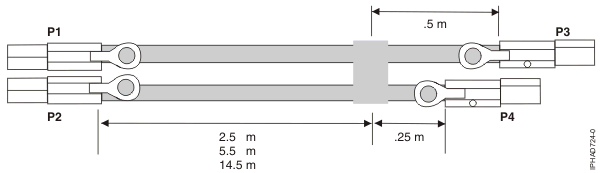
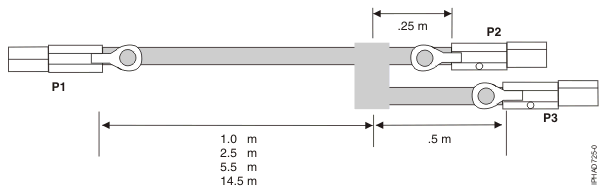
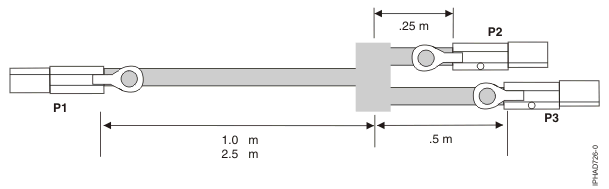
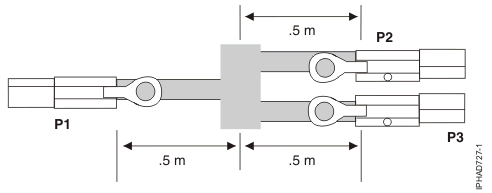
Figure 5, Figure 6, Figure 7, and Figure 8 illustrate connecting a SAS adapter to one, two, three, or four disk expansion drawers. It is also possible to connect three disk expansion drawers by omitting one of the cascaded drawers shown in Figure 7. Disk expansion drawers can be cascaded only one level deep.
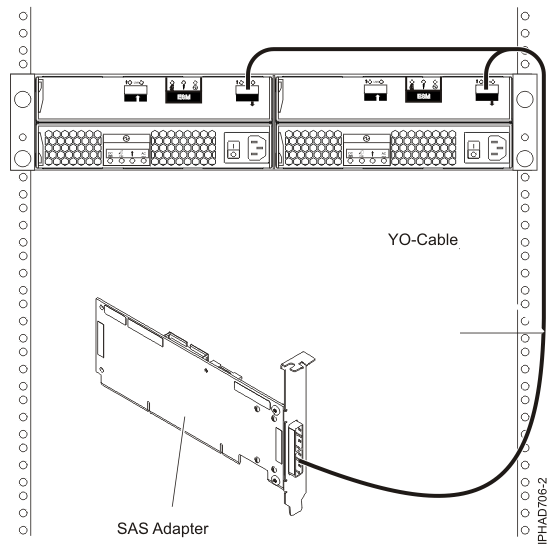
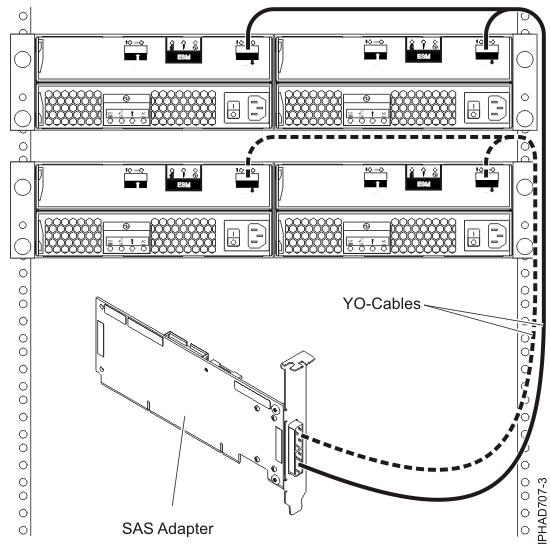
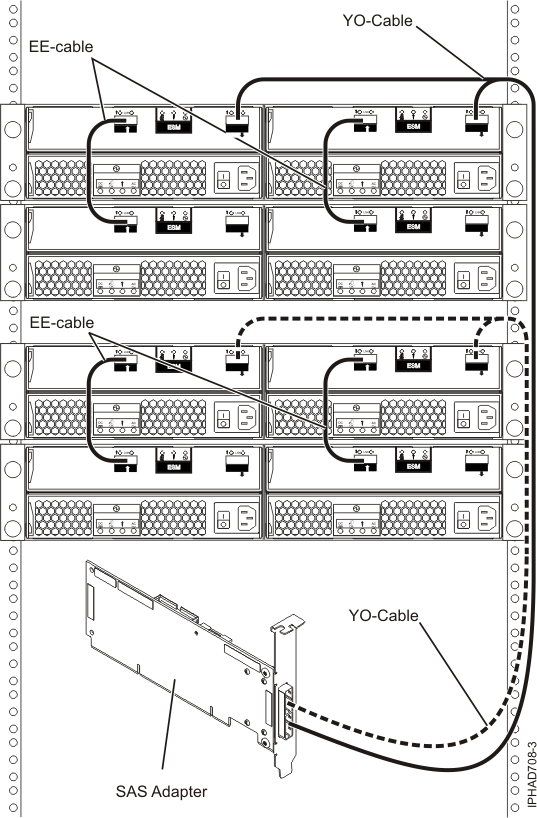
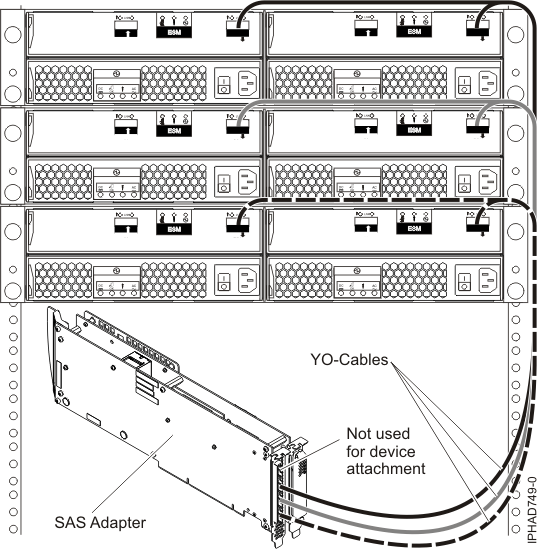
When attaching only hard disk drives, it is also possible to cascade a second disk expansion drawer off of two out of the three drawers for a maximum of five disk expansion drawers per adapter. Refer to Figure 7. Disk expansion drawers can be cascaded only one level deep.
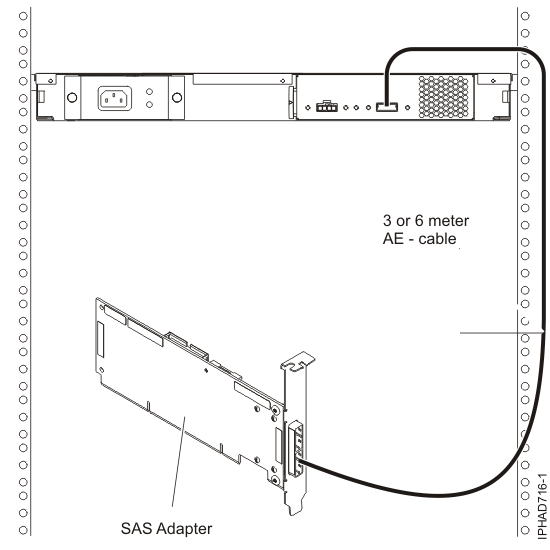
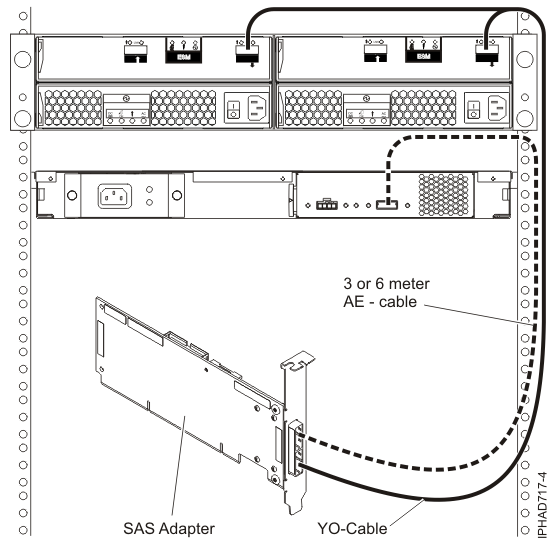
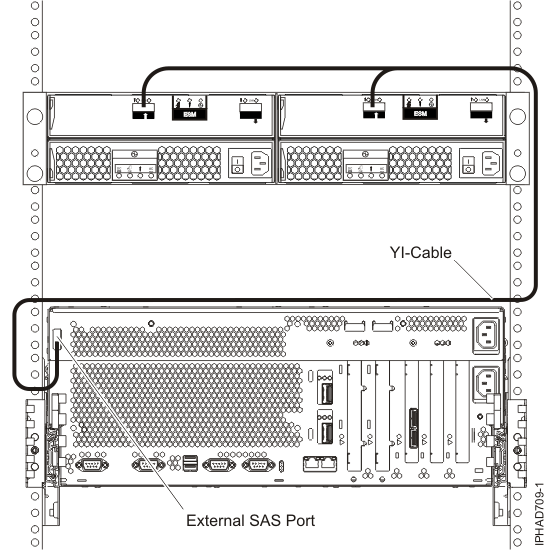
Figure 12 and Figure 13 illustrate connecting a 9125-F2A system I/O unit external SAS port to one or two disk expansion drawers.

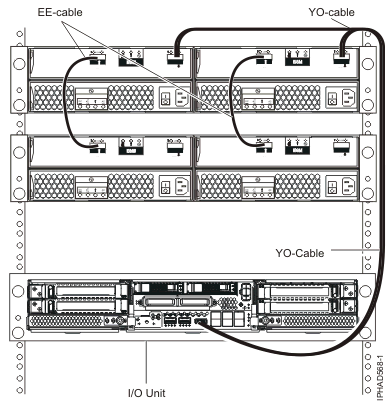
Figure 14 and Figure 15 illustrate connecting a SAS adapter to internal SAS disk slots through one or two FC3650 or FC3651 cable cards. Figure 17 and Figure 19 illustrate connecting a disk expansion or media expansion drawer in addition to the internal SAS disk slots. Figure 20 illustrates connecting a SAS adapter to internal SAS disk slots through an FC5909 or FC5911 combination adapter and cable card.
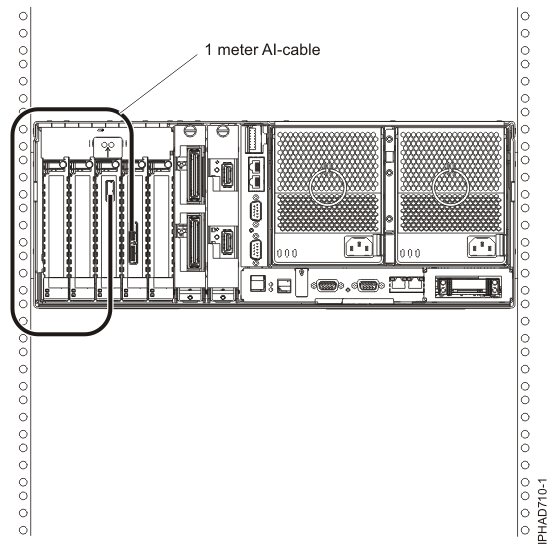


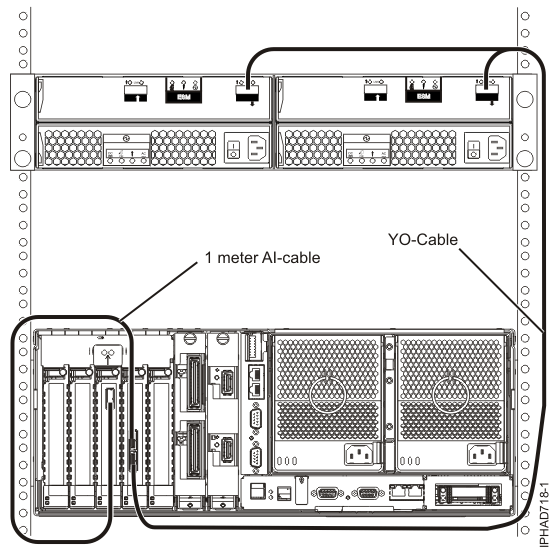
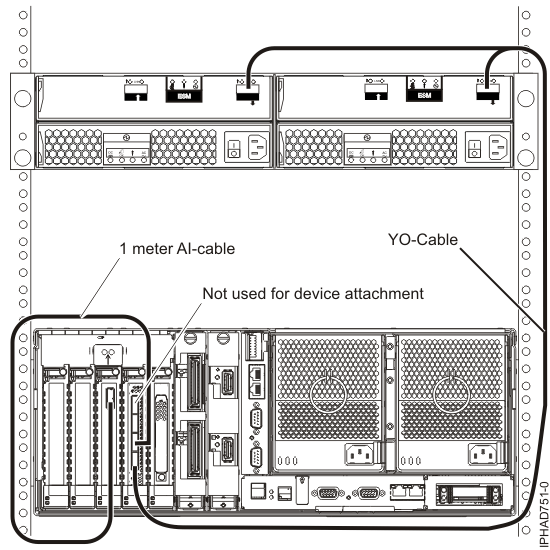
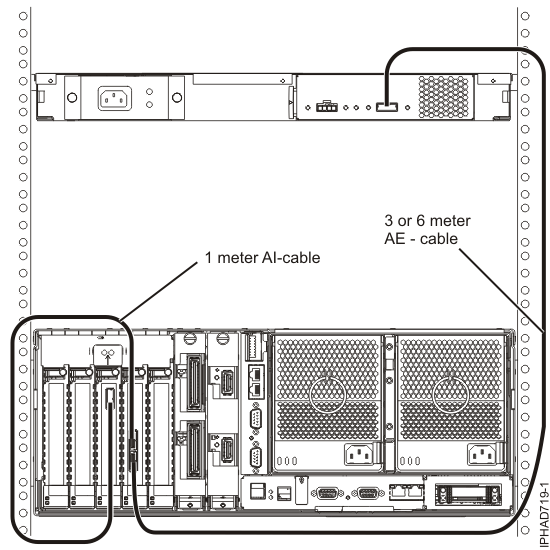
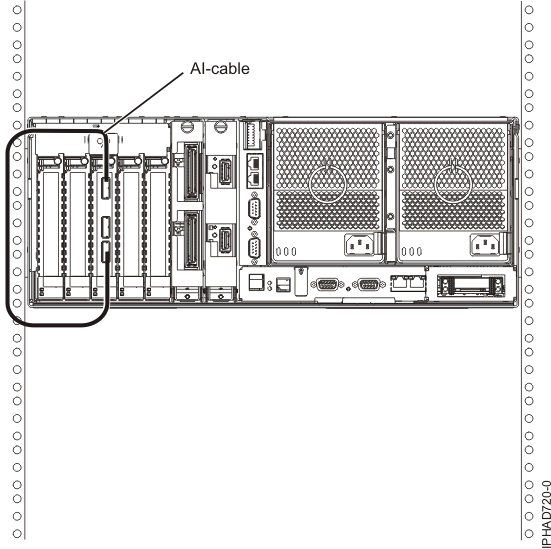
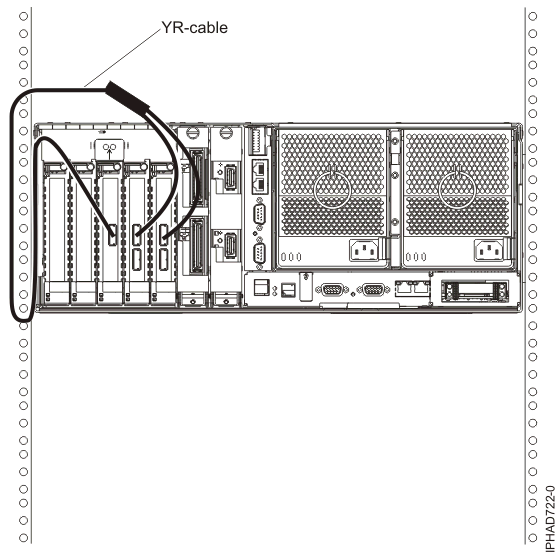
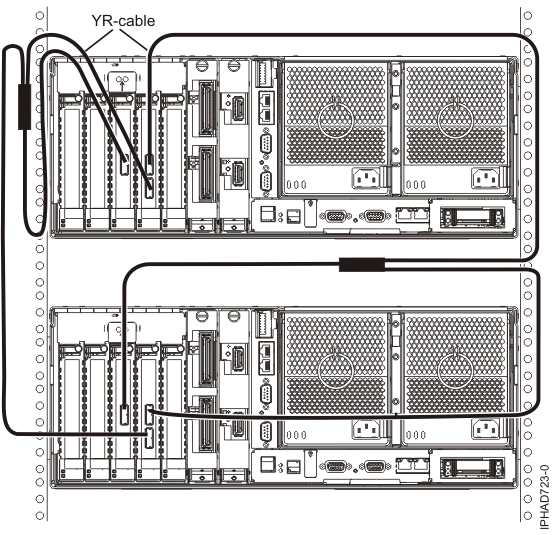
Figure 23 illustrates connecting a SAS adapter to internal SAS disk slots through the system external SAS port.

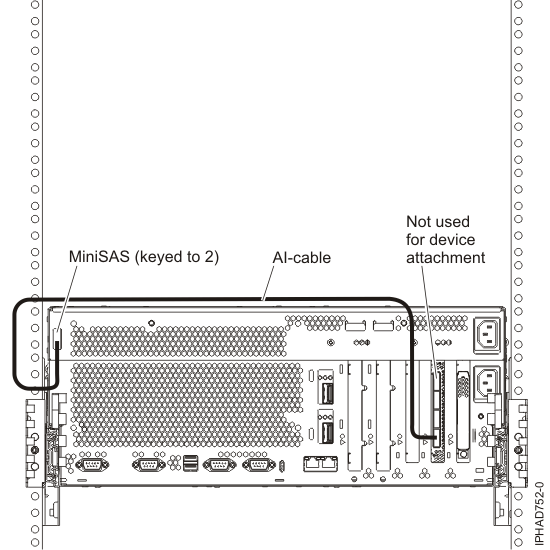
Figure 25, Figure 26, Figure 27, and Figure 28 illustrate connecting two SAS adapters to one, two, or four disk expansion drawers in a RAID configuration. It is also possible to connect three disk expansion drawers by omitting one of the cascaded drawers shown in Figure 27. Disk expansion drawers can be cascaded only one level deep.

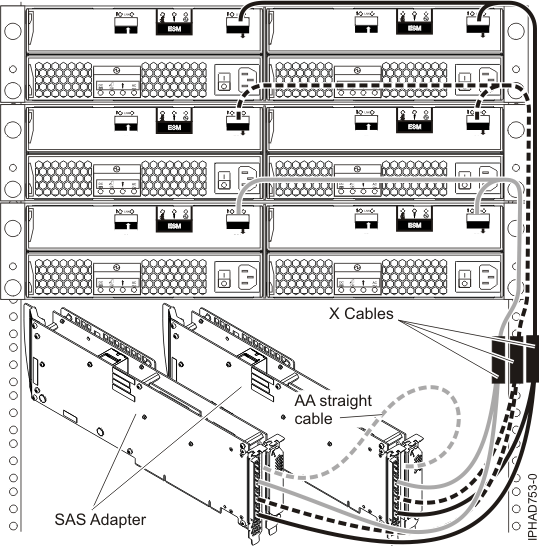
When attaching only hard disk drives, it is also possible to cascade a second disk expansion drawer off of two out of the three drawers for a maximum of five disk expansion drawers per adapter. Refer to Figure 7.
Figure 29 illustrates connecting two SAS adapters to a disk expansion drawer in a unique JBOD configuration.
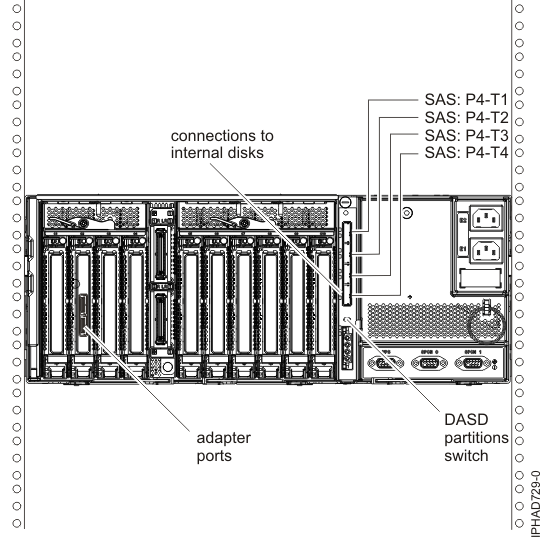
There are several possible configurations for attaching PCIe SAS adapters to the internal SAS disk slots in the PCIe 12X I/O drawer, and multiple ways of setting up the disk layout within the drawer. The disk unit partitions switch setting on the rear of the PCIe 12X I/O drawer controls the grouping of the disk units within the drawer. This will also affect the way the adapter or adapters are cabled to specific ports on the PCIe 12X I/O drawer. The desired switch position should be selected before attaching the AT cables. If the disk unit partitions switch is changed, the PCIe 12X I/O drawer must be powered off and on for the new position to be detected.
All internal disk units are attached using AT cables. There are also options where other external expansion drawers might be connected to these same SAS adapters. External disk expansion drawers are attached using YO cables for single adapter configurations or X cables for two adapter configurations. External media expansion drawers are attached using AE cables for single adapter configurations. External media expansion drawers are not supported for two adapter configurations.
For complete details and examples of these configurations within the PCIe 12X I/O drawer, see Configuring the 5802 disk-drive subsystem. Figure Figure 30 illustrates the rear view of a typical connection from two PCIe SAS adapters to the PCIe 12X I/O drawer. Use the AT cable to attach from an adapter port to a SAS port on the PCIe 12X I/O drawer.
 Subscribe to this information