Overview for setting up trusted profiles
A trusted profile is a grouping of identities into a single, shared IAM identity. Create trusted profiles to quickly grant users, IAM access groups, compute resources, services, and service IDs access to your account without an invitation.
Through trusted profiles, enterprises can manage access and permissions to their IBM Cloud account from an on-premises IAM solution. This can be LDAP (Lightweight Directory Access Protocol) or some other user registry managed by your organization. Thanks to trusted profiles, enterprises avoid setting up IBM Cloud accounts for each user and are able to monitor, audit, and remove access by using their centralized IAM solution.
- Required roles
-
To configure identity providers for trusted profiles, you must have one of the following roles in the IBM Cloud account:
-
- Account owner
-
- Administrator role on all account management services
-
- Administrator role on the IAM Identity Service
Prerequisites:
To set up trusted profiles, you must first configure an IBM Cloud SAML and an identity provider (for example, Azure Active Directory). For more information see IBM Cloud docs: Federating with the IBM Cloud SAML service provider (SP)
Setting up trusted profiles
To set up your trusted profile:
-
Log in to your IBM Cloud account and then navigate to Manage > Access(IAM) > Trusted profiles.
-
Click Create.
-
Type the name for the trusted profile and then click Continue.
-
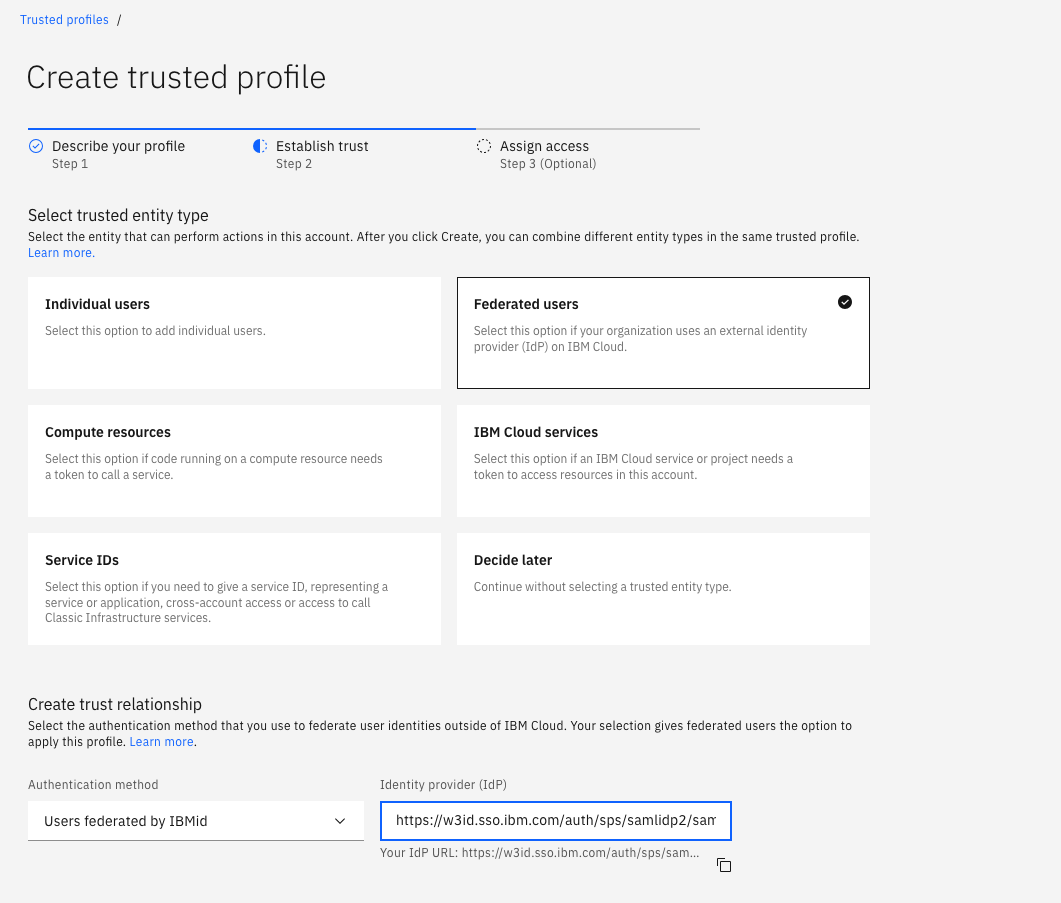
For trusted entity type, select Federated users.
-
For authentication method, select Users federated by IBM Cloud IdP.
-
In the Identity provider (IdP) text box, add the URL of your IdP's SAML endpoint.
-
Click Add a condition to start adding new access conditions.
-
From the Filter attributes pull-down menu, select an attribute that you want to use. For example:
email. To access details about the IdP's metadata schema, click the Expand icon next to Identity provider data. -
From the Qualifier pull-down menu, select one of the available conditions, for example, Equals
-
In the Value field, type the condition value, for example
john.doe@example.comand then press Continue. -
For access type, select Access group or Access policy.
-
Create the policy: after each step, click Next.
- Select the service that the access policy applies to.
- Select the resources that the access policy applies to.
- Select the roles and actions that the access policy applies to.
-
Add any optional conditions, if applicable and then click Add. Your trusted profile is created.
Limitations
The following limitations apply:
- If a User API key is needed to authenticate runtime operations, this API key must be generated by one of the static users of trusted profiles. Static users are referred to as
Individual usersduring the setup process and are added to a trusted profile based on their IAM ID. For more information, see Creating access keys with trusted profiles.
Common issues and solutions
The following sections describe common issues that users encounter when working with trusted profiles and how to resolve them.
User cannot access resources through a trusted profile
When a user who is logged in through a trusted profile cannot access a resource, the trusted profile creator must verify the access levels that are granted to the trusted profile in the IBM Cloud account.
To verify and grant access:
- Navigate to Manage > Access (IAM) > Trusted profiles.
- Select the specific trusted profile.
- Click Access.
- Grant account and resource level access through access groups or access policies.
Understanding role precedence with trusted profiles
When a project has both a user and a trusted profile (that the user is part of) as collaborators, role precedence applies.
If the user has admin level access and the trusted profile has viewer level access, the trusted profile receives admin level access. The higher privilege takes precedence even though the trusted profile is configured as a viewer. The same concept applies to access groups and user groups.
The highest level of access that is granted through any method (direct user access, trusted profile, or access group) becomes the effective access level.
Creating access keys with trusted profiles
If a trusted profile needs to create an access key, the access key must be provided by one of the static members of the trusted profile.
Static members are users who are added to a trusted profile based on their IAM ID during the setup process. These users are referred to as Individual users in the setup interface.
Federated users who are authenticated through an external identity provider cannot generate their own API keys. They must request an API key from one of the static members of the trusted profile.