Subscribe to this information
POWER7 information
Learn about the disk drive locations and where the service indicators are located for your disk-drive enclosure.
The availability of disk drive locations depends on the number of SCSI interface cards installed in the SCSI disk-drive enclosure. If the next available disk drive position is the first slot in a disk-drive enclosure, such as D21, D26, or D46, look at the disk drive controller to verify that the enclosure is connected to a SCSI bus port. The controller end of the cable is clearly labeled with the disk-drive enclosure to which it connects. If the enclosure is not connected to a disk drive controller, you must either install the disk drive in a different disk-drive enclosure or connect the enclosure to a SCSI bus port on a disk drive controller. You might need to add a disk drive controller before you can add disk drives to the expansion unit.
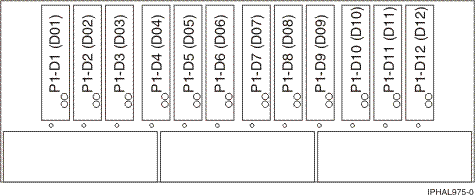
The following figures show the disk drive locations for the front and rear of the 5786, 5787, 7031-D24, and 7031-T24 SCSI disk-drive enclosures.

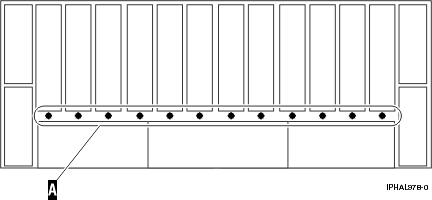
The following figures show the locations of the disk drive service indicators (A) for the 5786, 5787, 7031-D24, and 7031-T24 SCSI disk-drive enclosures.