How to install the Process Mining Operator
This section describes the options available for installing Process Mining operator in OpenShift.
Note: If IBM Process Mining is installed on a cluster (and in a namespace) where a cloud pak is already installed, you can install the IBM Process Mining operator from Operator Hub. You need not install Catalog sources and operator groups.
The Process Mining operator installation also installs the following required operators if they are not available on the namespace:
- IBM Cloud Platform Common Services Operator
- IBM Automation Foundation Core Operator
- IBM DB2 Operator
- IBM Operator Catalog
As the initial step, you must install the required CatalogSources in your cluster. The CatalogSource is a repository of CSVs, Custom Resource Definitions (CRDs), and operator packages.
Installing Operator dependencies
You need to install CatalogSource for the following dependencies:
- IBM Cloud Platform Common Services Operator
- IBM Automation Foundation Core Operator
- IBM DB2 Operator
- IBM Redis Operator
First, use the following command to open a terminal window and login to your OCP cluster:
oc login --token=<LOGIN TOKEN> --server=https://<SERVER URL>
Then, use the following commands to deploy the catalog sources to the cluster:
cat <<EOF | oc apply -f -
apiVersion: operators.coreos.com/v1alpha1
kind: CatalogSource
metadata:
  name: ibm-db2uoperator-catalog
  namespace: openshift-marketplace
spec:
  sourceType: grpc
  image: icr.io/cpopen/ibm-db2uoperator-catalog@sha256:99f725098b801474ff77e880ca235023452116e4b005e49de613496a1917f719
  imagePullPolicy: Always
  displayName: IBM Db2U Catalog
  publisher: IBM
  updateStrategy:
    registryPoll:
      interval: 45m
EOF


cat <<EOF | oc apply -f -
apiVersion: operators.coreos.com/v1alpha1
kind: CatalogSource
metadata:
  name: ibm-cloud-databases-redis-operator-catalog
  namespace: openshift-marketplace
spec:
  displayName: ibm-cloud-databases-redis-operator-catalog
  publisher: IBM
  sourceType: grpc
  image: icr.io/cpopen/ibm-cloud-databases-redis-catalog@sha256:9d4eec7ba489efefa6e8be937a79173a4c0cfad5ca5ad2f648f0eed10261a165
  updateStrategy:
    registryPoll:
      interval: 45m
EOF


cat <<EOF | oc apply -f -
apiVersion: operators.coreos.com/v1alpha1
kind: CatalogSource
metadata:
  name: opencloud-operators
  namespace: openshift-marketplace
spec:
  displayName: IBMCS Operators
  publisher: IBM
  sourceType: grpc
  image: icr.io/cpopen/ibm-common-service-catalog:3.15.1
  updateStrategy:
    registryPoll:
      interval: 45m
EOF

cat <<EOF | oc apply -f -
apiVersion: operators.coreos.com/v1alpha1
kind: CatalogSource
metadata:
  name: iaf-core-operators
  namespace: openshift-marketplace
spec:
  displayName: IAF Core Operators
  publisher: IBM
  sourceType: grpc
  image: icr.io/cpopen/ibm-automation-foundation-core-catalog:1.3.4
  updateStrategy:
    registryPoll:
      interval: 45m
EOF
Installing the Process Mining catalog
Before installing the catalog and the process mining custom resource, you need to decide the namespace on which you want to perform the installation. You need to install process mining in an existing Cloud Pak or create a new namespace if a Cloud Pak is not already installed in the cluster.
Use the following command, to create a new namespace:
export PM_PROJECT=mynamespace
oc new-project ${PM_PROJECT}
Creating the catalog source for Process Mining
Use the following commands to create the catalog source for the Process Mining catalog:
cat <<EOF | oc apply -f -
apiVersion: operators.coreos.com/v1alpha1
kind: CatalogSource
metadata:
  name: ibm-automation-processminings
  namespace: openshift-marketplace
spec:
  displayName: IBM ProcessMining Operators
  publisher: IBM
  sourceType: grpc
  image: icr.io/cpopen/processmining-operator-catalog:1.1.0
  updateStrategy:
    registryPoll:
      interval: 45m
EOF
Creating the Operator group
The Operator Group is a unit of multitenancy for operators that Operator Lifecycle Manager (OLM) manages. It constrains the installation of operators in its namespace to a specified set of target namespaces.
Warning: do not create the Operator Group if you are installing into a CloudPak. It is required only when IPM is installed standalone inside a namespace.
Use the following commands to create the operator group for Process Mining:
cat <<EOF | oc apply -f -
apiVersion: operators.coreos.com/v1alpha2
kind: OperatorGroup
metadata:
  name: processmining-group
  namespace: ${PM_PROJECT}
spec:
  targetNamespaces:
  - ${PM_PROJECT}
EOF
Creating the subscription
The subscription tracks changes to catalogs and ensures that the operators are up to date. Use the following commands to create a subscription:
cat <<EOF | oc apply -f -
apiVersion: operators.coreos.com/v1alpha1
kind: Subscription
metadata:
  name: processmining-subscription
  namespace: ${PM_PROJECT}
spec:
  channel: v2.0
  installPlanApproval: Automatic
  name: ibm-automation-processmining
  source: ibm-automation-processminings
  sourceNamespace: openshift-marketplace
EOF
Verifying the Operator installation
The operator is available inside the Operator > Installed Operators section of your OpenShift Container Platform (OCP) console:
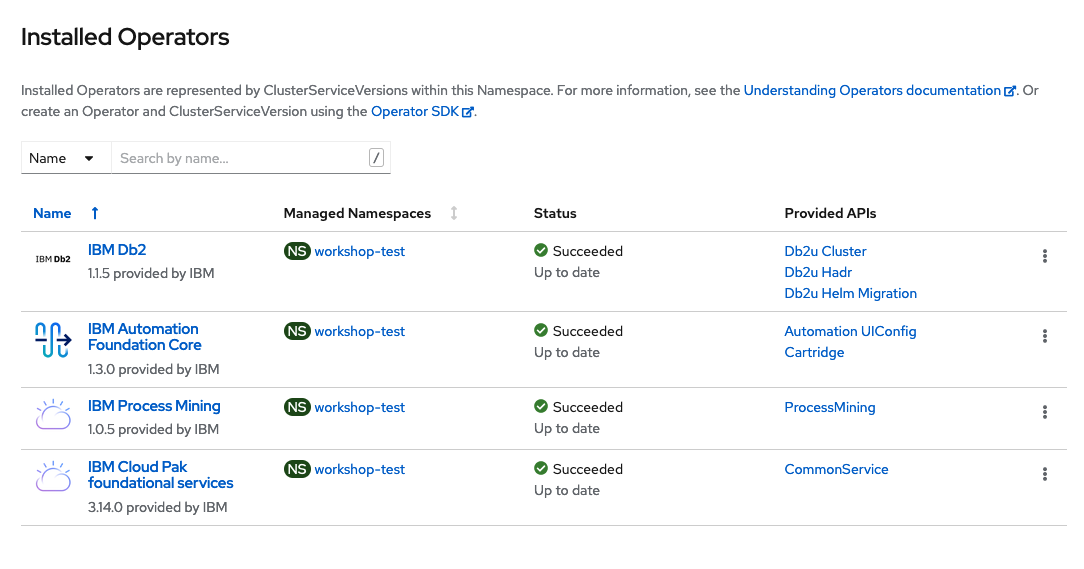
You can click the operator to see the information in detail. You can create instances when the status is Succeeded.
Deploying custom resource with the Operator Hub
To create an instance of your Process Mining Custom Resource (CRD), you need to click the Create Instance link. It then prompts a form with possible configuration options.

The following configuration options are mandatory:
- Accept the License
- Select the Cloud Pak
- Storage Class


Deploying CRD without the Operator Hub
You can deploy a Process Mining Custom Resource in the namespace using the OpenShift command-line tool.
The following code displays a Custom Resource with the installation configuration set to default values. The only mandatory fields in this configuration are the acceptance of the license and the choice of Cloud Pak for license metering purpose.
cat <<EOF | oc apply -f -
apiVersion: processmining.ibm.com/v1beta1
kind: ProcessMining
metadata:
  name: processmining-instance
  namespace: ${PM_PROJECT}
spec:
  license:
    accept: true
    cloudPak: IBM Cloud Pak for Business Automation
  defaultStorageClassName: rook-cephfs
EOF
The following example displays the available customization options:
cat <<EOF | oc apply -f -
apiVersion: processmining.ibm.com/v1beta1
kind: ProcessMining
metadata:
  name: processmining-instance
  namespace: ${PM_PROJECT}
spec:
  license:
    accept: true
    cloudPak: IBM Cloud Pak for Business Automation
  defaultStorageClassName: rook-cephfs
  taskmining:
    storage:
      events:
        name: processmining-repository
        size: '10'
      database:
        name: processmining-mongo
        size: '5'
  processmining:
    storage:
      database:
        class: 'ibmc-file-gold-gid'
        size: '5'
      events:
        name: taskminer-data
        size: '50'

EOF
For more information on custom resource definition, see CRD.
Validate the installation
For more information on validating the installation of an instance, see Validate successful installation.