About tape encryption keys
This topic describes the encryption keys that can be used by The IBM® Encryption Key Server component for the Java™† platform or the Tivoli® Key Lifecycle Manager.
An AES encryption key is typically a random string of bits generated specifically to scramble and unscramble data. Encryption keys are created by using algorithms that are designed to ensure that each key is unique and unpredictable. The longer the key string, the harder it is to break the encryption code. Both the IBM and T10 methods of encryption use 256-bit AES algorithm keys to encrypt data. 256-bit AES is the encryption standard that is recognized and recommended by the U.S. government.
Encryption method
Two types of encryption algorithms are used by the encryption key server: symmetric algorithms and asymmetric algorithms. Symmetric, or secret key encryption, uses a single key for both encryption and decryption. Symmetric key encryption is used for encrypting large amounts of data efficiently. Asymmetric encryption, or public/private key encryption, uses a pair of keys. Data encrypted using one key can be decrypted only by using the other key in the asymmetric key pair.
When an asymmetric key pair is generated, the public key is typically used to encrypt, and the private key is typically used to decrypt. The encryption key server uses both types: symmetric encryption for high-speed encryption of user or host data, and asymmetric encryption (which is necessarily slower) for protecting the symmetric key that is used to encrypt the data (key wrapping).
Encryption keys can be generated by the encryption key server, by applications such as Tivoli Storage Manager, or by a utility such as keytool. The responsibility for generating AES keys and the manner in which they are transferred to the tape drive depends on the tape drive type and the method of encryption management. However, it is be helpful to understand the difference between how the encryption key server uses encryption keys and how other applications use them.
How the encryption key server processes encryption keys
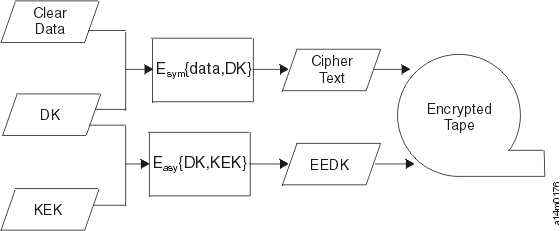
In system-managed and library-managed tape encryption, unencrypted data (clear text) is sent to the tape drive (TS1150 Tape Drive, TS1140 Tape Drive, TS1130 Tape Drive or TS1120 Tape Drive), and converted to ciphertext by using a symmetric 256-bit AES Data Key (DK) generated by the encryption key server. The ciphertext is then written to tape. The encryption key server uses a single, unique Data Key for each Enterprise Tape Cartridge. This Data Key is also encrypted, or wrapped, by the encryption key server by using the public key from an asymmetric Key Encrypting Key (KEK) pair. This process creates an Externally Encrypted Data Key (EEDK). The EEDK is written to the cartridge memory and to three more places on the tape media in the cartridge. The tape cartridge now holds both the encrypted data and the means to decrypt it for anyone that holds the private part of the KEK pair.
The DK can also be wrapped a second time by using the public key of another party to create another EEDK. Both EEDKs can be stored on the tape cartridge. In this way, the tape cartridge can be shipped to a business partner who holds the corresponding private key. That private key would allow the DK to be unwrapped and the tape decrypted by the business partner. Figure 1 illustrates the symmetric and asymmetric processes.
Encryption key server default keys
The physical volume pool property settings continue to provide an option for two keys. In addition to providing a manually entered key, the management interface provides a mutually exclusive check box per key that states a default key should be used for that particular key. Each of the two keys for each pool can be set up differently, allowing one key to be the default while another is manually entered. For example, key 1 may be set up to use a default key while key 2 is manually provided. Or, both keys can use the default or both keys can be provided manually. When a physical volume is written from beginning of tape and one or both key settings are configured to use default keys, the TS7700 informs the drive that one or both keys are set up for default. The drive negotiates through the TS7700 to the key server and requests that the key server use default keys currently configured within the key server. Since the key is provided by the key server, the TS7700 is not aware of what key is used for the physical volume when default keys are used.
The user should be able to determine whether either or both keys that are used for a particular encrypted physical volume are default keys or manually provided keys. To help with enhancements that require ranges of physical volumes based on when they were encrypted, a new time of encryption timestamp is introduced into the physical volume table. Each time a physical volume is written from beginning of tape with encryption enabled by using any key type, this timestamp is updated to the current time. This new timestamp can be used to determine when the volume keyed and is included in the physical volume BVIR output.
†Refer to the topic Trademarks in the Related information section for complete attribution.External key management for disk encryption
In addition to local key management for disk encryption, some TS7700 machines support external key management disk encryption, which stores the secure key in an IBM Secure Key Lifecycle Manager (SKLM) server.
External encryption key management removes the responsibility of managing the key from the disk subsystem controllers. The key is stored in volatile memory inside the controllers. This means that if the 3956-CSA or 3956-CSB controller is powered off and powered back on, the controller must obtain the security key from the SKLM server again. The 3956-CSA or 3956-CSB controller does not connect directly to the SKLM server. The 3956-CSA or 3956-CSB controller connects to the SKLM server through a proxy server. The proxy server is provided by the 3057-VEC or 3957-VED. The proxy server requests keys to the SKLM servers on behalf of the 3956-CSA or 3956-CSB controllers. The keys are then given to the 3956-CSA or 3956-CSB controllers by the proxy server.
Proper configuration is necessary for the disk subsystem controllers to communicate with the proxy server. The following figure shows the interconnection of the 3956-CSA or 3956-CSB and the SKLM server using the proxy server.