Write-Protect switch
The position of the write-protect switch on the tape cartridge determines whether you can write to the tape.
If the switch 1 is set to:
- The locked position
 (solid red), data cannot be written to
the tape.
(solid red), data cannot be written to
the tape. - The unlocked position (black void), data can be written to the tape.
If possible, use your server's application software to write-protect your cartridges (rather than manually setting the write-protect switch). This application allows the server's software to identify a cartridge that no longer contains current data and is eligible to become a scratch (blank) data cartridge. Do not write-protect scratch (blank) cartridges. The tape drive cannot write new data to them.
If you must manually set the write-protect switch, slide it left or right to the desired position.
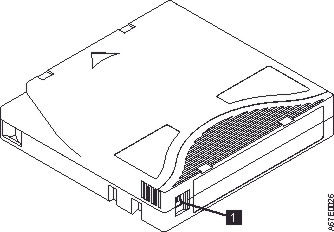
| 1 | Write-Protect switch |