Multiple repository servers
In a cluster that spans different geographic regions, the network connection between hosts is typically a WAN. When a service in one region needs to download a large package from the repository server (RS), which happens to be in the other region, the connection can become a bottleneck and adversely affect other network traffic. To mitigate this issue, you can deploy a local RS.
With this arrangement, a primary RS retains global control of package deployment while each local RS serves an individual region. The local RS registers with the primary RS when the local RS starts up. Each region can only have one local RS.
Cluster regions
- Linux®: $EGO_CONFDIR/../../eservice/rs/conf/region.xml
- Windows: %EGO_CONFDIR%\..\..\eservice\rs\conf\region.xml
- Define the region by IP range. The primary RS checks the IP address of the compute host and redirects the request to the local RS.
- Define the region by resource groups. The primary RS checks the resource group the compute host belongs to and redirects the request appropriately.
The use of either IP ranges or resource groups must be consistent for all regions; that is, you cannot mix the definition.
If the RS primary is unable to find the region associated with a download request in the table, the primary RS itself will service the request. Therefore, you do not need to configure the region where the primary RS is running since the primary RS will serve that region by default.
Local and primary RS interaction
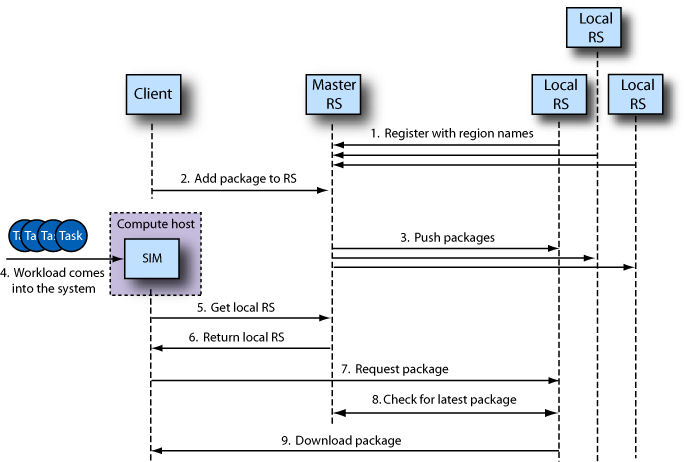
The local RS registers with the primary RS when the local RS starts up. During registration, the local RS passes its region name to the primary RS. If the primary RS is down or the connection between the local RS and primary RS is broken, the local RS will log an error message and try to re-establish a connection.
The primary RS maintains a region or resource group table and a region/IP table. When a client needs to upload a package, it connects to the primary RS. After the client uploads the package to the primary RS, the primary RS pushes the package to each local RS. If the local RS is down when the client uploads the package, the package in the local RS will not be in sync with the latest package. Therefore, the local RS always checks with the primary RS for the latest version each time the package needs to be downloaded to a compute host.
When a compute host needs to download a package, it sends a redirection request to the primary RS. (A redirection request basically asks the primary RS for the URL of the local RS.) If the regions are defined using resource groups, the redirection request includes the compute host’s resource group name. The primary RS searches the region.xml file for the compute host’s resource group or IP address, whichever is applicable, and redirects the request to the proper local RS.
When the client removes a package from the primary RS, the primary RS propagates the request to every local RS.
Local RS host requirements
- It must be accessible by all compute hosts in the local region.
- It must have enough disk space (either local or shared) to store all packages.
- The current OS must support RS.
Package download bandwidth control
- Linux: $EGO_CONFDIR/eservice/esc/conf/services/rs.xml
- Windows: %EGO_CONFDIR%\eservice\esc\conf\services\rs.xml