Web service clients
Web services provide a standard means of inter-operating between different software applications, running on a variety of platforms or frameworks. This section begins with a description of the major components and concepts of a web service. Later, we describe these concepts within the IBM® Spectrum Symphony environment.
Web service components
- XML
- XML is used in the web services architecture as the platform-independent format for transferring information between the web service and the web service client. The XML format ensures uniform data representation and exchange.
- WSDL
- The web services description language (WSDL) describes the message syntax associated with the invocation and response of a web service. A WSDL file is an XML document that defines the web service operations and associated input/output parameters. In a way, the WSDL can be considered a contract between the web services client and the web services server.
Basically, a WSDL document describes three fundamental properties of a web service:
- The operations (methods) that the service provides including input arguments needed to invoke them and the response.
- Details of the data formats and protocols required to access the service’s operations.
- Service location details such as a URL.
WSDL 1.1 was suggested in a note to W3C as an XML format for describing web services; refer to http://www.w3.org/TR/2001/NOTE-wsdl-20010315.
- XML schema
- XML schema are used to specify the structure of WSDL documents and the data type of each element or attribute. XML schema describe the documents that serve as the body of the SOAP messages traversing the IBM Spectrum Symphony Developer Edition web service interface.
- SOAP
- SOAP is the protocol used for communication between the web service and the client application. SOAP uses the Hypertext Transfer Protocol (HTTP or HTTPS) as the underlying protocol for transporting the data. SOAP 1.1 was suggested in a note to W3C as a protocol for exchanging information in a distributed environment. Refer to http://www.w3.org/TR/2000/NOTE-SOAP-20000508/.
Web service security
The IBM Spectrum Symphony web services implementation supports the use of UserNameToken-based authentication between the web service client and the IBM Spectrum Symphony web service. Refer to UsernameToken Profile 1.0 (OASIS Web Security Standard 200401) for further information.A closer look at a IBM Spectrum Symphony WSDL and schema
This section looks at some key features of a IBM Spectrum Symphony WSDL and schema.SOAP binding style
SOAP supports two invocation models: Remote Procedure Calls (RPC) and document style.
In the RPC-style model, clients invoke the web service by sending parameters and receiving return values that are wrapped inside the SOAP body. These procedure calls are synchronous, which means that the client sends the request and waits for the response.
In the document style model, the client sends the parameters to the web service within an XML document. The web service receives the entire document, processes it and possibly returns a response message. Using the document style, the body of the SOAP message is interpreted as straight XML. Hence, this combination of sending a document with a literal XML infoset as a payload is referred to as document/literal. This is opposed to the RPC style that uses RPC conventions for the SOAP body as defined in the SOAP specification. One advantage of using the document-centric approach is that document messaging rules are more flexible than the RPC style, which allows for changes to the XML schema without breaking the calling applications.
<soap:binding style="document" transport="http://schemas.xmlsoap.org/soap/http"/>
...
 <input>     <soap:body use="literal"/> </input>
Passing parameters to a web service
...
<types><schema targetNamespace="http://www.platform.com/soam/v2/wsse.xsd"
...
 <element name="sdViewSession">
   <complexType>
    <sequence>
     <element name="appName" type="xsd:string" minOccurs="0" maxOccurs="1"
     nillable="true"/>
     <element name="sessionId" type="soam:SessionID" minOccurs="1" maxOccurs="1"/>
     <element name="filter" type="xsd:string" minOccurs="0" maxOccurs="1"
     nillable="true"/>
     <element name="maxCap" type="xsd:long" minOccurs="1" maxOccurs="1"/>
    </sequence>
   </complexType>
 </element>
...
<message name="sdViewAppResponse"> <part name="parameters" element="soam:sdViewAppResponse"/>linebreak pdf</message><message name="sdViewSession"> <part name="parameters" element="soam:sdViewSession"/></message>
...
<portType name="SoamPortType">
...
<operation name="sdViewSession">
  <documentation>Service definition of function soam__sdViewSession</documentation>
  <input message="tns:sdViewSession"/>
  <output message="tns:sdViewSessionResponse"/>
 </operation>
...
...
<portType name="SoamPortType">
...
 <operation name="sdViewSession">
  <documentation>Service definition of function soam__sdViewSession</documentation>
  <input message="tns:sdViewSession"/>
  <output message="tns:sdViewSessionResponse"/>
 </operation>
...
<message name="sdViewSession">
 <part name="parameters" element="soam:sdViewSession"/>
</message>
...
<element name="sdViewSession">
 <complexType>
  <sequence>
   <element name="appName" type="xsd:string" minOccurs="0" maxOccurs="1"
   nillable="true"/>
   <element name="sessionId" type="soam:SessionID" minOccurs="1" maxOccurs="1"/>
   <element name="filter" type="xsd:string" minOccurs="0" maxOccurs="1"
   nillable="true"/>
   <element name="maxCap" type="xsd:long" minOccurs="1" maxOccurs="1"/>
  </sequence>
 </complexType>
</element>
...
Return values from a web service
Web service operations often return information back to the client application. You can determine the name and data type of returned information by examining the WSDL or schema files for the web service.
<element name="sdViewSessionResponse">
 <complexType>
  <sequence>
   <element name="sessionAttrVector" type="soam:SessionAttributeVector"linebreak pdf minOccurs="1"
   maxOccurs="1" nillable="false"/>
  </sequence>
 </complexType>
</element>
Building a web service client
A web services client is an application capable of sending and receiving SOAP messages. Such an application serializes or deserializes the SOAP messages to a programming language type system enabling programmatic processing.
- Client serializes the arguments of the method call into the XML payload of the SOAP message
- Send the message to the web service
- Wait for a response (or timeout)
- Deserialize the XML payload in the response message to a local type or structure
- Return that type/structure as a value from the method call.
Using Axis2 to develop Java web service clients
As a client to a web service, encoding your requests in XML to the web service and decoding the responses you get back would be tedious (not to mention implementing the logic that deals with accepting requests and sending responses).
Apache Axis2 is an implementation of the SOAP protocol and it shields the developer from the details of dealing with SOAP and WSDL. You can use Axis on the client side to greatly facilitate the development of your client. Bear in mind that there are several tools available to aid in the development of a web service client and IBM does not endorse any particular one.
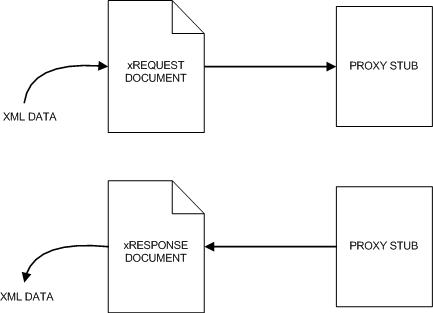
The client calls the stub, the stub translates the call into a SOAP message, and the stub sends it to the web service. The listening server receives the SOAP message and translates it into a method call at the server. Since the server is written in Java, the SOAP message is turned into a Java call. The server's return values are translated back to SOAP and then returned to the stub, which translates the returned SOAP message into a response to the client.
#!/bin/bash
# Add the location of Java tools to PATHexport PATH=/usr/local/jdk/bin/:$PATH
# Set the location of Axis2 binary installation
AXIS2_HOME=/home/ACCOUNT DIRECTORY/axis2-0.92-bin
AXIS2_LIB=../ego/axis2
# Build Axis2 classpath
AXIS2_CLASSPATH=.
for i in $AXIS2_HOME/lib/*.jar; do AXIS2_CLASSPATH=$AXIS2_CLASSPATH:$i;
done
SCHEMAS="Soam.wsdl"

#Cleanup
rm -fr ./src ./respources *.jar
cp ../../../Soam.wsdl .

# Generate the Java classes
for i in $SCHEMAS; do echo $i; j=`echo $i | sed -e 's/\(.*\)\..*/\1/'`; echo $j ;
java -classpath $AXIS2_CLASSPATH org.apache.axis2.wsdl.WSDL2Java -uri $i -o src
done

# Compile the generated classes
cd src
for i in codegen codegen/databinding/com/platform/www
 codegen/databinding/com/platform/www/impl codegen/databinding/org/w3/www linebreak pdfcodegen/databinding/org/w3/wwwimpl codegen/databinding/org/xmlsoap/schemas linebreak pdfcodegen/databinding/org/xmlsoap/schemas/impl;
do
javac -classpath $AXIS2_CLASSPATH $i/*.java;
done

# Create the Jar file
jar cf soamAdmin.jar ./codegen ./schemaorg_apache_xmlbeans/
mv soamAdmin.jar ..

#Cleanup
cd ..
#rm -fr ./src

# Use the generated jar file in classpath of your application
exit 0