Sending real-time orders during SmartStart
SmartStart enables you to view the potential benefits of using Fulfillment Optimizer prior to making major changes to your existing IBM Sterling Order Management processes. This topic explains the technical architecture and code patterns for implementing Fulfillment Optimizer during SmartStart.
If you’re dealing with complex orders and a complex fulfillment network, meeting rising customer expectations around fulfillment can be time consuming and difficult to accomplish. Fulfillment Optimizer uses AI-based optimization to help you address these expectations, while also maximizing profits. To preview how Fulfillment Optimizer can impact your business prior to making major changes to your existing order management system, you can implement SmartStart. By adopting and implementing the SmartStart approach, you can configure, test and implement Fulfillment Optimizer to make better fulfillment decisions against multiple objectives faster and more easily.
Learn how to use SmartStart to preview the benefits of Fulfillment Optimizer before making major changes to your IBM Sterling Order Management System.
Configuration checklist
Fulfillment Optimizer collates configuration and history data to perform optimizations based on competing business objectives. Before you start implementing this integration pattern, evaluate and prepare your configuration data that will be used for optimization.
Consider what configurational data you have. For SmartStart, the following configurations must be available to Fulfillment Optimizer:
- Fulfillment network (FN)
- Cutoff times for nodes (TP)
- Calendar of non-business days for nodes (NC)
- Shipping Service Level Agreements (SLAs)
- Node Carrier Applicability (NCA)
- Shipping Dimension Weight Factor (CMF)
- Carrier Rate Card (RC)
- Processing Coat (PC)
- Processing Plan (PP)
- Transit Matrix (TM)
- Products (SKU)
Use the following checklist to identify what data is used for each type of optimization.
*At a minimum, you must configure Shipping Cost Optimization and send the requisite data for it.
You must transfer this data to Fulfillment Optimizer. For more details, see Data integration.
Technical overview
Fulfillment Optimizer relies on the receipt of real-time orders to learn and determine the most cost-effective option for fulfillment. In order to obtain the required orders, Fulfillment Optimizer integrates with your order management system.
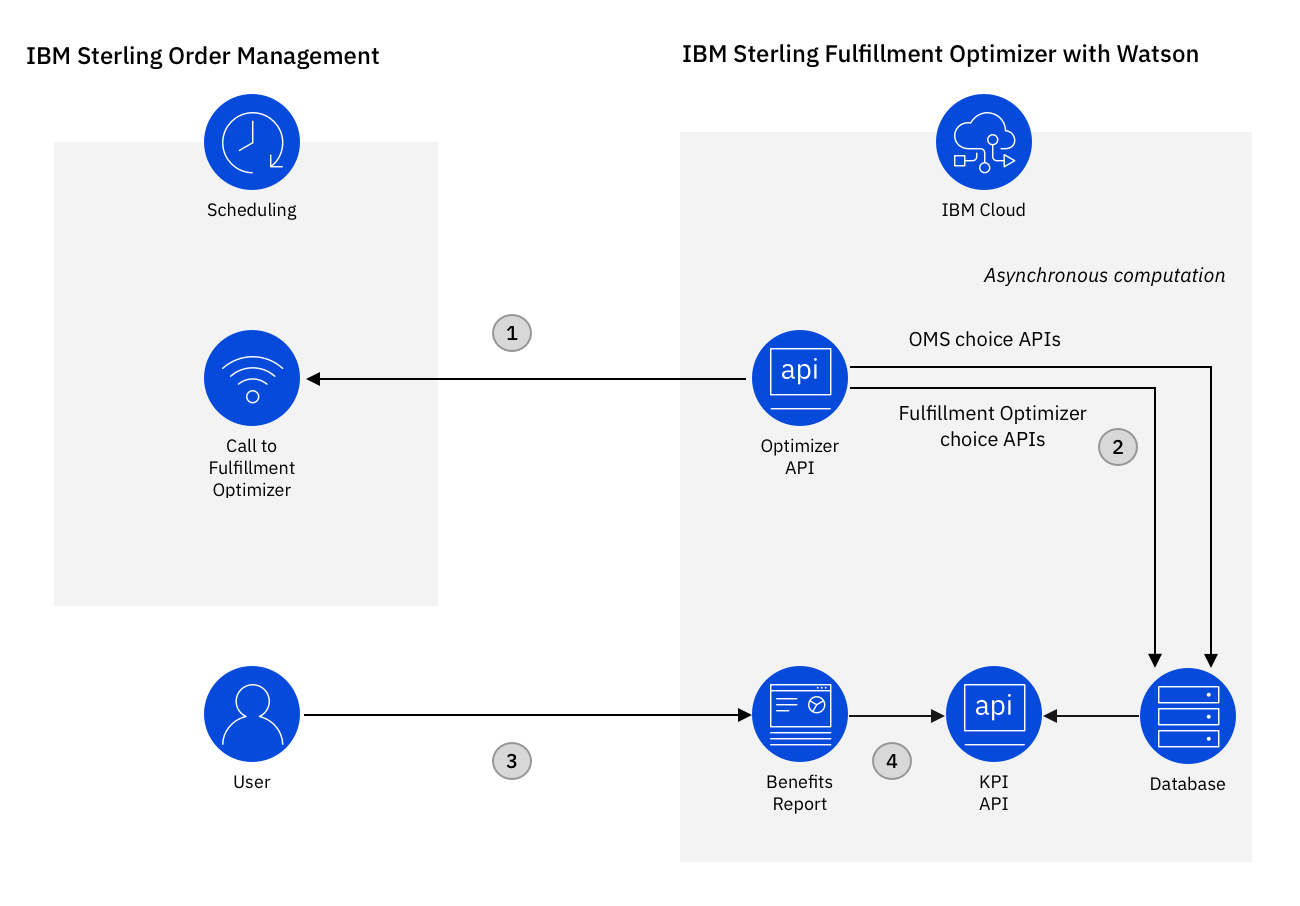
- To integrate the two applications, synchronous integration is required where the order
management system calls the Optimizer API in real-time when the schedule process runs.
In the evaluation phase, the order management system calls the idle version of the optimization API that can accept orders and process them asynchronously, thus providing you the ability to both test the integration and understand the potential benefits of using Fulfillment Optimizer prior to switching to the synchronous mode of integration between the two systems.
- Fulfillment Optimizer processes the received request and asynchronously calculates Key Performance Indicators (KPIs).
- A fulfillment manager can view the benefit and compare the accumulated KPIs using Benefits report.
- REST APIs that provide the data are also available for further analysis.
Reference integration pattern using IBM Sterling Order Management
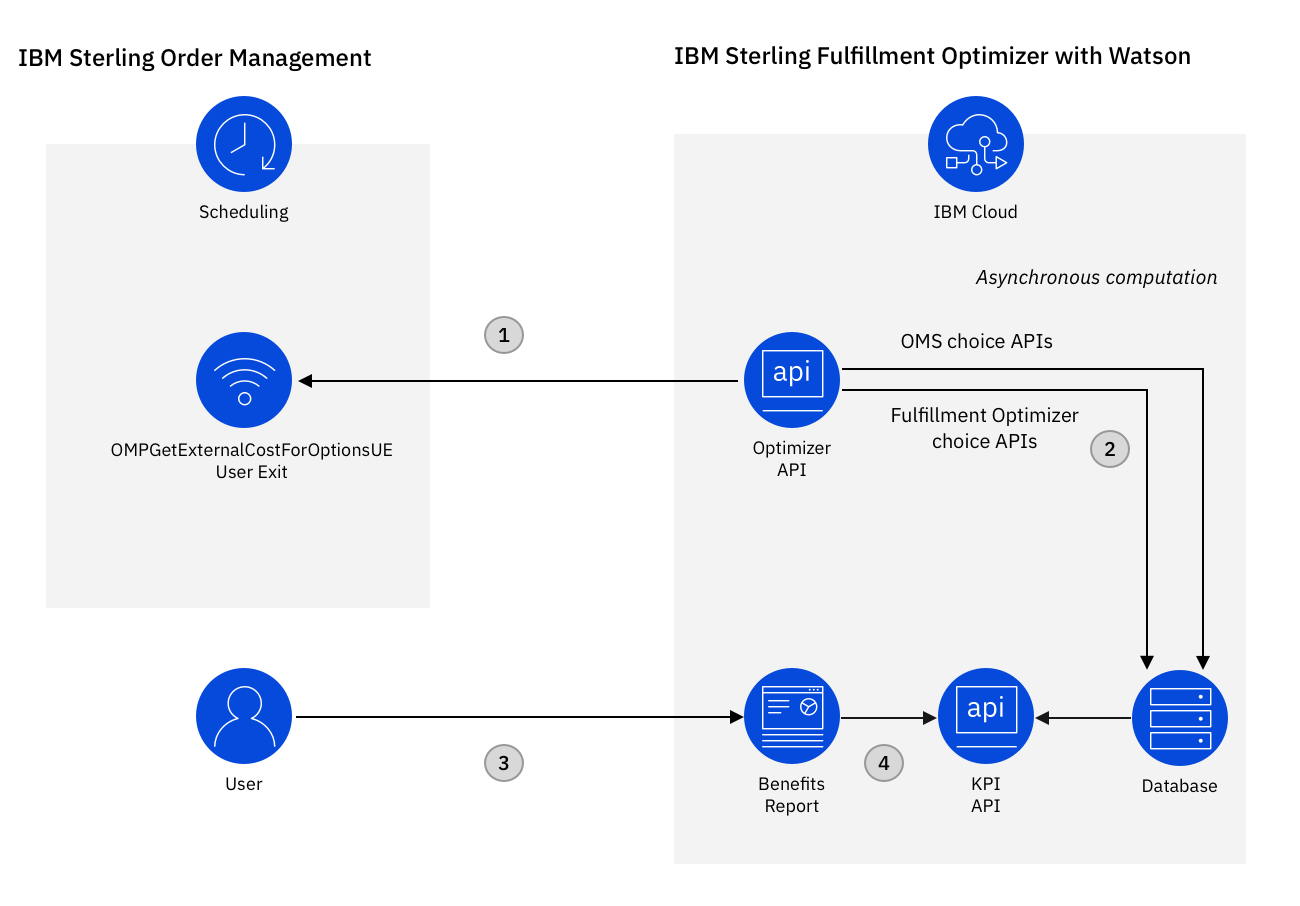
This pattern enables real-time integration from IBM Sterling Order Management to Fulfillment Optimizer and helps you obtain and deliver key insights on benefits that will optimize the cost to serve.
Procedure
- Enable the ENABLE_SHADOW_SOLVER rule using the IBM Order Management manageRule API. Use the
following input for the manageRule
API:
<Rules DocumentType=“0001” OrganizationCode=“XYZ” RuleSetFieldDescription=“Enable Shadow solver for XYZ.” RuleSetFieldName=“ENABLE_SHADOW_SOLVER” RuleSetValue=“Y”/> - Enable the landed cost parameters that will be considered for evaluation during order promising.
- Implement the
OMPGetExternalCostForOptionsUEuser exit in your order management system to invoke the Idle API using an HTTP client library.Refer to the user exit template in the OMPGetExternalCostForOptionsUE user exit template for the Optimizer API topic.
For more information about this user exit, see the IBM® Sterling Order Management System Javadocs.
To view an example demonstrating how to call the Idle API, see the Sample Idle Optimizer API integration topic.
- Calibrate the configuration data in Fulfillment Optimizer by setting and activating the optimization business objectives and node balancing coefficients. At a minimum, you must configure Shipping Cost Optimization. For example, to balance your fulfillment network and to optimize shipping cost, set a weight of 100 for Load balancing cost and Shipping cost.
- Specify the node balancing coefficients to balance your fulfillment network.
Once you are satisfied with the benefits accumulated by running Order Management System in Shadow Mode, you can switch to using the Optimizer API and use the response to apply the Optimizer recommendations in OMS.
Evaluating KPIs
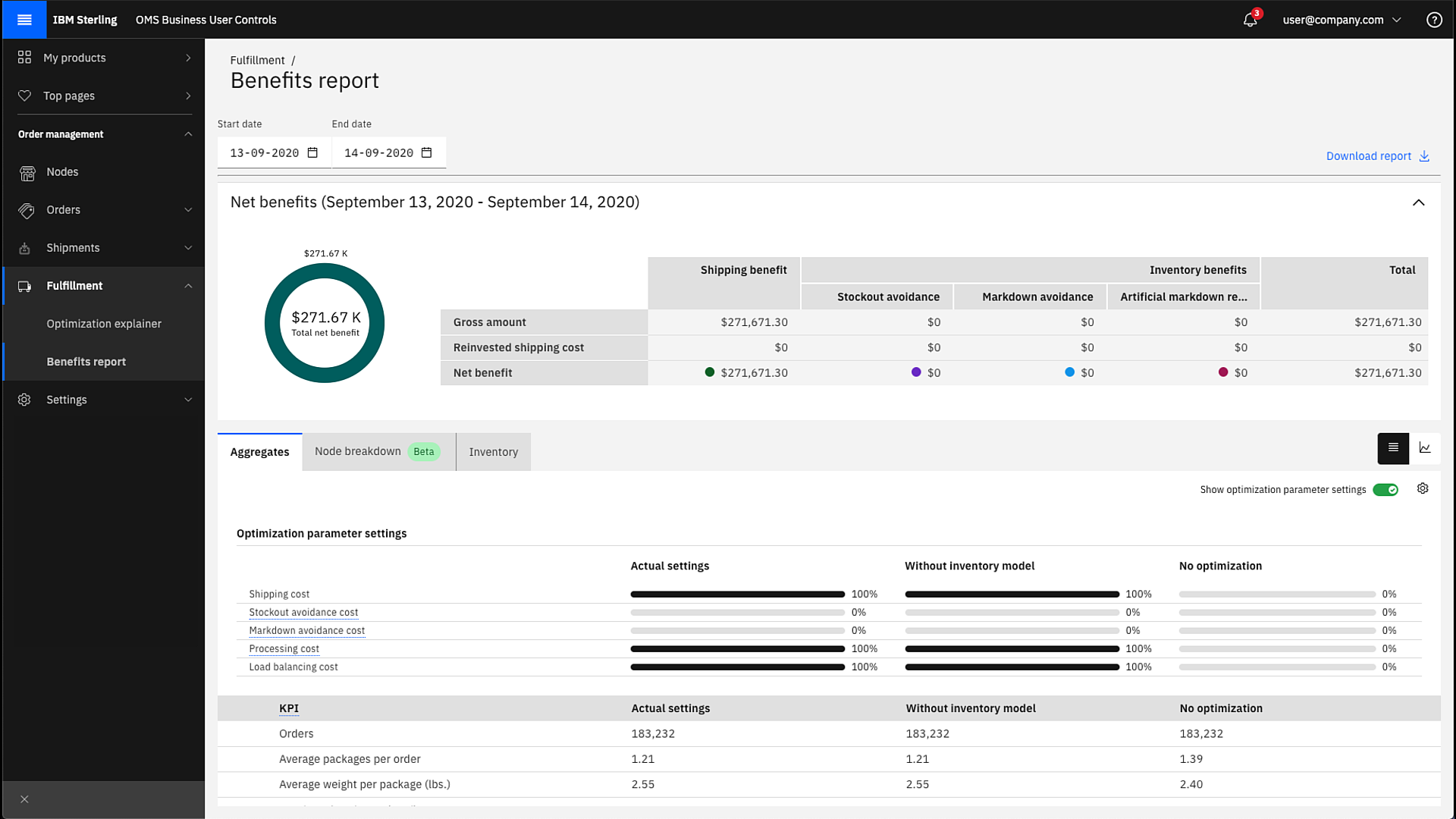
After completing these steps, you can start seeing the potential benefits of using Fulfillment Optimizer within Benefits report. Benefits report enables you to obtain a complete picture of the Key Performance Indicators and helps you aggregate and harmonize the data into a single analytical view. For example, you can view the net benefits accrued for a specific period of time in Benefits report.
The following image displays the results of idle optimization for a time period in which 183,232 orders were evaluated. The average number of packages per order is reduced from 1.29 to 1.21 with an estimated shipping benefit of $271,671.
You can also fetch the KPIs using the provided REST APIs.
HttpResponse<String> response = Unirest.get("https://api.orderoptimizer.ibm.com/explainer/api/v1/scenario/STANDARD/kpi/sourcing/summary?startDate=2020-05-05&endDate=2020-06-06")
  .header("tenantId", "CityCool")
  .header("Authorization", "Bearer token")
  .asString();
Or, fetch the total benefit for a date range using this API call:
HttpResponse<String> response = Unirest.get("https://api.orderoptimizer.ibm.com//explainer/api/v1/scenario/STANDARD/benefit/total?startDate=2020-06-01&endDate=2020-06-10")
  .header("tenantId", "CityCool")
  .header("Authorization", "Bearer until_growing_time_speeches_assigned")
  .header("Content-Type", "application/json")
  .asString();
The optimization models can be extended for you to avoid stockouts and markdowns while still accounting for the possibility of future sales. All of this is achieved using a hybrid cloud approach to integration that allows you to ramp up quickly on the cloud-based IBM Sterling Fulfillment Optimizer with Watson. For more information, watch the video about the Inventory Model and Benefits report.