Order cancel alert
An order might be canceled for several reasons. A customer might not want the order that is placed by mistake, a duplicate order is created, or the payment methods on the order turn out to be fraudulent. As soon as you cancel the order, a notification must be sent to the customer.
Solution
This section describes APIs, user exits, services, and other components.
The application provides a service that handles email notification when an order is successfully canceled. When an order is canceled through the changeOrder API, the ON_CANCEL event is raised, which invokes the YCD_CancelOrderNotification_3.0 service through the YCDOnCancel action.
Before sending the notification, the service attempts to close all open alerts on the order, if all order lines in that order have been canceled. A notification is sent to the customer if they have an email address defined. Otherwise, an alert is sent to the user to indicate that the user must inform the customer about the order cancellation.
Orders that are automatically canceled when promised delivery dates are not met, can be notified to the customer by using this feature. The message sent to the customer depends on the reason, either an automatic cancellation or a regular cancellation.
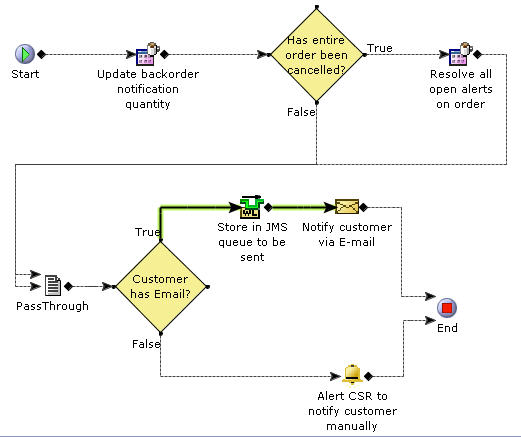
The YCD_CancelOrderNotification_3.0 service calls the getOrderDetails API to retrieve the relevant order information, and passes it on to an email service that will send the information to the customer, in html format, which is converted by an XSL.
Although the solution is provided with the application, you must enhance the service to account for the email service being potentially down. The suggested solution is instead of calling the getOrderDetails API, pass the output XML of the ON_SUCCESS event to a queue of your choice (for example, a JMS queue), and check to see if the email server is up. If it is down, leave the notification in the queue, and try to reprocess it later. If it is up, call the XSL to convert the XML in the queue to HTML, and send the email to the customer.
Implementation
- Enable the ON_SUCCESS event in the Change Order transaction in the Applications Manager. By default, the cancel order notification is turned off because the ON_SUCCESS event is disabled.
- The template that is used by the email sender component of the service to format the output XML of the getOrderDetails API into HTML is found in the following file: <INSTALL_DIR>/repository/xapi/template/merged/email/YCD_Cancel OrderNotification.xsl.sample. Copy this file, name it CancelOrderNotification.xsl, customize it as needed, and specify the XSL used to generate the HTML message in the body template field of the service’s email sender component.
End-user impact
If an ordered is canceled and the customer does not have an email address, an alert is sent to the Customer Notification queue. By default, the user monitors this queue and informs the customer about cancellation.