Logical components and functions
The following information describes key logical components and functions of TSLM and the names and terms that are used in its environments.
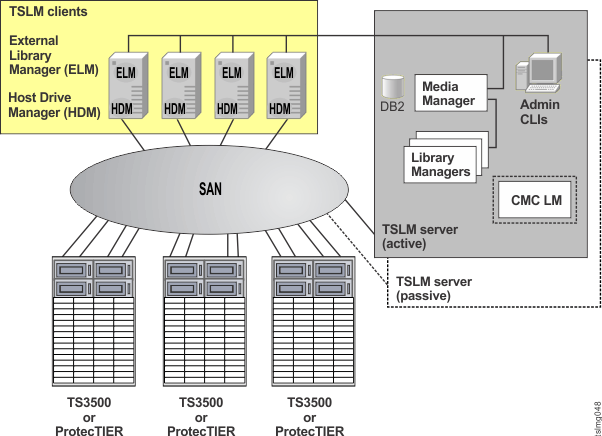
- Media Manager (MM)
- The Media Manager (MM) is the central server component which, among other tasks, coordinates access to drives and cartridges, handles volume allocation and deallocation requests, and stores a log of all activities. The MM uses a TSLM bundled (and constrained) version of IBM® DB2® for persistent storage.
- Library Manager (LM)
- The Library Manager (LM) provides the Media Manager access to library media changers. The LM reports all slots, tape drives, and cartridges to the Media Manager, controls libraries on behalf of the Media Manager, and encapsulates (that is, ’virtualizes’) the library hardware. Because of this virtualization, new library hardware can be integrated into TSLM without any changes to an existing installed Media Manager.
- Library Manager for CMC (CMC LM)
- The Library Manager for Connected Media Changer (CMC LM) provides the Media Manager with control of the IBM TS3500 Tape Library Shuttle Complex. The CMC LM discovers shuttle connections, and controls movement of cartridges from one library to another using shuttle connections.
- Host Drive Manager (HDM)
- The Host Drive Manager (HDM) reports all local device handles to MM, runs mount and unmount commands, checks the path before a cartridge is loaded, and reports statistical data to MM when a cartridge is unloaded.
- Admin Console / Command Line Interface (CLI)
- The Admin Console offers a Command Line Interface (CLI) which enables configuration and administration of TSLM.
- External Library Manager (ELM)
- The External Library Manager (ELM) serves as a management layer between IBM Spectrum
Protect and the TSLM Media Management software. It translates the IBM Spectrum
Protect
External Media Management Interface (EMMI) API into commands of the IEEE 1244 Media Management
Protocol that is understood by TSLM.
The ELM executable must reside on the same server that runs the IBM Spectrum Protect server for TSLM, because the IBM Spectrum Protect server directly executes the ELM executable.
The ELM executable communicates with TSLM over a TCP/IP connection.
All TSLM components can run on the same or on different servers. Therefore, different options are available for scaling and high availability. Application servers that need access to TSLM managed drive and cartridge resources must run the HDM. In addition, IBM Spectrum Protect servers need the ELM for TSLM.
- Applications
- Applications refer to client programs (for example, backup/archive software like IBM Spectrum Protect) that are able to use TSLM for media management purposes. For every application that can use TSLM, an application object that describes the application must be created. The addapp command must be used to create application objects. Applications are the primary holder of ownership in TSLM. Volumes, for example, belong to the application that allocated them.
- Application instances
- An
application instance (AI) is an instance of an associated application that is authorized to use
TSLM. The IBM Spectrum
Protect server and the IBM Spectrum
Protect
agent are examples of an application instance. For every application instance that can use TSLM, an application instance object that describes
the instance must be created.
An application object must be created before an application instance object with the same ApplicationName can be created. Applications, therefore, work as blueprints for application instances. All instances of an application own the objects of their corresponding application.
The AI.Privilege attribute holds the current privilege level of the application instance. Privileged application instances are able to change the privilege level of any instance. The application object cannot be deleted until all Application Instance objects that have the corresponding ApplicationName are deleted.
Two types of privilege levels exist for application instances: administrative and standard.
- Administrative application instances
- A privileged administrative application instance has complete control. In general, such an administrative application might perform operations on behalf of one or more applications. It is able to unmount or deallocate volumes that were mounted by other applications. An administrative application can create any kind of object and can modify the attributes of any object.
- Standard application instances
- Standard, non-privileged application instances can view objects that they own or objects that
contain objects owned by them. For example, volumes that are owned by a non-privileged application,
the libraries that contain those volumes, and the drives in which those volumes are currently
mounted.
This level of privilege allows only the creation, modification, or deletion of some client attributes of certain objects.
Figure 2. Groups and pools 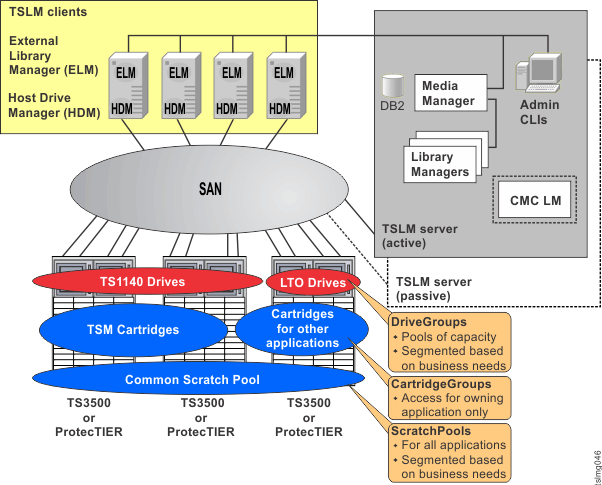
- Drives
- A drive is a device that is used to access the contents of a
cartridge. Each drive must be represented by a corresponding object in the IBM Tape
System Library Manager database. Drive objects are created while a library
manager is reporting the inventory of the library it is controlling.
- The DriveDisabled attribute is a way to stop or suspend the use of a drive, even though all of the support for it is present and running. The DriveDisabled attribute is an administratively controlled switch.
- The DriveStateHard and DriveStateSoft fields show the current state of the drive.
- The LibraryName, BayName, and CartridgePCL attributes show the location and the contents of the drive.
- The DriveGroupName attribute is used to group drives to support an access permissions model. Each drive must belong to a DriveGroup.
- DriveGroupApplication records are used to allow applications to access particular DriveGroups.
- DriveGroups
- A DriveGroup object is a named group to which a drive can belong. DriveGroups are used to aggregate drives, and then to support both an access permissions model and a preferential usage policy. Each drive must belong to a DriveGroup. A DriveGroup might span across Libraries.
- DriveGroupApplications
- These objects allow applications to access drives in a DriveGroup. An application might have access to one or more DriveGroups. The groups can be ordered by setting the DriveGroupApplicationPriorityField. This allows administrators to set a preference sequence when they search DriveGroups for empty drives.
- Cartridges
- Each physical tape cartridge is represented by a corresponding
object in the IBM Tape
System Library Manager database. Each object
represents one piece of removable media. The cartridge objects are automatically created when a
library is scanned for entities by a Library Manager.
The Physical Cartridge Label (PCL) must be unique among all cartridges. When the first Volume is allocated on a cartridge, the cartridge becomes owned by the application that owns the volume. The ApplicationName attribute records this association.
- CartridgeGroups
- CartridgeGroups are named groups to which cartridges can belong. They are used to control an application's access to cartridges. A single CartridgeGroup can contain cartridges from more than one library.
- CartridgeGroupApplications
- CartridgeGroupApplication objects allow applications to access Cartridges in CartridgeGroups. An application might have access to one or more CartridgeGroups. The groups can be ordered by setting the CartridgeGroupApplicationPriority field. This allows an administrator to set a preference sequence for searching CartridgeGroups for unused cartridges.
- ScratchPools
- ScratchPools
are a special CartridgeGroup. They are searched first for empty cartridges before any other
CartridgeGroup.
If a volume is allocated on a cartridge that belongs to a ScratchPool, the cartridge is moved to another ordinary CartridgeGroup that the application that runs the command has access to. If the application does not have access to another ordinary CartridgeGroup, the cartridge is not moved out of the ScratchPool, but is set to the "not allocatable" state, which prevents it from being used by another application.
To see how many cartridges are currently available, create at least one ScratchPool and another ordinary CartridgeGroup so that the ScratchPool contains only empty cartridges. By default, the IBM Tape System Library Manager installation creates a ScratchPool and an ordinary CartridgeGroup named "Default".
- Volumes
- A volume object represents an application-specific linkage to a cartridge. Volumes get allocated by an application. In case no cartridge is specified, TSLM searches for an empty cartridge to create the linkage. After the first volume is allocated on a cartridge, no more volumes can be allocated on this cartridge. Therefore, the volume and the cartridge are now owned by the application that allocated the volume.
- Libraries
- To control a physical tape library with TSLM, a library object must be created. Libraries contain slots with cartridges and drives, which can be used to read and write the cartridges.