Promotion
Using the promotion feature, you can manage content, relating to multiple deployment environments, in a central WSRR instance and have subsets of that content copied automatically to environment-specific WSRR instances in response to lifecycle transitions.
The process of copying an entity from one WSRR instance to another is called promotion, and the promotion feature performs the copy operation automatically when the entity undergoes an appropriate lifecycle transition as a result of your governance activity.
| Source system | Target system | Promotion supported? |
|---|---|---|
| v8.5.6.n | v8.5.6.n | All promotion is supported, including policy promotion |
| v8.5.6.n | v8.5.5.n | All promotion is supported, including policy promotion |
| v8.5.6.n | v8.5.0.n | All promotion is supported, including policy promotion |
| v8.5.6.n | v8.0.0.n | All promotion is supported, including policy promotion |
| v8.5.6.n | v7.5.0.2 or newer | Promotion is supported. Policy promotion is not supported |
| v8.5.6.n | v7.0.0.4 or newer | Promotion is supported. Policy promotion is not supported |
- If you want to configure promotion between two registries that are in different WebSphere® Application Server cells, the names of the cells must be unique.
- Both the source and target WSRR instances must have the same active configuration profile. This ensures that the same business models, lifecycles, and ontologies exist on the source and target instances.
How promotion works
You configure promotion by defining promotion environments and transitions.- Location and security details for the server on which the target WSRR instance is installed.
- The promotion type. This can be any of the following types:
- synchronous: a WSRR entity is promoted immediately after it undergoes an appropriate lifecycle transition.
- manual: all of the promotion data is stored in a .zip file, which then needs to be manually loaded into the target WSRR instance. You can import the promotion data into the target system later by using the WSRR web UI, or you can write a script that performs the import. You can then schedule the script to run at a particular time.
- asynchronous: you schedule the promotion to occur at a later time.Note: The current asynchronous promotion capability is deprecated, and will be removed in a future release. Use the manual option to achieve an asynchronous effect.
A transition specifies the details of a lifecycle transition that results in promotion, and the environments to which a WSRR entity is promoted when it undergoes that transition.
Each time a WSRR entity undergoes a lifecycle transition, the promotion mechanism checks whether that transition is defined in the promotion configuration. If it is, the entity is promoted to the environment, or environments, specified in the transition definition.
An entity is promoted along with all properties and classifications defined on the entity. In addition, all entities that are the targets of relationships defined on the entity that is being promoted are also promoted.
Example of promotion
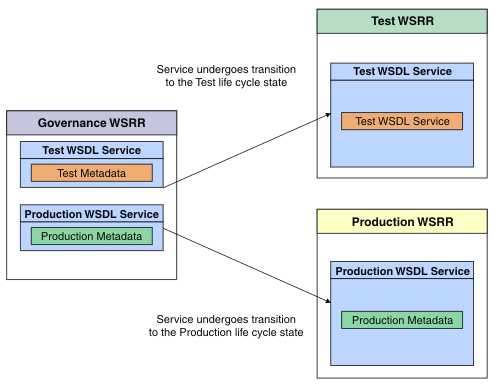
In this example, you have the following WSRR instances:- A central WSRR instance where all your WSDL services are loaded, managed and governed.
- A "Test" WSRR instance, to which you want to copy WSDL services when they have reached a point in their lifecycle at which they are ready for test.
- A "Production" WSRR instance, to which you want to copy WSDL services when they have reached a point in their lifecycle at which they are ready for production.
This example scenario is summarized in the following diagram:
Re-promotion
After an object, and all supporting objects, has initially been promoted, it might become necessary to re-promote due to some metadata changes on an object.If you are using a WSRR 8.5.6 profile in your target registry (or have enabled the
update all logical objects
behavior for an upgraded profile) and are using a minimal
promotion type, then WSRR attempts to update all objects that have a dependency on any of the
objects that are updated by the promotion. See Setting the "update all logical objects" option for
details on enabling this feature on an upgraded profile.
Otherwise, only those objects that have been transitioned and caused the re-promotion will be considered, all supporting objects that have not been transitioned remain as they were on the target registry. If additional supporting objects have been attached to those transitioned, that are not currently present on the target registry, these are created. For those objects that have been transitioned, an update is attempted on each object. Where the content of a document has been changed, an update is not possible and a deletion and creation occurs. It is possible that this deletion causes an error due to other dependencies; this indicates that it is not safe to alter the content and use re-promotion. You must first manually examine the dependencies and ensure that it is safe to delete them before carrying out the re-promotion.
Re-promotion of a previously promoted object occurs automatically when that object is transitioned to another state that is defined in the promotion configuration, not when its metadata is changed. You must therefore make sure that the lifecycle defines a transition from the current state, in which the object resides after the previous promotion, to the state from which re-promotion is to occur, and that you define that state in the promotion configuration.
- An object A is governed.
- A is promoted to the target registry.
- Governance is removed from A.
- A is re-governed.
- A is re-promoted to the target registry.
Deletion of objects
In a typical promotion scenario, you have a governance master registry where you make changes, and then you promote objects from there to one or more runtime registries. Promotion can not cause an object to be deleted in a runtime WSRR registry in response to a deletion on the governance master WSRR registry. The act of deleting an object on the governance master is separate from the act of making a lifecycle transition that results in a promotion operation taking place. To ensure that the runtime registry continues to accurately reflect its environment, any objects that are deleted from the governance master registry must also be deleted from any runtime registries that they are stored in.
Promotion is described in detail in the following subtopics: