Integrating with WebSphere Service Registry and Repository Advanced Lifecycle Edition
With both IBM® Rational® Asset Manager and IBM WebSphere® Service Registry and Repository, you can develop and collaborate on business assets in Rational Asset Manager with the assets also appearing as the appropriate business objects for approval and deployment in WebSphere Service Registry and Repository. To develop and collaborate on SOA services, the best practice is to use IBM WebSphere Service Registry and Repository Advanced Lifecycle Edition.
WebSphere Service Registry and Repository is the master metadata repository for runtime service descriptions.
- Traditional Web services implementing WSDL interfaces with SOAP/HTTP bindings
- A broad range of service-oriented architecture (SOA) services that can be described using WSDL, XSD and WS-Policy decorations, but might use a range of protocols and be implemented according to a variety of programming models.
WebSphere Service Registry and Repository is where information about services that is scattered across an enterprise is brought together to provide a single, comprehensive description of a service.
If you connect a community in Rational Asset Manager with WebSphere Service Registry and Repository, you can publish assets that contain web services documents to the WebSphere Service Registry and Repository repository. If you configure a mapping file, you can publish assets to WebSphere Service Registry and Repository as specific WebSphere Service Registry and Repository Business Model Objects. Otherwise, assets that you publish to WebSphere Service Registry and Repository are generic concepts in WebSphere Service Registry and Repository that link to the asset in Rational Asset Manager.
You can also use the Rational Asset Manager interface to find service documents and service metadata that are located in WebSphere Service Registry and Repository.
Rational Asset Manager includes the ALE policy and the ALE transition policy. You can use the ALE policy to automatically publish specific asset types to WebSphere Service Registry and Repository for you and enforce the mapping file that you configured for your connection to WebSphere Service Registry and Repository. In the pre-configured SOA lifecycles, the ALE policy is runs every time you modify an asset or move it to a different state. When the policy runs, it refers to the mapping file and performs the appropriate action on the object in WebSphere Service Registry and Repository; for example, when you create a new asset of the Business Solution type in Rational Asset Manager, the ALE policy will run and automatically create a Business Capability object in WebSphere Service Registry and Repository.
Using WebSphere Service Registry and Repository Advanced Lifecycle Edition
For more information about WebSphere Service Registry and Repository and the Advanced Lifecycle Edition, visit the WebSphere Service Registry and Repository Version 7.5 Information Center.
For information about installing WebSphere Service Registry and Repository, see the planning and installing topics.
If you are upgrading from an earlier version of WebSphere Service Registry and Repository, see “Upgrading or migrating to a Version 7.5 installation.”
Publish assets in Rational Asset Manager to WebSphere Service Registry and Repository
If you connect a community in Rational Asset Manager to WebSphere Service Registry and Repository, you can publish assets that contain Web services documents and other business objects to WebSphere Service Registry and Repository.
If you configure a mapping file for your connection, you can publish assets to WebSphere Service Registry and Repository as business model objects; otherwise, assets that you publish to WebSphere Service Registry and Repository will be generic concepts in WebSphere Service Registry and Repository that link to the assets in Rational Asset Manager.
Synchronizing objects in WebSphere Service Registry and Repository to Rational Asset Manager
You can configure the connection between a WebSphere Service Registry and Repository repository and a community in Rational Asset Manager to synchronize at scheduled intervals.
- Physical documents:
- WSDL
- XSD
- WS-Policies
- SCA modules
- XML files
- Other physical documents
- Concepts:
- Concepts with artifact relationships
- Other concept types that you select when you configure the connection to WebSphere Service Registry and Repository
If you change the WebSphere Service Registry and Repository server, those changes are reflected in the assets in Rational Asset Manager the next time that the connection synchronizes.
Configuring the connection
- Enable the SOA model library: for more information, see Enabling the service-oriented architecture (SOA) model library.
- Configure the ALEConfiguration in WebSphere Service Registry and Repository: The ALEConfiguration in WebSphere Service Registry and Repository is where you specify the URLs and the credentials to access both applications. In a similar manner to the mapping file in Rational Asset Manager, you can specify the triggers and actions in WebSphere Service Registry and Repository that will be pushed and synchronized to the Rational Asset Manager server. For more information, see Advanced Lifecycle Edition in the WebSphere Service Registry and Repository information center.
- Create a connection between a community and WebSphere Service Registry and Repository: while doing so, you can select and edit the mapping file that is included with the SOA model library or specify your own. For more information, see Connecting to WebSphere Service Registry and Repository.
- Configure the SOA lifecycles for your community: for more information, see Creating the SOA lifecycles collection. To customize the lifecycles, see Creating master lifecycles.
How assets in Rational Asset Manager map to objects in WebSphere Service Registry and Repository
If you use the mapping configuration file that is included in the SOA model library, the following table displays how assets in Rational Asset Manager map to objects in WebSphere Service Registry and Repository:
| Asset type in Rational Asset Manager | Object in WebSphere Service Registry and Repository |
|---|---|
| Business Solution | BusinessCapability extends Asset |
| Business Solution categorized as Software Development/Kind/Process | BusinessProcess extends BusinessCapability |
| Business Solution categorized as Software Development/Kind/Web Application | BusinessApplication extends BusinessCapability |
| Business Solution categorized as Software Development/Kind/Service | BusinessService extends BusinessCapability |
| Release | CapabilityVersion extends Asset |
| Release categorized as Software Development/Kind/Process | ProcessVersion extends CapabilityVersion |
| Release categorized as Software Development/Kind/Web Application | ApplicationVersion extends CapabilityVersion |
| Release categorized as Software Development/Kind/Service | ServiceVersion extends CapabilityVersion |
| Specification categorized as Software Development/Kind/Service/Interface | ServiceInterfaceSpecification extends Asset |
| Specification categorized as Software Development/Kind/Schema | SchemaSpecification extends Asset |
| DoU | DoU |
For more information and examples on which processes can be automated, see the topics on synchronization in the WebSphere Service Registry and Repository information center.
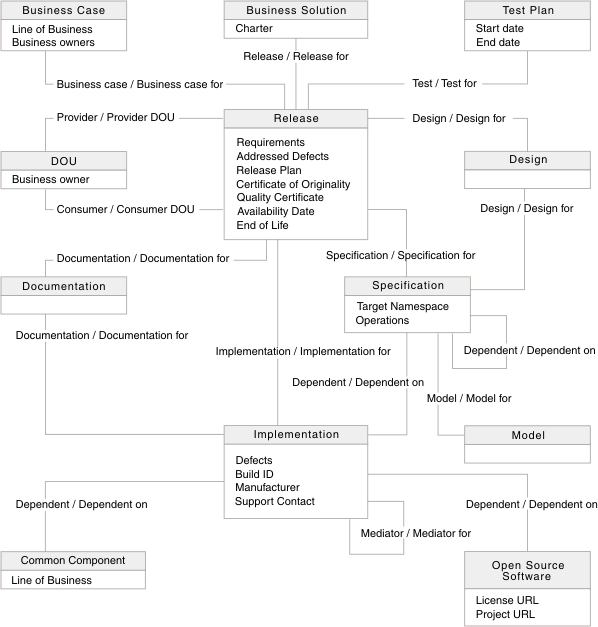
The SOA Model library in Rational Asset Manager
The
following diagram shows the asset types, the required attributes for
those asset types, and the relationships between asset types for the
SOA Model library: