Timer categories
| Attribute name | Description | Default value |
|---|---|---|
| DniPollingIntervalTimer | Polling interval. | 60 |
| DniSchemaTimer | Schema name of the corresponding timer table. | DNIvDSN |
| DniTableTimer | Table name of the corresponding timer table. | DNI_TIMER01 |
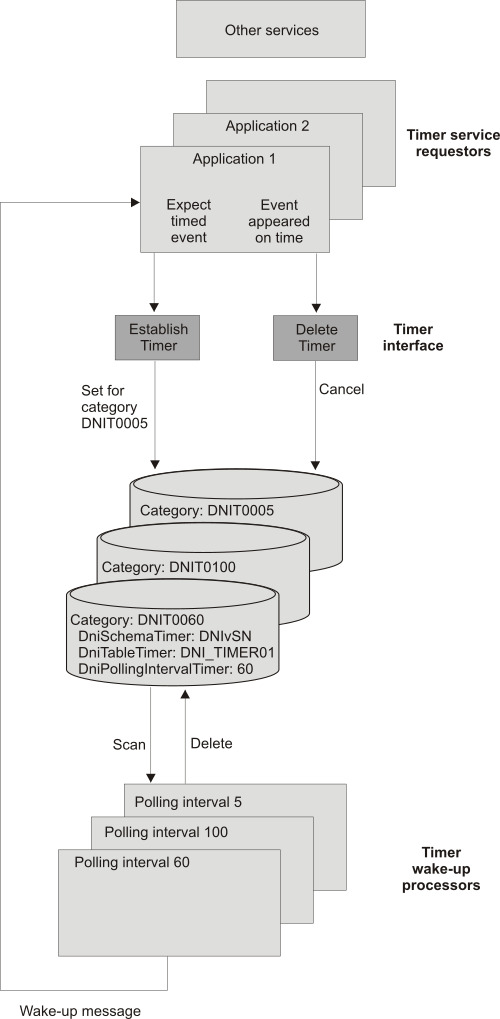
Each category summarizes one timer environment that consists of one timer wake-up processor and one timer table. Each started timer wake-up processor processes only the timer table specified for the DniTableTimer attribute. The timer wake-up processor uses this category, including its timer table.
If applications have different timer requirements, separate the timer records into different timer tables. You categorize timer requirements by the amount of timer requests per time unit issued by the requesting application, the duration of the timer polling interval, or both. By separating the timer requirements into different timer tables, you can better tune your application performance.
You can decide to change the default timer category. To have all timer requests with different wake-up intervals be processed by the timer wake-up processor within the specified time limit, the polling interval of the timer wake-up processor needs to be set to the minimum time limit. For example, you have two different timer requirements for 5 seconds and 60 seconds. Therefore, the polling interval of the timer wake-up processor needs to be set to 5 seconds. You could decide to change the polling interval of the default timer category DNIT0060 from 60 to 5 seconds. However, if this would affect performance, you might want to create another timer category.
Figure 1 shows the timer service with the default timer category.
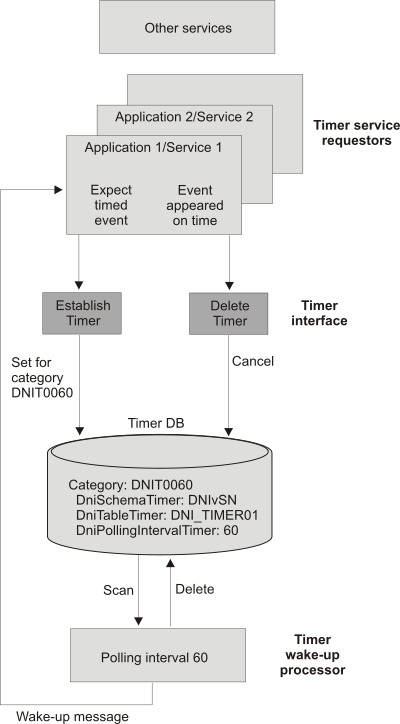
Figure 2 shows an example where three timer tables exist. The timer tables have polling intervals of 5 seconds, 60 seconds, and 100 seconds.