Authorisations
An authorisation is an entity that authorizes one BIC to send messages to or receive messages from a correspondent BIC for a particular service. Each authorisation is unidirectional and can be specified to apply only to certain message types or categories.
- Authorisation to send (toSnd)
- An authorisation, received from a correspondent, that authorizes
your BIC to send messages to the correspondent BIC for a particular
service. An authorisation to send becomes active only if you accept
it, at which point it is said to be Enabled. If you reject
an authorisation to send, the Relationship Management Application
sets its status to Rejected and notifies the correspondent. If
you delete an authorisation to send that was accepted earlier, the
Relationship Management Application sets its status to Deleted and
notifies the correspondent.
A correspondent can revoke an authorisation to send. When the RM transfer service receives an RMA message that indicates that an authorisation to send was revoked, the Relationship Management Application sets the status of the authorisation to Revoked.
- Authorisation to receive (toRcv)
- An authorisation, created by you, that authorizes your BIC to
receive messages from the correspondent BIC for a particular service.
When you create an authorisation to receive, the Relationship Management
Application sends a corresponding authorisation to send to the correspondent.
That authorisation to send authorizes the correspondent to send messages
to your BIC. The authorisation to receive remains in the Enabled status
as long as the correspondent either does not react to or accepts the
corresponding authorisation to send. If the correspondent does not
want to send messages to your BIC for the specified service, the correspondent
rejects or deletes the authorisation to send, and the Relationship
Management Application automatically changes the status of the corresponding
authorisation to receive to Rejected.
When you revoke an authorisation to receive, the Relationship Management Application sets its status to Revoked and notifies the correspondent.
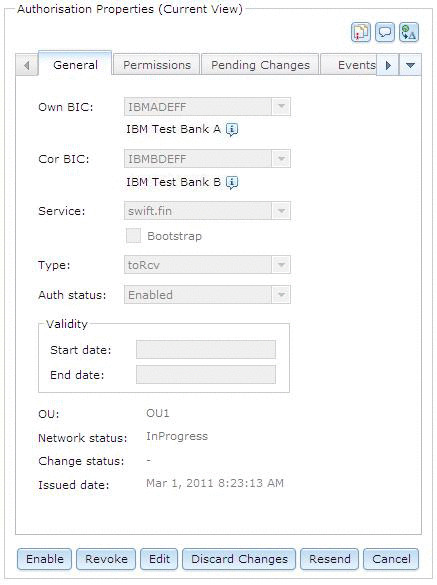
When you open an authorisation, its properties are displayed in a view similar to the one shown in Figure 1.
- Current version
- This is the version of the authorisation that is currently active and that is used to authorize message traffic.
- Pending version
- This is the version of the authorisation that is not yet active
due to one of the following reasons:
- It is a draft of an authorisation. The authorisation was not yet submitted. After the draft is approved, it becomes the current version.
- It is a changed version of a current authorisation, but the changes were not yet approved. After the changes are approved, it replaces the current version.
- It is an authorisation to send that was received from a correspondent but was not yet accepted. After the received authorisation to send is accepted, it replaces the current version.
- Stale authorisations
- An authorisation for which the own BIC or the correspondent BIC no longer exists or is otherwise invalid is called a stale authorisation. When you delete a stale authorisation, it is removed from the RMDS, and cannot be recovered or reactivated. Therefore, it is important that you ensure that an authorisation is indeed stale before carrying out the Delete stale action.