Example of an MER business workflow
A workflow is a sequence of activities performed in accordance with business processes. A workflow determines what can be done, by whom, and under what circumstances.
- Business workflow
- Routes a message in response to a business action.
- User workflow
- Routes a message in response to a user action.
- A user creates and submits a message. 1
- The workflow specifies that a different user must either accept or reject that message. 2
- If the authorizer rejects the message, it is placed on an edit queue, where a user can edit and resubmit it to the authorize queue. 3
- If the authorizer accepts the message, it is placed on an output queue for further processing by applications external to the MER Facility. 4

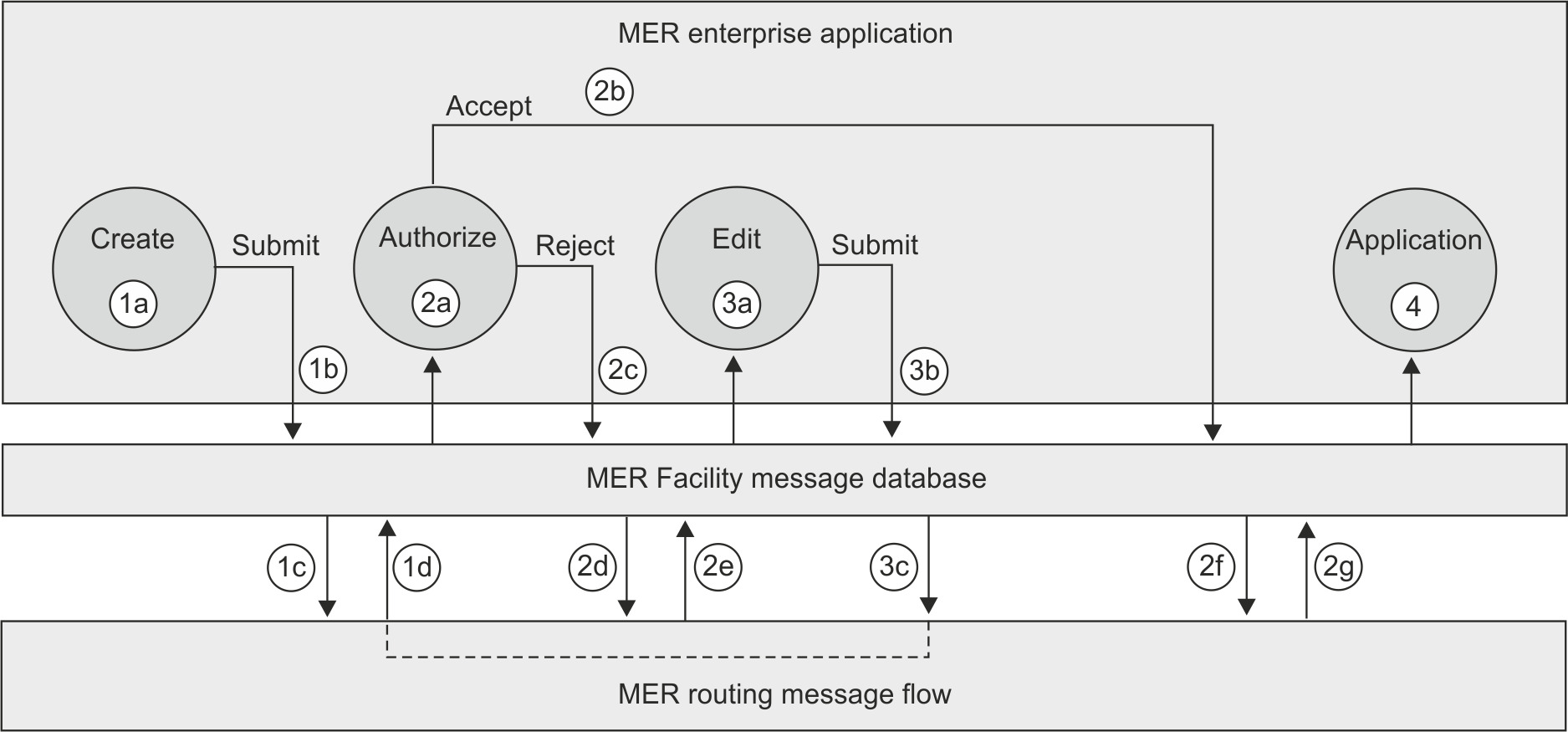
Figure 2 shows the same workflow as it is implemented using the MER Facility:
- A user creates and submits a message 1a .
- The MER enterprise application records in the database 1b that:
- The message is in a main create queue, and the name of that queue.
- An MER routing message flow is to continue processing the message. It does this by setting the next processing type field for the message to Business.
- The MER routing message flow that processes messages that are
in that main create queue continually scans the queue to determine
whether there are any messages that it is to process. When it encounters
such a message 1c , it determines the
next processing step in the workflow. In this example, the next step
is for the message to be processed by someone other than the user
who created the message, so it sets fields in the message 1d to
indicate:
- That the message is in a main authorize queue, and the name of that queue.
- That the MER enterprise application is to continue processing the message. It does this by setting the next processing type field of the message to Application.
- The message is now in the authorize queue 2a . A new user (not the user who created the message) can now either accept or reject the message.
- The MER Facility sets fields in the message to indicate:
- That the message is in the main authorize queue.
- That an MER routing message flow is to continue processing the message.
- Whether the message was accepted 2b or rejected 2c . If accepted, the message is placed in an output queue for further processing by applications external to the MER Facility 4 .
- The MER routing message flow that processes messages that are
in that main authorize queue (this can be, but is not necessarily,
the same message flow that monitors the main create queue) continually
scans the queue to determine whether there are any messages that it
is to process. When it encounters such a message ( 2d or 2f ),
it determines the next processing step in the workflow. Depending
on the action (accept or reject), the message flow determines the
appropriate destination for the message:
- If the message was accepted, it sets fields in the message 2g to
indicate:
- That the message is in a main application queue, and the name of that queue.
- That the MER enterprise application is to continue processing the message.
- If the message was rejected, it sets fields in the message 2e to
indicate:
- That the message is in the main edit queue.
- That the MER enterprise application is to continue processing the message.
- If the message was accepted, it sets fields in the message 2g to
indicate:
- Submit
- This is the only action that is possible for a message that is in a queue with the purpose Create, Edit, or Display. It indicates that the message is to be routed to the next step in the workflow.
- Accept
- For a message that is in a queue with the purpose Authorize, Retype, or Confirm, this action indicates that authorization was granted by the user.
- Reject
- For a message that is in a queue with the purpose Authorize, Retype, or Confirm, this action indicates that authorization was denied by the user.
Actions that require routing of a message to a queue of a different type but of the same purpose (for example, saving a message as a draft, or moving a message to the redirect queue) are processed by a user-action routing flow. The same is true of administrator actions such as editing a template or moving a message to a different queue.
To prevent different users from working on the same message at the same time, a message is locked as soon as a user opens it for manual processing. A locked message still resides in its queue and appears in message lists, but is flagged with a lock symbol. When the user completes the manual processing step, the message is automatically unlocked.