Configuration process flow
FTM SWIFT entities can go through the configuration process flow differently depending on several factors. The following example takes an entity through a simple configuration process. Someone has already put the entity into production, but you must change it. Dual authorization is enabled.
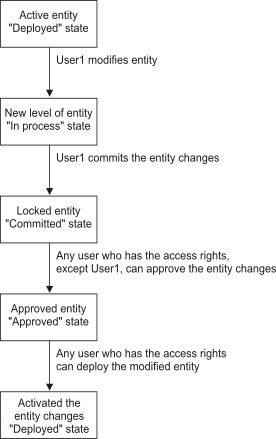
During the modification stage, you change an entity, for example, by changing its description. The type of changes that you can make depends on the entity type. These changes are described in more detail in Managing configuration entities and Administering security entities. During the modification stage, you can also create an entity, an entity relationship, or a new version of an entity, or you can delete an entity. To do this, you follow the same steps that you would follow to modify the entity. When you begin to modify an entity, it is locked for all other users. Only you can change it. The entity is in the In process state.
After you change an entity, you must commit the changes. Committing changes locks the entity so that it cannot be changed further by you or by other users. In this stage, the entity moves from the In process state to the Committed state.
In the approval stage, another user must approve the changes you made. The entity then moves from the Committed state to the Approved state. This example assumes that dual authorization is enabled. Otherwise, the behavior would depend on the type of entity that you modified: either you could approve the changes yourself, or the approval stage would be skipped.
Finally, in the activation stage, you or any user who has the access rights can put the changed entity into production. The entity then moves from the Approved state (or Committed state) to the Deployed state. This process flow is valid only for configuration entities. See Difference in the process flow for configuration entities and security entities for the process flow used for security entities.
The process is the same regardless of whether you create, delete, or change an entity. Figure 1 shows the steps through which the entity passed in the example.
- You might decide after you commit your changes in the modification stage that you are not done and must make additional changes. You or another user can reject the changes. This unlocks the entity so that only you can continue to modify it. This changes the state from Committed back to In process.
- Perhaps a user does not agree that your changes should be approved. After the changes were approved, this user can reject the approval. This changes the state from Approved back to Committed.
Figure 2 shows the configuration process flow when someone rejects changes made to an entity.
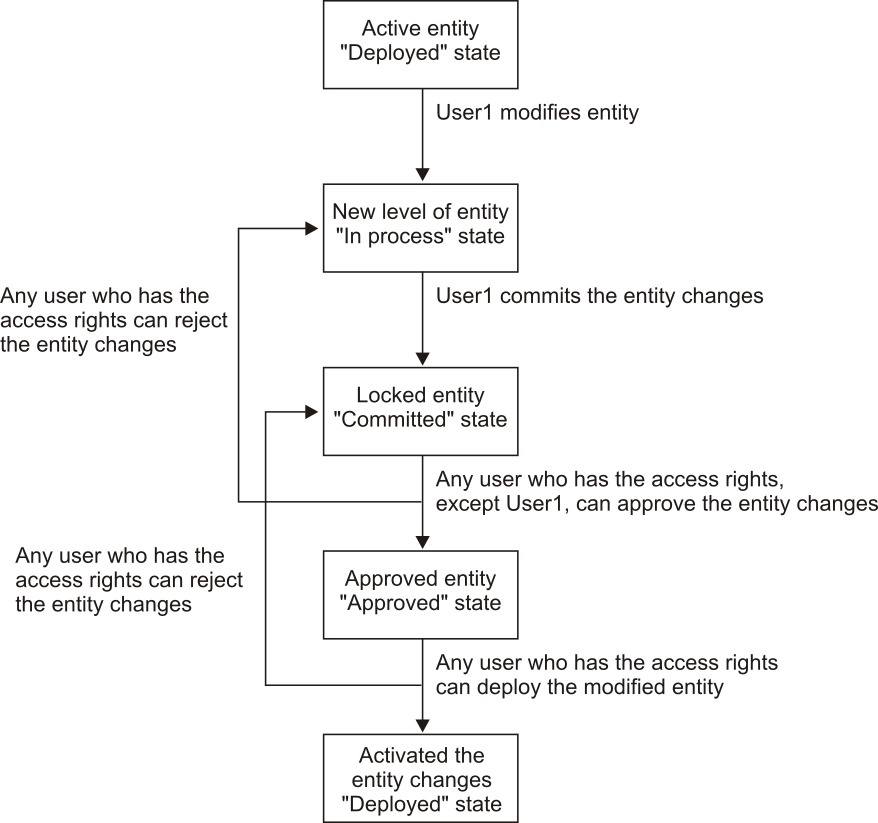
When you reject a changed entity, you must provide the reason why. FTM SWIFT temporarily stores reject reasons. This information is deleted when you move the entity to another state. For example, if you reject a changed entity, the entity is moved from the Committed state to the In process state. You can now continue to work with the entity. This example assumes that you were the initiator of the changes. When you complete the changes and put the entity back to the Committed state, the previous reject comment is deleted.
The same process occurs when a user rejects an entity after it was approved. If this happens, the entity moves from the Approved state to the Committed state. If you determine that you must make additional changes before the entity can be approved, you must reject the entity again. This changes the entity state from the Committed state to the In process state. Because there is a change in the state, the original reject reason is deleted.
- The use of dual authorization
- The difference in the process flow for configuration entities and security entities