Cluster configurations with dynamic LPARs
The advanced partitioning features of AIX® provide the ability to dynamically allocate system CPU, memory, and I/O slot resources (dynamic LPAR).
Using PowerHA® SystemMirror® in combination with LPARs allows you to:
- <Physical Adapter name>_Large_Send
-
Flag to indicate the large send option for this adapter
- <Physical Adapter name>_Large_receive
- Flag to indicate the large receive option for this adapter Note: When it is set and if the real adapter supports it, packets received by the real adapter is aggregated before they are passed to the next layer, resulting in better performance.
- <Physical Adapter name>_DMA_Errors
- The number of incoming packets dropped by the hardware due to the no resource error. Note: This error usually occurs because the receive buffers on the adapter were exhausted. Some adapters may have the size of the receive buffers as a configurable parameter.
- <Physical Adapter name>_Speed
- Indicates media speed attribute of this adapter
- Perform routine system upgrades through the dynamic allocation of system resources. When used with dynamic LPARs, PowerHA SystemMirror can reduce the amount of downtime for well-planned systems upgrades by automating the transition of your application workload from one logical partition to another, so that the first logical partition might be upgraded without risk to the application.
- Effectively redistribute CPU and memory resources to manage the workload. Combining PowerHA SystemMirror with dynamic LPAR lets you use customized application start and stop scripts to dynamically redistribute CPU and memory resources to logical partitions that are currently executing application workload, to further support application transition within a single frame. This way you maintain the processing power and resources necessary to support your applications, while minimal resources are devoted to upgrading, a less resource intensive task.
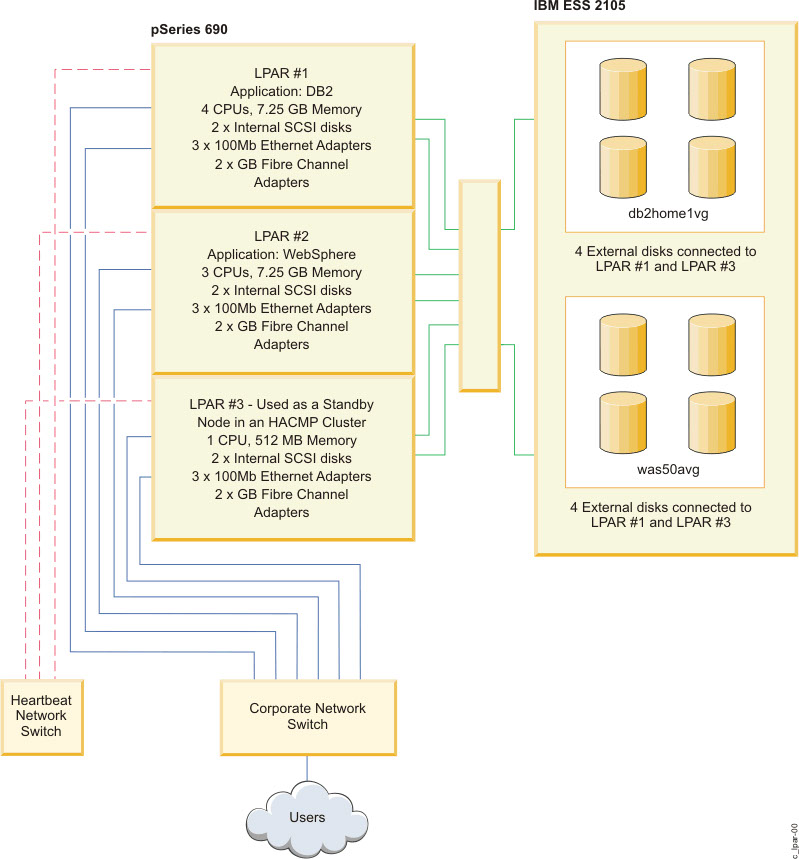
- LPAR 1 is running a back end database (DB2® UDB)
- LPAR 2 is running WebSphere® Application Server (WAS)
- LPAR 3 is running as a backup (standby) for both the DB2 and WAS LPARs. This LPAR contains only minimal CPU and memory resources.
When it is time to move either the DB2 or WAS application to the third LPAR (due to a planned upgrade or a resource failure in these LPARs, for instance), you can use customized application start and stop scripts in PowerHA SystemMirror to automate the dynamic reallocation of CPU and memory from the primary LPAR to the standby LPAR. This operation allows the third LPAR to acquire the CPU and memory resources necessary to meet business performance requirements. When PowerHA SystemMirror moves the resource group containing the application back to its home LPAR, the CPU and memory resources automatically move with it. Note: In general, dynamic LPARs allow dynamic allocation of CPU, memory and I/O slot resources. PowerHA SystemMirror and dynamic LPAR I/O slot resources are not compatible (although you can dynamically allocate I/O slot resources outside of PowerHA SystemMirror cluster).
The following figure illustrates this cluster environment:
DLPARs and Capacity on Demand
- Capacity on Demand (CoD) functions (including On/Off CoD and Enterprise Pool CoD) manage memory and CPU resources at the frame (CEC) level.
- DLPAR functions manage memory and CPU resources at the logical partition level.
The CoD function can activate preinstalled resources (CPU and memory) that are inactive. ROHA uses the CoD function to activate these resources when the resource requirements for your environment change. For example, during a takeover process your environment requires extra resources on the standby frame. In this example, the additional resources are dynamically provided and you do not have to add permanent hardware resources on the standby fame.
The active node is hosted by an LPAR on a frame with sufficient permanent resources. The standby node is hosted by an LPAR on a frame with minimal permanent resources and relies on ROHA to dynamically add extra resources. You can use the ROHA function to quickly and easily acquire extra resources to meet peek or unexpected workloads in your environment.